
The short answer
A direct query.runSuiteQL() call in SuiteScript returns at most 5,000 rows.
It raises no error and sets no warning flag, so the result looks complete. Oracle documents the 5,000-result limit for non-paged N/query runs (Oracle: Query.run()), and VCG's consultants consistently see runSuiteQL stop at exactly 5,000.
The fix is query.runSuiteQLPaged() with a unique sort order. Paged reads have a ceiling too: at most 1,000 pages and, without SuiteAnalytics Connect, 100,000 results across all pages (Oracle: query.runSuiteQLPaged(options)).
So when someone asks whether the limit is 5,000 or 100,000, the answer is both. 5,000 applies to the direct SuiteScript call. 100,000 is the ceiling for paged reads and for REST.
A quick glossary. SuiteQL is NetSuite's SQL query language, used to read records and transactions. SuiteScript is NetSuite's JavaScript customization layer, where most custom reports, scheduled jobs and integrations live. REST is NetSuite's web API, which outside systems use to read and write data. Map/Reduce is NetSuite's batch script type for large jobs.
The platform truncates without telling you, which is why the most useful clue is the count itself. A row count of exactly 5,000, 4,000 or 1,000 is rarely a coincidence.
Why finance should care
A truncated query doesn't produce garbage. It produces a clean, plausible result that happens to be wrong, and that's harder to catch.
Here is a synthetic version of a pattern VCG has worked through. An inventory-accrual subledger tracks goods received not invoiced (GRNI): receipts the company owes for but hasn't been billed on. The largest subsidiary had about 13,900 posting lines. The report read them with a direct call, kept 5,000, and produced a balance that would not tie to the general ledger. Nothing errored. The fix was to move every read to a paged helper, after which the balance tied.
Lookup tables can bite you too, because their size is a product of other things. A consolidated exchange-rate table holds a row for every combination of period, subsidiary and accounting book. A multi-year range on a large subsidiary tree passes 5,000 rows easily, and VCG's consultants have seen one run past 25,000. When that table was truncated, the missing rates didn't raise an error. Translated amounts dropped to zero and showed up as "missing FX rate" exceptions that weren't real.
Integrations fail the same way. A first page of results always looks complete, so a sync that only ever reads page one reports success on part of the data.
Can a CFO trust a report whose query might have been capped? Only if the read is proven complete. The control is a tie-out to a native NetSuite report or to the GL for the same period and subsidiary. "It ran without errors" proves nothing here.
Every row ceiling in one table
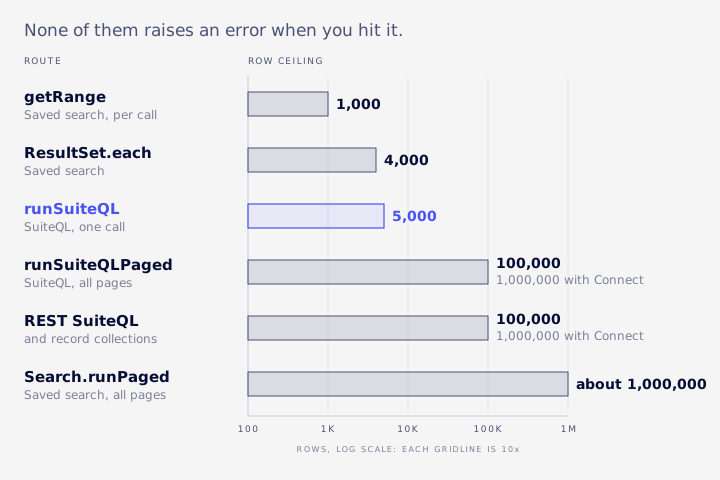
Every way of reading data out of NetSuite has a limit. None of them raises an error when you hit it.
| Route | Limit | At the limit | Source |
|---|---|---|---|
query.runSuiteQL | 5,000 rows | Stops silently | Oracle documents 5,000 for non-paged N/query; VCG observes it on runSuiteQL |
query.runSuiteQLPaged | Pages of 5 to 1,000 rows (default 50), at most 1,000 pages | 100,000 results across all pages without SuiteAnalytics Connect, 1,000,000 with it | Oracle |
Saved search ResultSet.each | 4,000 results | Stops silently | Oracle |
Saved search getRange | 1,000 results per call, end index exclusive | Returns at most 1,000 | Oracle |
Search.runPaged | Pages of 5 to 1,000 rows, at most 1,000 pages | About 1,000,000 rows at 1,000 per page | Oracle |
| REST SuiteQL and record collections | Default 1,000 per page, at most 1,000 pages, offset divisible by limit | 100,000 rows without Connect, 1,000,000 with it | Oracle |
| SuiteAnalytics Connect | Read-only ODBC, JDBC and ADO.NET access | Oracle's route for more than 100,000 rows | Oracle |
Sources for the rows: Oracle: N/search Module for the 4,000 limit, Oracle: ResultSet.getRange(options), Oracle: Search.runPaged(options), Oracle: Collection Paging and Oracle: SuiteAnalytics Connect.
Saved searches stop at 4,000
Saved searches read through SuiteScript have three methods, and they behave differently.
run().each()walks through results one at a time and stops at 4,000 without complaint. Oracle's help also describes a 1,000-record limit for N/search searches in general, so treat both figures as ceilings. It has a second trap. The function you pass in has to returntrueto keep going. If it returns nothing, iteration stops after the first row (Oracle: ResultSet.each(callback)).getRange()returns a slice by position, at most 1,000 per call. The start index is included and the end index is not. Ask for rows 0 to 5,000 and you get 1,000 back.runPaged()is the documented route for larger sets. It splits results into pages and reports a totalcount. It is not unlimited: Oracle caps it at 1,000 pages. Oracle also notes that result sets aren't cached, so results can shift if records change while you page through them.
The 1,000-page cap
Oracle documents the 1,000-page limit for Search.runPaged and for REST collection paging. For runSuiteQLPaged, Oracle states the same 1,000-page cap and a 100,000-result ceiling across all pages without Connect.
One related ceiling is not a NetSuite rule at all. An IN (...) list in a query tops out around 1,000 values. That's a practical limit inherited from the Oracle database underneath, not something NetSuite documents. VCG splits IN lists into chunks of 500 to stay well clear of it.
Paging needs a unique sort
Paging fixes the 5,000 cap, then brings in a quieter problem.
Every page re-runs the query and takes a slice of the result. If two rows tie on the sort column, say two invoices on the same date, the database is free to put them in a different order on each run. A row can sit at the bottom of page 3 on one run and at the top of page 4 on the next. Some rows get read twice, and others never get read.
Oracle is explicit. For runSuiteQLPaged you must specify a sort order to avoid duplicate or missing results, and "the query definition must provide a unique and unambiguous sorting order with a specified precedence" (Oracle: query.runSuiteQLPaged(options)). Some published examples still sort a paged query by trandate alone.
The dangerous part is that the total count stays correct, so nothing looks off. VCG's consultants saw a summarized saved search of about 2,000 rows with no unique default sort. Paging read 2,042 rows, but only 1,835 of them were distinct. 207 rows came back twice, others vanished, and paged.count looked fine the whole time. When the dropped rows feed a lookup, you don't see duplicates. You see spurious "no match" results.
How to build a unique sort
- End every
ORDER BYwith the record's internal id as a tiebreaker.ORDER BY trandate, idis safe whereORDER BY trandateis not. - On
GROUP BYqueries, sort by every grouping column, which is the full group key. VCG has seen a revenue-by-business-unit report that grouped by five columns and sorted by three drop and duplicate aggregated rows. - Pin nullable sort columns with
NULLS FIRSTorNULLS LAST, so nulls can't move between pages. - Don't sort a paged list by a created-datetime column. A batch of hundreds of rows can share the same second. Sort by the primary key instead.
What a safe paged read looks like
Here is the SuiteScript shape VCG uses.
It reads in pages of 1,000, sorts on a key that ends in id, collects every page, and then compares the rows it read with the total NetSuite reported. If they differ, it throws, so a short read can't pass quietly.
const readAll = (sql, params) => {
  const paged = query.runSuiteQLPaged({ query: sql, params, pageSize: 1000 });
  const rows = paged.pageRanges.flatMap((range) =>
    paged.fetch({ index: range.index }).data.asMappedResults()
  );
  if (rows.length !== paged.count) {
    throw error.create({
      name: 'INCOMPLETE_READ',
      message: `Read ${rows.length} of ${paged.count} rows`,
    });
  }
  return rows;
};

const sql = `SELECT t.id, t.tranid, t.trandate
             FROM transaction t
             WHERE t.trandate >= TO_DATE(?, 'YYYY-MM-DD')
             ORDER BY t.trandate, t.id`;
Note the TO_DATE call. Oracle's SuiteQL examples compare dates through TO_DATE with a format mask, so don't count on a bare date string (Oracle: SuiteQL Performance and Best Practices).
Over REST, the request is a POST to /services/rest/query/v1/suiteql, and the Prefer: transient header is required. Each response carries count, offset, totalResults, items, a hasMore flag and links (Oracle: Executing SuiteQL Queries Through REST Web Services). Loop on hasMore or the next link. Don't loop on "this page was full", because that test breaks when the last page is exactly full.
async function readAllRest(baseUrl, sql, authHeaders) {
  const rows = [];
  let url = `${baseUrl}/services/rest/query/v1/suiteql?limit=1000`;
  let total = 0;
  while (url) {
    const res = await fetch(url, {
      method: 'POST',
      headers: { ...authHeaders, 'Content-Type': 'application/json', Prefer: 'transient' },
      body: JSON.stringify({ q: sql }),
    });
    const page = await res.json();
    rows.push(...page.items);
    total = page.totalResults;
    url = page.hasMore ? page.links.find((link) => link.rel === 'next').href : null;
  }
  if (rows.length !== total) throw new Error(`Read ${rows.length} of ${total} rows`);
  return rows;
}
Two rules go with these helpers.
First, every read goes through the shared paged helper. VCG bans direct runSuiteQL calls outright, with no "this table is small" exceptions. Periods, accounts, subsidiaries and custom records all grow over an account's life, as the exchange-rate table above did.
Second, don't add your own cap back in. A "stop when rows reach ROW_CAP" guard recreates exactly the silent bug you just removed. If a ceiling truly can't be avoided, aggregate in SQL so the result is small, and return a visible capped: true flag that the user sees. Large result sets are a display problem. Page the screen, not the data.
REST paging and the 100,000 wall
Oracle's collection paging rules are short.
The default is 1,000 results per page, on at most 1,000 pages. The offset must be divisible by the limit, so limit=1000&offset=1000 is valid. The total is 100,000 results without SuiteAnalytics Connect and one million with it. A smaller page lowers the total, because the cap is limit times 1,000 pages (Oracle: Collection Paging). By that arithmetic, limit=1 allows no offset above 999, and VCG saw such requests rejected.
VCG's own tests found how this plays out at the edge. In most accounts, the page at offset 99,000 returns hasMore: false even when totalResults is higher, and a request at offset 100,000 returns a 404 "offset out of bounds". Some accounts page further. These are test results, not documented behaviour, so don't build on either one. The totalResults check in the helper above is what catches it.
For reads larger than 100,000 rows you have two options.
- Split the read into key or date ranges and run each one as its own paged read. Size the ranges by row count, not by id span. VCG has seen a single range of 1,000 transaction ids hold more than 100,000 transaction lines.
- Use SuiteAnalytics Connect. Oracle's REST SuiteQL page points there for anything over 100,000 results.
ROWNUM is not a safe cap
ROWNUM is the Oracle database's row counter. People use it to cap a query (WHERE ROWNUM <= 2500) or to slice results.
On a paged REST read it isn't reliable. In one VCG test, a read capped with ROWNUM <= 2500 returned 3,000 rows while totalResults said 2,500, because the cap wasn't applied consistently across pages. Bound reads by a key or date range instead.
It also breaks aggregates. Wrapping a grouped query in SELECT * FROM (...) WHERE ROWNUM <= n can silently undo the grouping. The rows still look like groups, but every one shows COUNT(*) = 1 and a single line's value instead of a sum.
In one check VCG ran, a 36-line invoice that should have been one grouped row came back as 25 plausible-looking mismatches. The smell test is easy: an aggregate where every count is 1 hasn't aggregated anything. Reduce inside the SELECT, or use page size and page index.
Governance and when to leave SuiteQL
Governance is NetSuite's per-script usage budget, counted in units.
Only a few costs are confirmed in Oracle's documentation: query.runSuiteQL costs 10 units, Search.runPaged costs 5, and ResultSet.each costs 10, with the work your callback does charged on top. Published tables that list other costs, including a flat rate for loading a record, go beyond what those Oracle pages confirm, and record loads vary by record type. Measure what your own script uses with runtime.getCurrentScript().getRemainingUsage().
Larger pages mean fewer calls, so page size is rarely the problem. Per-row work is. A lookup that costs about 10 units per row can use up the budget on a single 100-row page. The better pattern is to group a page's ids by record type in memory and run one lookup per type with a chunked IN list. Cost then stays flat however large the page is.
Moving the work into a Map/Reduce script doesn't fix an unstable sort or a capped input query. Those carry straight through into the output.
Query shape matters as well. VCG has seen a paged query with a CROSS JOIN take about three minutes per page and then fail. Several small, ordered queries joined in memory ran fine.
When extracts regularly pass 100,000 rows, or feed a BI tool, it's time to stop pulling through SuiteQL. SuiteAnalytics Connect gives read-only ODBC, JDBC and ADO.NET access. A replicated warehouse is the other route. VCG did this for ProSource Supply, replicating NetSuite data into a warehouse with finance and operations dashboards on top.
Integrations hit the same walls
Connectors can hit these ceilings too, depending on how they read NetSuite.
MuleSoft's NetSuite REST connector defaults to a SuiteQL page size of 100 and a maximum total of 100,000 results, which its documentation describes as matching NetSuite's hard cap per query. Setting the maximum to -1 means unlimited, but NetSuite errors above 100,000 rows (MuleSoft: Configuring Query Operations).
Don't assume any connector, Celigo included, handles paging for you. Check how each flow pages, and compare its totals with the source system.
The same rules apply to the other side of an integration. Assume every list endpoint is paginated, including nested child collections that page on their own. In one CRM integration VCG reviewed, an embedded child query capped at 200 rows per parent, and orders were silently missing lines. Loop on the API's own "more" signal, set a maximum page count, and log an error when the loop hits it, so that truncation is loud.
A five-question report check
A controller can put these to whoever owns a report, reconciliation or integration, without reading any code.
- Is any row count a round 1,000, 4,000, 5,000 or 100,000?
- Does the report tie to a native NetSuite report or the GL for the same period and subsidiary?
- Does the read compare rows fetched with the platform's own total (
paged.countortotalResults), and fail when they differ? - Does every paged query sort on a unique key, or on the full group key for aggregates?
- Is there a hard-coded row cap or
ROWNUMlimit anywhere in the code?
A "no" to question 2 or 3, or a "yes" to 1 or 5, means the numbers are unproven until someone checks.
Takeaway
Silent truncation is a control gap, and it belongs in the same conversation as reconciliations and approvals.
Treat "ran without error" as unproven until the data ties to a native report or the GL. On the engineering side the rules are short: no direct runSuiteQL, a unique ORDER BY on every paged read, rows fetched must equal the platform's total, and no home-made row caps.
If your reports or integrations were built quickly and nobody can say how they page, a VCG assessment reviews them against these limits and tells you which numbers to trust. See how VCG approaches system integration and SuiteScript automation, or Book an Assessment.
FAQ
Is the SuiteQL limit 5,000 or 100,000 rows?
Both, on different routes. A direct query.runSuiteQL() call stops at 5,000. Paged SuiteQL and REST reads stop at 100,000 results without SuiteAnalytics Connect.
Why did my query return exactly 5,000 rows with no error?
NetSuite truncates the result without raising an error or flag. A round count of 5,000 is the sign. Switch to runSuiteQLPaged with a unique sort.
Why does my saved search stop at 4,000?
run().each() processes at most 4,000 results and stops silently. Use runPaged() for larger sets, and remember it has its own 1,000-page cap.
How do I get more than 5,000 rows?
Use runSuiteQLPaged with page size 1,000 and an ORDER BY that ends in the internal id, read every page, and check that the rows read equal paged.count.
Why do paged results duplicate or miss rows?
Each page re-runs the query. If the sort isn't unique, tied rows move between pages. The total count stays correct, so the problem is easy to miss.
Does ROWNUM work for chunking a REST read?
Not as a cap. VCG has seen ROWNUM <= 2500 return 3,000 rows over REST paging. Use key or date ranges.
Can I page past 100,000 rows over REST?
Not reliably without SuiteAnalytics Connect. Split the read into key or date ranges sized by row count, or use Connect.
Do Celigo or MuleSoft integrations hit these limits?
REST-based connectors such as MuleSoft's do: it documents a 100,000-result maximum. For any connector, including Celigo, check how each flow pages and compare its totals against the source.
How do I know a report isn't silently dropping rows?
Tie it to a native report or the GL, and make the code compare rows fetched with the platform's total and fail when they differ.