
The short answer
Most NetSuite Map/Reduce best practices come down to one design rule: assume every piece of work will run twice.
NetSuite can process the same record again after a server restart, a retry or a yield, so the rules are:
- Make every write safe to repeat, so a second pass leaves the books exactly as the first one did.
- Keep getInputData light. Return a search or query, not a pile of results.
- Do each record's work in map or reduce, inside the per-call limits (1,000 usage units for map, 5,000 for reduce).
- Leave Buffer Size at 1.
- Make summarize check every error source, including the input stage.
- Prove it in sandbox at production volume, with a dry-run switch.
A Map/Reduce is a NetSuite script for bulk work. It splits a large job into small pieces, runs the pieces in parallel and reports at the end. It suits jobs such as mass bill creation or nightly payment imports.
For a controller, the part that matters is that nothing rolls back. Each save is final the moment it happens. If a run stops halfway, the books stay half changed, and if it runs again, anything not built for that gets posted twice.
This guide is written for the CFO, controller or administrator who has to approve these scripts, answer for them at close and audit, and clean up when one goes wrong. It ends with ten questions you can put to whoever wrote yours.
How a run moves through NetSuite
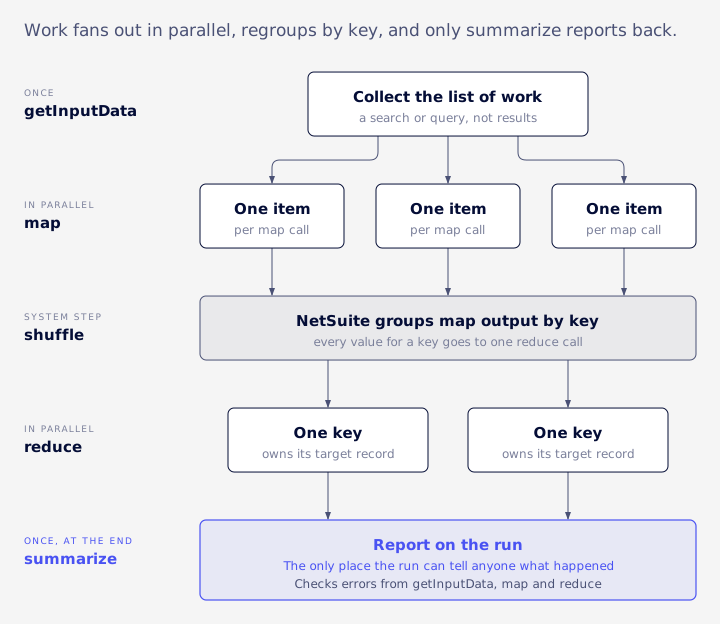
A Map/Reduce script runs in five stages (Oracle: SuiteScript 2.x Map/Reduce Script Type):
| Stage | What it does | Runs |
|---|---|---|
| getInputData | Collects the list of work | Once |
| map | Handles one item at a time | In parallel |
| shuffle | NetSuite groups map output by key | System step |
| reduce | Handles one group (one key) at a time | In parallel |
| summarize | Reports on the run | Once, at the end |
getInputData is required. You need at least one of map or reduce, and you can skip the other. Summarize is optional on paper, but it's the only place the script can tell anyone what happened, so treat it as required (Oracle: Map/Reduce stages).
getInputData can return an array, an object, a file, a query, a dataset, a search, or a reference to a saved search, SuiteQL query, query or file (Oracle: getInputData). Return the search object itself. A search that has already been run and turned into a result set isn't on Oracle's list, so don't rely on it.
Keys and values travel as text
Each piece of work is a key and a value, and both reach map and reduce as strings. The code has to parse the value and convert numeric IDs on arrival. Oracle says non-string values from getInputData are converted with JSON.stringify, and so is an object passed as a key to context.write. It doesn't say what happens to an object passed as the value, so stringify values yourself (Oracle: mapContext).
Map or reduce for the write?
Map tidies up one item. Reduce is where to write when several items roll up into one target record, such as many invoice lines into one vendor bill, because the shuffle sends every value for a key to a single reduce call. One reduce owns that record, and nothing else touches it in the same run.
There is a quieter consequence of skipping reduce. In VCG's experience, a map-only script has no summary output at all, and summarize code that reads it can throw an error instead of finding an empty list. Anything summarize needs to see has to pass through reduce.
The limits that matter
Oracle sets hard limits on each call to each stage (Oracle: Map/Reduce Governance).
Usage units are NetSuite's metering for script work: a search, a record load or a save each costs some.
| Stage | Usage units | Time | Instructions |
|---|---|---|---|
| getInputData | 10,000 for the whole stage | 60 minutes | 1 billion |
| map | 1,000 per call | 5 minutes | 100 million |
| reduce | 5,000 per call | 15 minutes | 100 million |
| summarize | 10,000 for the whole stage | 60 minutes | 1 billion |
Going over one throws SSS_USAGE_LIMIT_EXCEEDED, and what happens next depends on where:
- getInputData ends and the script jumps straight to summarize. Map and reduce never run.
- map or reduce loses that one call. Anything it passed on with context.write is thrown away, and the run carries on with the next item. Records it already saved stay saved.
- summarize stops the script.
Yielding is automatic
There is also a soft limit. After each map or reduce call, NetSuite checks the job. If it has used more than 10,000 units, or has run past the deployment's Yield After Minutes setting (3 to 60, default 60), the job ends cleanly and a new job picks up the remaining work (Oracle: Map/Reduce yielding).
The check happens only between calls, so a running function is never cut off by it. There's no documented way to force a yield, and none is needed. Unlike older scheduled scripts, a Map/Reduce doesn't need code to reschedule itself mid-run. That 10,000 is not extra room for a single call either: one map call still has 1,000 units.
Size limits
Oracle's governance page caps keys at 3,000 bytes (KEY_LENGTH_IS_OVER_3000_BYTES), values at 10 MB, and persisted data for the run at 200 MB. Persisted data is the keys and values still waiting to be processed plus the reduce results. Hitting the 200 MB cap throws PERSISTED_DATA_LIMIT_FOR_MAPREDUCE_SCRIPT_EXCEEDED and jumps to summarize. Oracle's own reference pages for mapContext give different figures (4,000 bytes for keys, 1 MB for values), so stay well under both.
Where scripts usually run out
A common cause of trouble is getInputData, because its 10,000 units cover the whole stage. Picture a payments import where getInputData runs a search and then looks up details for each bill. It works on a small test batch and fails once the batch grows past a few hundred bills. The fix is to collect IDs only and move each lookup into map, where every item gets its own 1,000 units and a failure stays with one item.
Reduce's 5,000 units go further than map's 1,000, but a reduce call handles every value for one key, so one oversized key can still exhaust it. The dependable way to get more room is to split the work into more keys. Count the rows in the production account before you pick a design.
When a run is interrupted
If a run stops halfway, nothing is undone. Here is where each piece of work stands afterward.
| Work | State after a crash | Where to look |
|---|---|---|
| Finished before the stop | Saved and stays saved | The records themselves; summarize output |
| In flight at the stop | May be run again | Errors in the summary; check the target record |
| Not yet started | Shown as pending in the summary, processed later unless the run exits | The summary |
How the pending items are handled depends on the retryCount and exitOnError settings covered below.
Oracle documents three ways the same work gets processed a second time (Oracle: Map/Reduce best practices):
- An application server restart. Items left in an uncertain state are retried automatically unless retryCount is 0 (Oracle: Configuration Options for Handling Map/Reduce Interruptions).
- The retryCount setting, which retries a failed item up to three times.
- A Buffer Size above 1, which raises the chance that items are processed twice after a restart.
Oracle's advice is to check context.isRestarted in every entry point, because a restarted job may hand the script work it has already done. The property exists on the context object of every entry point, so there is no stage where it can be skipped. The plain-English rule: when it is true, look at the target record before writing, and skip the write if the work is already there.
function reduce(context) {
  const invoiceKey = context.key;
  if (context.isRestarted && billExists(invoiceKey)) return;
  createBill(invoiceKey, context.values);
}
Here billExists and createBill stand for your own lookup and save. The point is the order: restart check, then state check, then write.
A duplicate bill, step by step
Here's a synthetic example of how that turns into a finance problem. A reduce stage creates one vendor bill per supplier invoice from a staging record, then marks the staging record processed.
- Reduce starts on supplier invoice 4471 and saves a vendor bill for $12,400.
- Before it can mark the staging record processed, the server restarts.
- NetSuite flags invoice 4471 as uncertain and retries it.
- The retry sees the staging record still unprocessed and creates a second $12,400 bill.
- The run finishes with no errors. AP now has two bills, and one of them may get paid.
Each step was reasonable on its own. The script never asked "does a bill for 4471 already exist?" right before saving.
Half-finished calls
The same thing happens inside one call. If map saves record A and then fails on record B, record A stays changed. Keep each call to one logical unit of work.
Writes that are safe to repeat
Can a Map/Reduce post duplicate journals, bills or payments? Yes, unless the write path refuses a second copy. These are the patterns that hold up.
Stamp a deterministic external ID
Give every created record an external ID built from the source system's ID, such as the supplier invoice number plus the vendor. NetSuite then refuses a second record with the same external ID. The script should treat that duplicate-record error as "already done" and skip, and match it narrowly, because "external id does not exist" is a different error. This is a practice VCG uses, not something Oracle documents as a duplicate control.
Check the current state before writing
Before each save, read what's there now and skip the save if nothing would change. That holds up better than a "processed" flag set after the fact. If you do use a flag, set it in the same save as the change wherever you can, so the two can't drift apart.
Put the check next to the write
A check in getInputData for "has this already been posted?" doesn't stop duplicates. Two overlapping runs both pass it, and a retried call passed it long before the interruption.
Use the native retry settings
The return object can carry a config block with retryCount (0 to 3) and exitOnError (default false). On an uncaught error NetSuite retries first, then checks exitOnError, then carries on with the next item. Setting exitOnError to true sends the script to summarize instead.
return {
  config: { retryCount: 2, exitOnError: false },
  getInputData, map, reduce, summarize
};
Retries are only safe on top of writes that can repeat. A hand-written retry loop inside map spends the same single 1,000-unit, 5-minute budget on every attempt, while a native retry gets a fresh call.
Concurrency and collisions
Concurrency Limit is the deployment field that sets how many SuiteCloud Processors the map and reduce stages can use.
It replaced the old Queues setting in 2017.2, and Oracle's default is 2 (Oracle: Map/Reduce deployment settings). An account without a SuiteCloud Plus licence has 2 processors, and one licence gives 5, at every service tier (Oracle: SuiteCloud Plus Settings).
Parallel calls that touch the same record can collide, so key the work on the target record and let one reduce call own it. Lower the concurrency when an outside system's rate limits share the load.
Buffer Size takes values from 1 to 64, and the default is 1. Oracle recommends leaving it at 1 when the script processes records, because larger values make duplicates more likely after a restart. Any speed gain is small next to a duplicate payment.
How summarize proves success
A status of Complete tells you the script stopped.
It can read Complete when nothing was written. To check: read inputSummary.error first, compare items found to records written, then run a saved search on Last Modified for the run window and count what changed.
Summarize has three error sources, and a sound script reads all of them (Oracle: System Response After an Uncaught Error):
- inputSummary.error, for a failure in getInputData
- mapSummary.errors, for each failed map call
- reduceSummary.errors, for each failed reduce call
A getInputData failure shows up only in the first one. If summarize doesn't check it, a failed run looks like a clean run that found nothing to do.
It is most damaging when getInputData has already done something before failing, such as clearing a staging table. The run then "succeeds" with an empty result and publishes that emptiness over the real data.
Reconcile and alert
Have summarize log and email four numbers: items found, keys processed, records written and errors. Send them to a named owner, not a shared inbox nobody reads. Summary also reports run time, usage, yields and concurrency, which help explain a slow night.
A worked example with synthetic numbers:
| Measure | Count |
|---|---|
| Items found | 1,200 |
| Keys processed | 1,200 |
| Records written | 1,187 |
| Errors | 13 |
1,187 written plus 13 errors equals 1,200 found, so the numbers tie. If they don't, someone looks before the next close. A skeleton that reads all three error sources:
function summarize(summary) {
  const inputError = summary.inputSummary.error;
  const mapErrors = [];
  summary.mapSummary.errors.iterator().each((key, error) => {
    mapErrors.push(key);
    return true;
  });
  const reduceErrors = [];
  summary.reduceSummary.errors.iterator().each((key, error) => {
    reduceErrors.push(key);
    return true;
  });
  log.audit('Run result', { inputError, mapErrors: mapErrors.length, reduceErrors: reduceErrors.length });
}
Then email the counts to the owner.
Who is told, and what the audit trail shows
Settle both before go-live rather than discovering them during an incident. Name a deployment owner and an execution role on purpose, because the trail points to them. Then have your administrator run a sandbox script that saves one record and fails another, and put three things in the runbook: who received the error email, what the execution log shows for the failed item, and how the system note on the saved record names the script and its role. Summarize's own email to a named owner is the alert you control.
Chaining and re-running
Oracle allows only one unfinished instance of a deployment at a time (Oracle: Map/Reduce terminology).
In VCG's experience the practical result is that a script resubmitting itself from summarize finds its own deployment still busy, and the submit fails with MAP_REDUCE_ALREADY_RUNNING. The workaround is a second deployment of the same script, or a small scheduled script that retries until the first deployment frees up.
The same route handles failures. Summarize collects the failed IDs and submits a second deployment with them through N/task. Only do this when the writes are safe to repeat.
Waiting on someone else's job
When your job depends on another team's Map/Reduce, don't trust its status alone and don't "proceed anyway" after a timeout. Take a row count, wait, take it again, and proceed only when the two match. If the data isn't ready, process nothing, re-queue, and log an error after a capped number of cycles. task.checkStatus only reports the status of a submitted task. It doesn't yield or reschedule anything.
Choosing the right tool
| Tool | Fits | Watch for |
|---|---|---|
| Map/Reduce | Large or growing volumes; one failed item shouldn't stop the rest | Needs rerun-safe writes and a real summarize |
| Scheduled Script | Small, sequential jobs | 10,000 units per run; in SuiteScript 2.x it reschedules itself through N/task, with no manual yield call |
Choose by counting rows in production. The thresholds below are VCG rules of thumb, not Oracle limits:
- Under a few hundred records, one pass, nothing else running: a Scheduled Script's 10,000 units is usually enough.
- Several thousand records, or volume that keeps growing: Map/Reduce, because each item gets its own units and a failed item doesn't stop the rest.
- Work that must run in parallel across many records: Map/Reduce, with concurrency set deliberately.
- A job that must stop at the first failure: a Scheduled Script, since Map/Reduce carries on past failed items unless exitOnError is set.
A synthetic example: a nightly job tidies 400 vendor records at about 20 units each, which is 8,000 units, just inside a Scheduled Script's 10,000. When the vendor list doubles, the same script runs out mid-run. Map/Reduce gives each vendor its own 1,000-unit call and doesn't have that cliff.
VCG's practice is that no script edits a balance meant to move through transactions. Quantity on hand, for example, should change through inventory transactions such as adjustments, not direct field writes.
The first production run
Run it in sandbox at production-like volume first.
Production often holds several times the sandbox record count. As a synthetic example, a sandbox might hold 15,000 active items against 80,000 in production, so a script that ticked one field on every active item would save all 80,000. Each save fires the User Event scripts already deployed and moves Last Modified, which integrations read as a change.
Dry run versus commit
A dry-run parameter is only as safe as the box on the deployment screen. A production run meant as a preview can still write records if Commit is ticked on the deployment while the script's own file says off. Before Save and Execute:
- Open the deployment's Parameters tab and read the mode.
- Have the script log its mode on the first line, and check that line.
- Untick Commit after a commit run.
Widen slowly
Start with a filtered subset and a concurrency of 1, check the summary email, then widen.
Closed periods and approvals
A script posts as its execution role, so that role decides what it can touch. VCG's practice is to never deploy a financial script as Administrator and to give it a dedicated role with only the permissions it needs. Before go-live, have the script try to post into a closed period in sandbox and try to save a record that normally needs approval. Record the exact result your account returns. If either save goes through, the script needs its own period and approval check before it writes.
Stopping a runaway run
Agree before go-live who can stop a run, and rehearse it in sandbox:
- Find the running job on the script's status page and cancel it, or disable the deployment so no new run starts.
- Expect saved records to stay saved. The call in flight may or may not have finished, so check its target.
- Read the summary and error list to see which keys completed.
- List what the run wrote with a saved search on Last Modified for the run window, filtered to the script's execution role.
- Reverse bad entries with a compensating transaction instead of deleting, so the audit trail shows both the mistake and the fix.
| Bad record | Usual reversal |
|---|---|
| Journal entry | Reversing journal |
| Vendor bill | Vendor credit |
| Payment | Void the payment |
Your accountants may prefer another route for a given record type. Decide it before the run, not during.
Testing
Force one failure in sandbox and confirm summarize reports it.
A controller's review checklist
Put these ten questions to whoever wrote the script. You don't need to read the code to judge the answers.
- Is it safe to run twice, and what stops a second copy?
- Does every entry point check isRestarted?
- What are retryCount and Buffer Size set to, and why?
- Does summarize read inputSummary.error?
- Who gets the error email?
- Does it reconcile items found to records written?
- Is there a dry-run switch, and what is it set to on the production deployment?
- What role does it run as, and can that role post to closed periods?
- How many records will it touch in production, and what fires on each save?
- How would we undo a bad run?
A vendor who built the script well can answer all ten in a short call. Vague answers to the first four are the ones to chase.
FAQ
What happens if a Map/Reduce crashes halfway?
Saved records stay saved, the item in progress may be run again, and the rest are processed later or shown as pending in the summary. Nothing rolls back.
Can it post duplicate bills, journals or payments?
Yes, if the write doesn't refuse a second copy. A deterministic external ID or a state check right before the save prevents it.
Do we need to reschedule a Map/Reduce that runs out of units?
Not within a run. Yielding is automatic between calls. A single call that exceeds its own limit fails and is reported in summarize.
When the scripts are already live
If nobody can answer these questions for your Map/Reduce scripts, review them before the next close rather than after a duplicate payment.
VCG reviews and repairs existing scripts through its SuiteScript automation and managed services work. If you want a second pair of eyes on your live scripts, you can book an Assessment.