
The short answer
Oracle's own analytics product, NetSuite Analytics Warehouse, runs on Oracle's database, not Snowflake (Oracle: NetSuite Analytics Warehouse overview).
So a NetSuite Snowflake integration takes one of four routes: a managed connector that reads SuiteAnalytics Connect (Fivetran, or Airbyte's Enterprise source), an iPaaS flow (a hosted tool that moves data between systems) such as Celigo, a Snowflake Native App (an app that runs inside Snowflake) such as Infometry's, or a pipeline you build yourself with SuiteScript (NetSuite's scripting language) or SuiteQL (NetSuite's SQL-style query language) over its REST web service.
Any of them can copy the data. The one to pick is the one that handles changed lines and deleted records, and that lets you prove the totals still match the general ledger.
A few more terms, defined once. The warehouse is the Snowflake database your reports read from. A sync is the recurring job that copies NetSuite data into it. An incremental load copies only what changed since the last run, as opposed to a full reload. The general ledger (GL) is NetSuite's record of what posted to which account. A tie-out is the check that proves a warehouse figure equals the matching NetSuite figure.
This guide is for two groups. Some teams are starting out and choosing a method. Others already have a pipeline and a Snowflake P&L that no longer matches NetSuite, and want to know why.
Why the copy drifts from the ledger
Take a synthetic example.
A company builds a Snowflake P&L in January, checks it against NetSuite, and it matches. By June the warehouse shows revenue about $40K higher than NetSuite's Income Statement for the same period. Nobody can find a single bad entry, because there isn't one. The gap is a few hundred small misses that piled up quietly.
When VCG's consultants rebuild warehouse feeds that have stopped matching NetSuite, the causes come from a short list:
- Change detection that watches only the transaction header, so edited lines are never re-read.
- Deleted records and deleted lines that are never removed from the warehouse.
- Rows merged on the document id instead of the line, so lines collapse or double up.
- Money columns cast without decimal places, so amounts round on load.
- Reads that stop at a row limit without raising an error.
- Partial loads that the scheduler reports as a success.
Each one is covered below. Most of them depend on how the sync is designed and checked, not only on which connector you bought.
Comparing the four routes
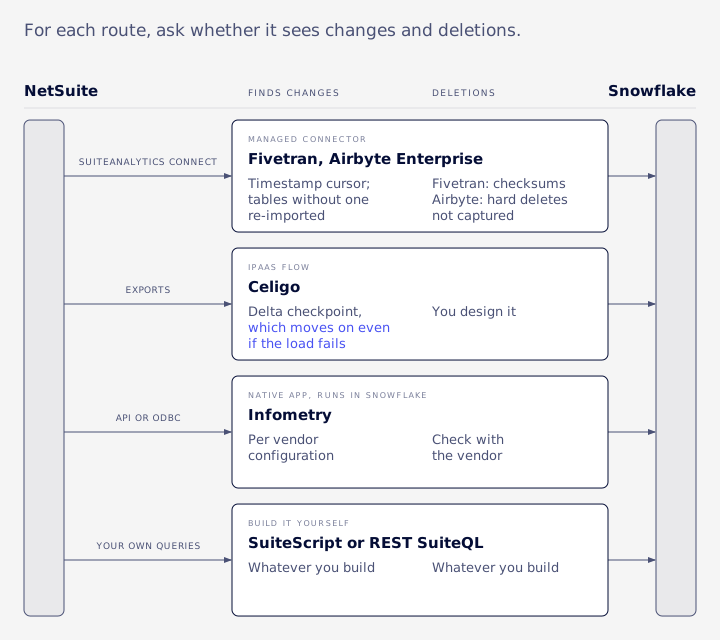
The useful comparison here is narrower than features or price. For each route, ask whether it sees changes, sees deletions, keeps line detail, and gives you something you can check.
| Route | How it reads NetSuite | How it finds changes | Deletions | NetSuite prerequisites | Pricing basis |
|---|---|---|---|---|---|
| Managed connector (Fivetran, Airbyte Enterprise) | SuiteAnalytics Connect, NetSuite2.com data source | Timestamp cursor on tables with a numeric key and a last-modified column; other tables re-imported on a schedule | Fivetran: chunk checksums on standard tables. Airbyte: cursor-based, hard deletes not captured | SuiteAnalytics Connect purchased, Connect Service feature enabled | Fivetran: per connection, by monthly active rows. Airbyte: Enterprise connector at extra cost |
| iPaaS (Celigo) | Scheduled or real-time NetSuite exports | Delta exports with a checkpoint | You design it | Integration role and auth | Vendor-quoted; confirm with Celigo |
| Snowflake Native App (Infometry) | API or ODBC mode, running inside Snowflake | Per vendor configuration | Check with the vendor | Check with the vendor | Check with the vendor |
| Custom SuiteScript or REST SuiteQL | Your own queries | Whatever you build | Whatever you build | Integration role, token-based auth | No connector fee; you pay in build and support time |
Managed connectors over SuiteAnalytics Connect
SuiteAnalytics Connect is NetSuite's read-only database-style access through ODBC, JDBC and ADO.NET drivers. Oracle's docs say you must have purchased it and turned on the Connect Service feature before you can use it (Oracle: SuiteAnalytics Connect).
Fivetran's NetSuite connector reads Connect. It is not change data capture in the database sense, and it does not use SuiteTalk SOAP or REST. A table syncs incrementally only if it has a numeric primary key and a column such as lastmodified, lastmodifieddate or linelastmodifieddate. Tables without one get fully re-imported, every sync, twice a day or weekly depending on their size. Calculated columns can change without the timestamp moving, and those changes are missed.
Fivetran treats the SystemNote table as immutable and detects deletes on standard tables with chunk checksums (Fivetran: NetSuite SuiteAnalytics connector). That page also covers custom fields: the connector reads whatever schema Connect exposes to the role, custom fields and records included.
Fivetran bills each connection on monthly active rows (MAR), meaning distinct primary keys changed in a month, at a tiered rate that falls with volume and a $5 monthly minimum per connection. From January 1, 2026, deletes count toward MAR as well (Fivetran: usage-based pricing).
Airbyte lists two NetSuite sources. The marketplace connector uses SuiteTalk REST and is in beta. The SuiteAnalytics Connect source is an Enterprise connector sold at additional cost. Both are cursor-based, so hard deletes are not captured (Airbyte: NetSuite Enterprise source).
iPaaS flows (Celigo)
Celigo runs scheduled or real-time NetSuite exports, processes them page by page, supports delta exports and holds failed records for retry in its error management screen.
One behavior matters a lot for a warehouse. If the import into Snowflake fails, the delta checkpoint still moves forward, so the failed record is not exported again unless it changes again in NetSuite. You have to retry it from error management or run a backfill (Celigo: failed record flow behavior). Saved-search date filters also ignore the time of day, which matters if you plan to run a delta more than once a day.
Snowflake Native App (Infometry)
Infometry's connector runs as a Snowflake Native App in API or ODBC mode. Its product page advertises "up to 3 million records in less than an hour", "up to 150% faster" replication and up to 50% cost savings (Infometry: NetSuite to Snowflake connector). These are "up to" marketing figures with no stated baseline, so treat them as the vendor's claims and test against your own volumes.
Custom SuiteScript or REST SuiteQL
Building it yourself gives full control and no connector fee. It also means you own pagination, governance limits, deletions, retries and monitoring, which is most of this article. If you build, build on REST or SuiteScript. Oracle has said no new SOAP integrations from release 2027.1 and full SOAP removal in 2028.2 (Oracle: SOAP web services end of life).
Where NetSuite Analytics Warehouse fits
NSAW is an Oracle-side alternative, not a route into Snowflake. It runs on Oracle Autonomous Data Warehouse, which current docs call Autonomous AI Lakehouse, with Oracle Analytics Cloud on top. It is priced by tier: Standard (1TB, 10 users), Premium (3TB, 50 users) and Enterprise (5TB, 100 users), with 5-user add-on packs.
It loads daily, with up to four ad hoc refreshes a day. Premium and Enterprise add Frequent Data Refresh, as often as hourly (Oracle: NSAW editions and data refresh). If your company is not committed to Snowflake, it belongs on the shortlist.
Syncing only what changed
An incremental sync rests on a watermark: a saved timestamp that means "everything modified since the last good run". Three rules keep it honest.
- Read from the watermark minus an overlap window, so records saved during the last run are not skipped.
- Save the new watermark only after the load has landed and passed its checks.
- Never use a fixed "last 24 hours" window. If one nightly run fails, that day is gone for good.
The header date misses line changes
The trap most pipelines fall into is watching only the transaction header's lastmodifieddate. That date often does not move when a line or an accounting line changes. In a multi-subsidiary account VCG's consultants reviewed, a single week produced a large batch of transaction line rows, and a similar batch of accounting-line rows, that changed under headers whose date stayed put. A header-only sync never re-read any of them.
The fix is to build the "what changed" list from all three timestamps:
SELECT t.id FROM transaction t
WHERE t.lastmodifieddate >= ?
UNION
SELECT tl.transaction FROM transactionline tl
WHERE tl.linelastmodifieddate >= ?
UNION
SELECT tal.transaction FROM transactionaccountingline tal
WHERE tal.lastmodifieddate >= ?
Then re-read every line of every transaction on that list. As a safety net, a pipeline can also reload all open periods plus a three-day lookback on every run instead of trusting one watermark. History is loaded once, so the daily job only has to handle recent change.
Tables with no timestamp
Some small lists and reference tables have no reliable last-modified column. Reload them in full into a staging table, then publish from staging. They are small, so the cost is low, and you avoid guessing.
Time zones
The time zone of a datetime depends on how you read it. REST returns datetimes in UTC. SOAP and the N/format module follow the user's preferred time zone unless you pass one (Oracle: time zone handling in web services). Oracle does not say how SuiteQL datetime columns are zoned, so compare a few records against the UI before you trust them, and store UTC in Snowflake.
Deleted records and deleted lines
An upsert-only sync inserts new rows and updates changed ones.
It never sees a deletion, because a deleted record leaves nothing behind to read. Deleted invoices stay in the warehouse, and the P&L creeps upward month after month. It is one of the most common reasons VCG's consultants see a replicated P&L drift above the ledger.
Hard deletes
Oracle documents three places to find deleted records: the SuiteQL deletedrecord table, SOAP getDeleted, and the Deleted Record search type, which is limited to administrators by default (Oracle: Deleted Record search). Oracle's examples for the table use columns such as recordid, name, type, scriptid, deleteddate, deletedby and context (Oracle: tracking deleted records). No last-modified column is documented, so filter on deleteddate. Some guides point to a REST "deletedRecord" resource. We found no such resource in Oracle's documentation.
The table has traps VCG's consultants have run into:
- Over REST it rejects SELECT * and COUNT(*). Name the columns you want.
- It times out on multi-year date ranges. Read it in month windows.
- deleteddate is a datetime, so format it with TO_CHAR.
- recordid is unique only within a record type. Confirm each candidate against the transaction table before you delete anything.
In some accounts the whole table is small enough to reload in full instead of tracking a watermark.
Deleted lines on transactions that survive
Remove one line from a twelve-line sales order and the order still exists. deletedrecord holds records, not lines, so it shows nothing. The only way to catch it is to re-read recently modified transactions and delete warehouse lines whose key is no longer in NetSuite. A pipeline can look back 60 days for this, for example. That window is a design choice, not a NetSuite rule.
How you run that cleanup matters. A DELETE built with a NOT IN list of every surviving line key works in testing. At real volumes the statement grows to megabytes and hits Snowflake's statement size limit. Load the surviving keys into a staging table and delete with an anti-join (delete rows that have no match in that table) instead.
One more thing to check: a pipeline can load the deleted-record table and still never purge the GL lines it points to. Loading the deletions is half the job.
Modelling line-level tables
NetSuite transactions have three grains, and a warehouse needs to keep them apart:
- The transaction: the document itself, such as an invoice or purchase order.
- The transaction line: item, quantity and amount, one row per line.
- The accounting line: what posted to which account, in which accounting book.
Key every row on the line
The merge key for a line table is per line, for example transaction plus line id. Merging on the document id collapses a twelve-line purchase order into one row. Merging on the internal id would do exactly that to every order. Internal ids are also unique only per record type, not across types, so an id alone does not identify a row.
Which lines belong where
A transaction carries more than item lines. There is a main line that summarises the document, plus tax and shipping lines, and some lines post to the GL while others do not. A revenue-by-item report wants item lines. A GL table wants posting accounting lines only. Decide this per model and write it down, because mixing them is one of the common ways totals double.
Money and exchange rates
In Snowflake, a bare ::NUMBER cast means NUMBER(38,0). It rounds 1234.56 to 1235 and an exchange rate of 1.3542 to 1, with no warning. Use scale 6 for amounts and scale 10 for rates, in both the casts and the table definitions. Don't use FLOAT for money either: Snowflake documents FLOAT as roughly 15 digits of precision, and sums over many rows can drift.
One merge, with the columns in step
Land each batch in staging and run a single MERGE (an upsert in one statement) into the target. The query reads the batch from one JSON bind, meaning a single parameter passed to the statement, and FLATTEN turns its array into rows:
MERGE INTO gl_line t
USING (
  SELECT v.value:"transaction"::NUMBER        AS transaction_id,
         v.value:"line"::NUMBER               AS line_id,
         v.value:"amount"::NUMBER(38,6)       AS amount,
         v.value:"exchangerate"::NUMBER(38,10) AS exchange_rate
  FROM TABLE(FLATTEN(INPUT => PARSE_JSON(?))) v
) s
ON t.transaction_id = s.transaction_id AND t.line_id = s.line_id
WHEN MATCHED THEN UPDATE SET amount = s.amount, exchange_rate = s.exchange_rate
WHEN NOT MATCHED THEN INSERT (transaction_id, line_id, amount, exchange_rate)
  VALUES (s.transaction_id, s.line_id, s.amount, s.exchange_rate);
Keep the column order identical in the source alias, UPDATE SET, INSERT and VALUES. Adding one column means editing several places. Get one out of order and data shifts into the wrong columns without an error.
Proving it ties to the GL
A controller needs a way to prove the warehouse matches the books.
A warehouse is trustworthy when it passes a defined set of checks every period. Here is a ladder of checks, weakest first:
- Row count against the source. Cheap, and catches gross failures. It cannot catch a wrong amount.
- Distinct-key count against row count. If there are more rows than distinct line keys, something inserted twice. Retries cause this.
- Debits equal credits per period, to the cent. A ledger that does not balance in the warehouse has lost or duplicated lines.
- One period's P&L total against NetSuite's Income Statement, run with the same filters. This is the check that proves the warehouse matches the books.
Match the filters exactly
A comparison only means something if both sides use the same accounting book, subsidiary, period and posting-only lines. One mismatched filter can make a correct warehouse look broken, or hide a broken one.
Currency and consolidation
transactionaccountingline.amount is in the base currency of the line's subsidiary. A consolidated figure needs consolidation, either NetSuite's BUILTIN.CONSOLIDATE in SuiteQL or a rebuild in the warehouse. If you translate in Snowflake, join the exchange rate on the line's subsidiary, not the header's.
Fivetran's open-source dbt package builds balance sheet and income statement models, converts currency for the parent subsidiary, rolls non-balance-sheet activity into retained earnings or net income, and calculates the cumulative translation adjustment (Fivetran: dbt_netsuite package). That is a useful starting point. It is still a model, and it needs the same tie-out before anyone signs off on it.
Rebuilding a consolidated balance sheet
If you rebuild consolidation yourself, three traps account for most balance sheets that won't tie:
- Translate balance-sheet balances once, at the as-of period's rate. Translating each line at its own period's rate gives a balance sheet that will not tie.
- NetSuite posts no closing entry, so retained earnings and net income have to be computed.
- The cumulative translation adjustment (CTA) is computed per subsidiary.
Multi-book and back-dated edits
With multi-book accounting, VCG's consultants check currency and exchange-rate treatment book by book. Don't assume primary-book rates anywhere.
People also post to closed periods. When an edit lands in an earlier period, rerun the tie-out for every period your change window touched, not only the current one.
Make it a close step
Put the ladder on the monthly close checklist with a named owner and a pass or fail result. A dashboard tile that someone might glance at is not a control.
What it costs to run
NetSuite side
Routes that read SuiteAnalytics Connect need the Connect licence. Every route also competes for NetSuite's concurrency limit, which is set by service tier: 5 for Shared and Tier 3, 10 for Tier 2, 15 for Tier 1 and 1+, and 20 for Tier 0, plus 10 per SuiteCloud Plus licence. Sandbox accounts stay at 5 whatever you buy (Oracle: concurrency governance).
Snowflake side
Snowflake bills warehouses per second, with a 60-second minimum each time a warehouse starts (Snowflake: warehouses overview). A sync that wakes the warehouse every 15 minutes pays that minimum every time, even when it moves a handful of rows. A small warehouse with a short auto-suspend is a common setting. It is a community habit, not a Snowflake recommendation.
Connector side
Price against the model, not a quoted range. Fivetran charges per connection on MAR, deletes included. Celigo and Infometry price by quote, so ask each vendor how they count usage. Airbyte's Connect source is an extra-cost Enterprise connector. To compare them, count your own monthly changed rows (lines, not documents) and deletions, then price each model against that number.
Custom side, in governance units
SuiteScript meters work in governance units. Oracle gives each Map/Reduce stage (Map/Reduce is NetSuite's script type for large batch jobs) its own budget per invocation: 1,000 units for map, 5,000 for reduce, and 10,000 each for getInputData and summarize. The often-quoted 10,000 per map/reduce job is a soft limit that makes the job yield and reschedule (Oracle: Map/Reduce governance). The 10-unit cost for SuiteQL applies to N/query inside SuiteScript, not to REST calls (Oracle: script governance limits).
Here is an illustrative example. Suppose a paged read costs about 10 units per 1,000 rows and each push to Snowflake about 10. A 53,000-row period at 500 rows per batch would need around 1,600 units, which does not fit a 1,000-unit map invocation. Larger batches (still inside the 1MB payload ceiling) and splitting the period by MOD(transaction id, N) bring it back under. Those unit costs come from VCG's own measurements, so measure your own.
Two lessons apply: the pre-flight check has to use the loader's real batch count, and the job-level 10,000 is a yield point, not a bigger budget for one call. If one batch can't fit in map's 1,000 units, doing it in reduce gives it 5,000.
What breaks, and how you'd know
Reads that stop early
query.runSuiteQL() stops at 5,000 rows and raises no error. This is a source of silent loss: a deletion window that goes past 5,000 rows quietly drops the rest, so the deletion sync itself loses rows. The paged version takes 5 to 1,000 rows per page and requires a unique ORDER BY (Oracle: runSuiteQLPaged). For an aggregate query that means ordering by the full GROUP BY key. Ordering by a datetime that is only accurate to the second reshuffles rows between pages, so order by the primary key.
REST SuiteQL returns at most 100,000 results per query (Oracle: SuiteQL through REST), and the offset must divide evenly by the limit (Oracle: REST collection paging). VCG has seen accounts stop at that ceiling with hasMore false while totalResults is higher. Split large reads by key range, sized by row count (one 1,000-id chunk once held over 100,000 lines), and compare rows fetched with totalResults on every read.
Columns that load as NULL
asMappedResults() lowercases every key, whatever case you used in the alias. A double-quoted Snowflake JSON path is case-sensitive, so v.value:"ID" against "id" loads NULL into every column while the row count looks perfect. A test suite can pass entirely because its test data used uppercase keys, while the real loader fills every column with NULL. Test data has to be copied from real API output.
Concurrency errors
Several jobs hitting NetSuite at once run into the concurrency limit. Back off and retry when NetSuite reports a concurrency error. For calls to the Snowflake SQL API, retry only on 429 and 5xx responses (500, 502, 503, 504), with backoff. Retrying everything turns one error into a pile-up.
Snowflake SQL API quirks
The Snowflake SQL API returns 202 when a statement is still running (Snowflake: handling SQL API responses). 202 sits inside the 2xx range, so a generic "success" check accepts it and never polls. Test for 202 first and poll until you get 200. The requestId must be a UUID, built once per logical statement, so a retry cannot run the same statement twice.
The JWT (a signed token used to authenticate) is valid for at most an hour, so set its lifetime a little under, around 3,500 seconds (Snowflake: SQL API). Chunked pushes can partly succeed with no rollback, which is one more reason to stage before you publish.
Partial loads that look green
A full refresh written as "delete all, then insert" is two calls with no transaction around them. If the job dies in between, the table sits empty until the next run. That is tolerable for a small dimension and wrong for anything someone reports from during the day. Load into staging and let one MERGE touch the target. VCG's rule is that any error leaves the stage populated, the run marked failed and the target untouched.
Two more guards matter. A replace-mode publish must refuse an empty stage, because "delete where not in stage" against an empty stage deletes every row. And a sharded load must clear only its own slice before restaging, because NetSuite retries failed map invocations. Clearing the whole period throws away sibling shards. Clearing nothing double-inserts.
Schema changes and permissions
In some setups the Snowflake integration role cannot create tables or receive future grants, so every new table needs its own explicit GRANT. A new dataset added without one fails only at load time, after the extract has already run. Ask a Snowflake admin about granting the integration role to the role that owns the objects.
Saved searches cause their own version of this. A pipeline that reads search columns by position remaps every field when someone reorders the search. Read by field id.
Text that changes on the way in
Older loads that build SQL by joining strings, with regex scrubbing of quotes and commas, corrupt data. VCG's consultants have seen apostrophes rewritten, a .replace() that fixed only the first occurrence, a single degree sign breaking a load, and nulls landing as the literal text "null". Passing the batch as one JSON bind and using FLATTEN and MERGE, as in the example above, removes that whole class of bug.
Freshness and real time
The routes covered here poll NetSuite on a schedule, use real-time exports, or use a script that fires when a record is saved.
In VCG's experience, hourly or a few times a day is realistic for most finance reporting. Each run pays Snowflake's 60-second minimum and uses some of NetSuite's concurrency, so more frequent is not free.
Near real time can come from Celigo's real-time exports or from custom User Event scripts (scripts that run when a record is saved) that post to an endpoint. A script-based design needs its own error handling and replay for the times the endpoint is down, and VCG's consultants treat the extra work on each save as a cost to measure.
Set the frequency by when people make decisions with the data. A daily close dashboard does not need a 5-minute sync.
Security and ownership
NetSuite access
VCG recommends giving the integration its own role with read-only access to the records it needs, and authenticating with tokens rather than a user's login. If you track deletions through the Deleted Record search, remember that Oracle limits it to administrators by default, so the role needs that access granted on purpose (Oracle: Deleted Record search).
Snowflake access
Use key-pair authentication for a dedicated service user and role. Snowflake lets a user hold two public keys, so you can rotate keys without downtime and run an old and a new pipeline side by side during a migration (Snowflake: key-pair authentication).
In SuiteScript, sign the token with a Digital Certificate record through N/crypto/certificate, uploaded as a .p12 file. A NetSuite secret field cannot be used for signing, because there is no way to read the value back. Avoid hard-coding the private key in a shared library file: it turns every key rotation into a redeploy of every script that uses it.
Monitoring
A load succeeds when the integration log shows it completed and the tie-out checks pass. A green script status alone proves nothing. Helper functions that catch and swallow their own errors make a failed push look fine, so check the log.
Ownership
Name one owner, ideally a finance lead and a NetSuite admin together, for the monthly tie-out and for schema changes. When a new custom field shows up in a report request, someone needs to own adding it, granting it and checking it.
Choosing your route
These factors usually decide it:
- Whether you already own SuiteAnalytics Connect.
- How much data engineering time you have.
- How many subsidiaries and accounting books you report across.
- How much drift you can tolerate before someone notices.
- How fresh the data really needs to be.
A single entity with standard reporting can often use a managed connector over Connect, as long as someone runs the tie-out monthly and understands which tables are fully re-imported.
A multi-subsidiary group whose finance reporting must tie needs line-level keys, deletion handling and the consolidation traps covered above, whichever tool moves the data. A connector shortens the copying work. The modelling and checks still have to be built. For OneWorld setups, see multi-subsidiary and OneWorld.
A heavily customised account with many custom records and fields leans toward an iPaaS flow or a custom pipeline, because you will be mapping and testing those objects either way.
VCG built a data warehouse for ProSource by replicating its NetSuite data, then put finance and operations dashboards on top (ProSource case study). The broader integration work sits under system integration, and ongoing monitoring and tie-outs can be run as managed services.
If your warehouse numbers no longer match NetSuite, the drift can usually be traced to one or more of the causes above.
FAQ
Is there a native NetSuite to Snowflake connector?
We found none from Oracle. Oracle provides the SuiteAnalytics Connect drivers and NetSuite Analytics Warehouse, which runs on Oracle's own database. Getting data into Snowflake means a third-party connector, an iPaaS flow, a Snowflake Native App or a custom pipeline.
Do I need SuiteAnalytics Connect?
Not to read deletions: SuiteQL can query the deletedrecord table within the REST and paging limits. You do need Connect for the managed connectors that rely on it, and to read past REST SuiteQL's 100,000-result cap in a single query.
How do I sync records that have no last-modified date?
Reload them in full into a staging table, check the stage is not empty, then publish to the target in one step.
How do I model line tables without duplicating or collapsing rows?
Key each row on its line, such as transaction plus line id, and merge on that key. Keep transaction, transaction line and accounting line as separate tables, and filter GL models to posting lines only.
What does it cost to run?
It depends on your monthly changed rows and deletions, your NetSuite service tier, and how often the Snowflake warehouse wakes up. Price each route against your own volumes, and include the time someone spends running the monthly tie-out.
Can the warehouse replace NetSuite's financial reports?
Only once it passes the tie-out every period. Until then, NetSuite remains the book of record and the warehouse is a reporting copy.
If your Snowflake figures have drifted and you want to know where the gap comes from, Book an Assessment.