
The short answer
In VCG's testing, the connector's report tool matched the ledger for the transactions it selected by date.
The trouble is which transactions it selects. The report tool takes a date range, and your general ledger (GL) closes by accounting period. Oracle says so plainly in its report tool documentation: "Accounting periods are not supported. Currently, the report tools ignore the Report by Period user preference" (Oracle: MCP Standard Tools report tools).
So a month's P&L from Claude or ChatGPT can differ from your income statement whenever something is dated in one month and posted to another.
Two terms carry the rest of this article. The transaction date is the date printed on the document: the bill date, the journal date. The posting period is the accounting month the entry lands in. NetSuite lets them differ, so a controller can book a September accrual on October 3 during close and still post it to September.
The rule this article argues for is simple. The ledger produces the number. The AI investigates it and explains it.
This is written for the CFO, controller or NetSuite admin who has connected an AI client to NetSuite through the AI Connector Service, seen a clean-looking P&L that doesn't match the GL, and now has to decide whether that output can go anywhere near close, a board pack or an auditor.
What a $500K gap looks like
VCG's consultants tested this directly. For one month at a client's subsidiary, they compared net income from the connector's report tool with the GL two ways.
Summed by transaction date, the GL matched the AI's net income to the cent. Summed by posting period, which is how the books actually close, the two were about $500K apart, spread across 13 accounts.
The missing and extra lines followed a pattern. Bills dated in the prior month but posted to this one had dropped out. So had accruals and reclass journals dated outside the month but posted to it. Going the other way, items dated inside the month but posted to a different period had crept in.
Revenue tied both ways, and that made the gap easy to miss. It tied only because every revenue line that month happened to be dated inside the month. A tie on one section of the P&L tells you nothing about the rest of it.
Treat this as observed behaviour in one account, not a documented Oracle defect. The Oracle: ns_runReport page lists a date range, a subsidiary and some other optional parameters, but no accounting-period parameter, and it never discusses date versus period. It is worth running the same test in your own account.
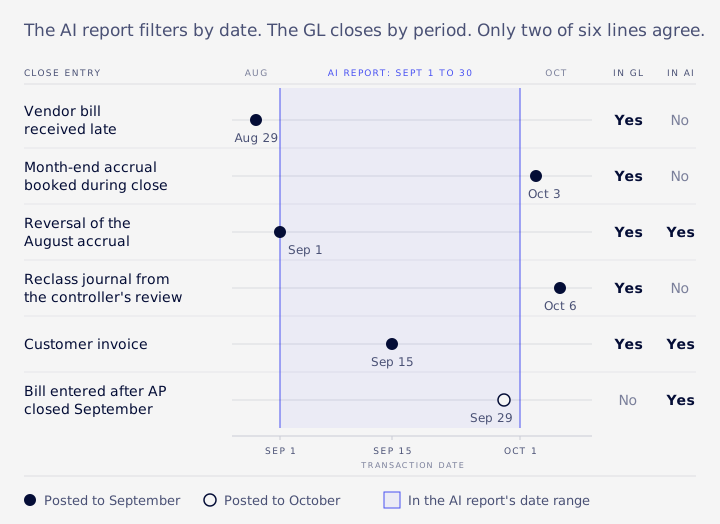
Here is a synthetic September example showing where six ordinary close entries land.
| Line | Transaction date | Posting period | In the GL for September? | In the AI's Sept 1 to 30 report? |
|---|---|---|---|---|
| Vendor bill received late | Aug 29 | September | Yes | No |
| Month-end accrual booked during close | Oct 3 | September | Yes | No |
| Reversal of the August accrual | Sep 1 | September | Yes | Yes |
| Reclass journal from the controller's review | Oct 6 | September | Yes | No |
| Customer invoice | Sep 15 | September | Yes | Yes |
| Bill entered after AP closed September | Sep 29 | October | No | Yes |
Only two of the six lines agree. None of them is an error. Each one is normal close activity.
Which settings make the gap bigger
Transaction dates outside the posting period
The accounting preference Allow Transaction Date Outside of Posting Period governs whether users can date a transaction in one month and post it to another. Every such line is a potential variance between a date-filtered report and the GL. Oracle's Trial Balance help adds that a report can run by date or by period depending on the Report by Period preference (Oracle: Trial Balance).
Tightening the preference narrows the gap, but it has a cost: accruals and late bills booked during close often need exactly that flexibility. It is a trade-off. If you keep the flexibility, run the mismatch list before close and know which lines it produces.
Oracle's Transactions with Date/Period Mismatch page gives you that list. Run it before close and you have the lines most likely to explain an AI-versus-GL difference.
Report by Period
In the NetSuite UI, a report can run by date or by period depending on the user's Report by Period preference. Oracle says the AI report tools ignore that preference. So a controller and the AI can run what looks like the same income statement and get different answers, because they are not running the same report.
Calendar year versus fiscal year
Oracle also warns that the AI client "won't be able to see the accounting periods that you have set up in your NetSuite account, and may use the calendar year as the fiscal year or ask you to provide more details about your fiscal year" (Oracle: MCP Standard Tools report tools). If your year ends in June, tell the AI that in the prompt, with exact start and end dates.
Oracle's own pages disagree on filters
The Oracle: AI Connector Service FAQ says "only date filters and subsidiary filters are supported" and that "Accounting periods are not supported and subsidiaries affect the report results." The report tools page says the tools support the report filters and footer options available in the UI, with custom filters unsupported. Those statements don't fully agree. Until Oracle reconciles them, test the filter you care about in your own account instead of relying on either page.
Other ways the numbers go quietly wrong
Date versus period is the biggest cause, but it isn't the only one. Each of these returns a believable number with no error message.
Subsidiary scope. The report tool's subsidiary ID is positive for a single subsidiary. A negative ID means a consolidated view that includes child subsidiaries, or a context view showing a child's data in a parent's currency (Oracle: MCP Standard Tools report tools). Ask the AI which ID it used.
Accounting books. If you run multi-book accounting, confirm the AI used the primary book. The ns_getAccountingBooks tool lists them.
Row ceilings. Oracle says "AI clients have their own limitations. They usually support up to ~5,000 rows per call," and large queries can hit token limits or time out (Oracle: AI Connector Service FAQ). That is a limit of the AI client, not of NetSuite. A truncated pull gives a smaller total, and the client may not make the truncation obvious. Use the pageSize parameter on ns_runCustomSuiteQL to page through results, and check the row count against what you expect.
Aging reports. VCG has seen the native aging report, run through the connector, age its buckets from today rather than from the as-of date, and at subsidiary level leave out child subsidiaries. Compare the total to the GL and rebuild the buckets yourself.
Custom filters and custom segments. Oracle states that "Custom filters are also not supported" and that report tools may return null values for custom reports that use custom segments for column segmentation.
Made-up numbers. Oracle's guidance says to check "both the steps taken ... and the final answer for accuracy, because LLMs may sometimes make up information" (Oracle: AI Connector Service best practices). Its risk page calls hallucination an LLM weakness "out of NetSuite control" (Oracle: Associated risks, controls and mitigation strategies). If the figures look like sample data, the model may have used placeholders. Oracle's fix is to tell it to use real data from your NetSuite account.
A tie-out playbook for every close
Oracle tells you not to rebuild financial reports with SuiteQL.
Its advice is worth quoting in full: "Don't use SuiteQL or build new reports for financial reports. NetSuite standard reports use important business rules that SuiteQL can't apply" (Oracle: AI Connector Service best practices). That is right, but it leaves finance without a way to check the AI's version of those reports.
The query below is a check on the report, not a replacement. The native income statement or trial balance stays the published figure. The query exists to tell you where the AI output and the ledger part ways.
Set the baseline from the ledger
Start with the smallest query that gives you the period's balances. Four rules apply:
- Cut by the accounting period's end date, never by transaction date.
- Keep posted lines only.
- Use base-currency amounts.
- Use one accounting book unless multi-book is in scope.
In NetSuite's query language (SuiteQL), the GL detail sits in a table called transactionaccountingline: one row per account per transaction, per book. The transaction table holds postingperiod, the accounting month each transaction posts to. A minimal baseline looks like this, with your own subsidiary and book IDs:
-- Period balances by account: September, one subsidiary, primary book
SELECT a.acctnumber, a.fullname, SUM(tal.amount) AS period_amount
FROM transactionaccountingline tal
JOIN transaction t ON t.id = tal.transaction
JOIN transactionline tl ON tl.transaction = tal.transaction AND tl.id = tal.transactionline
JOIN account a ON a.id = tal.account
JOIN accountingperiod ap ON ap.id = t.postingperiod
WHERE tal.posting = 'T'
  AND tal.accountingbook = 1
  AND tl.subsidiary = 5
  AND ap.enddate = TO_DATE('2026-09-30', 'YYYY-MM-DD')
GROUP BY a.acctnumber, a.fullname
ORDER BY a.acctnumber
Run it with pagination, and confirm the totals agree with the native trial balance run by period. If the baseline doesn't tie to NetSuite's own report, fix that before comparing anything to the AI.
Diff the AI output against the baseline
Compare in layers, so each step narrows the search:
- By period, to find the month that diverges.
- Within that month, by transaction type: journal, vendor bill, customer receipt and so on.
- Within the type that moved, by individual transaction.
If most of the gap sits in journals and bills, check their transaction dates against their posting periods.
Keep an unattributed bucket
Some lines won't group cleanly. Manual journals with no source document, or lines missing the field you grouped by, are the usual ones. Put their total in an explicit "unattributed" line instead of dropping it. A residual you can see is one you can investigate.
Hand the gap to the AI
Only now bring the AI back in. Give it the variance, the period and the list of transactions, and ask it to explain them. For example, it can group journals or summarise memos, which you still check against the ledger. The gap is the thing you investigate, not a number you publish.
The checklist
Before trusting any AI figure, confirm six things:
| Check | What to confirm |
|---|---|
| Period | The baseline was cut by posting period, and you know what date range the AI used |
| Subsidiary ID | Positive or negative, and whether children were meant to be included |
| Book | Primary book, unless multi-book is in scope |
| Currency | Base currency on both sides |
| Row count | No truncation near the AI client's ~5,000-row limit |
| Fiscal year | Stated explicitly in the prompt |
Turning the tie-out into an automated check
A tie-out that someone has to remember to run will be skipped in a busy close. The same comparison can run as a regression test instead.
Pick a fixed set of control questions: net income for the month, the AR total, cash by subsidiary. Each month, put each question to the AI and compare its answer with the ledger baseline described above. Each comparison passes or fails against a materiality threshold you set. Failures get flagged before anyone starts building a board pack.
This is AI-assisted automated testing, and the split of duties matters. AI can draft the checks and investigate the failures. The pass or fail rule stays deterministic: a number, a threshold, a comparison. You don't want a model deciding whether a $40K difference is material.
Browser automation tools such as Playwright can extend the check to what a controller actually sees. A script opens the native income statement in the NetSuite UI and confirms it shows the same figure as the baseline. That closes the loop between the report people read and the ledger underneath it.
Two operational notes help keep the check reliable.
Throttling looks like broken queries. The connector shares the account's concurrent-request limit with your other integrations, unless an admin sets a separate limit on its integration record, and one prompt can trigger several requests (Oracle: AI Connector Service and concurrency governance). A burst of errors on queries that worked minutes earlier is often another session using the same pool. Rerun a known-good control query before changing anything. If that fails too, it is most likely throttling. Then narrow the query by period and subsidiary.
The execution log is not your audit trail. Every connector call is logged on the integration record (Setup > Integration > Manage Integrations, then the AI Connector Service (MCP) subtab of the Execution Log). It shows request time, duration, status, user, HTTP status and URL path. It is kept for 21 days in production and 7 in sandbox (Oracle: Connect to the AI Connector Service). Treat the log as a 21-day debugging aid, and keep your own record of which figures were checked and how.
Can AI numbers be used for close or audit?
Not as the figure of record.
Native reports and the GL are the system of record. Oracle's order of preference puts standard reports and saved searches ahead of custom SuiteQL, and VCG treats SuiteQL as a reconciliation check. AI output is analysis.
Oracle's own FAQ says roughly the same thing. The standard tools improve accuracy because they pull from NetSuite reports and saved searches, but "AI clients may still produce incorrect or 'hallucinated' results, so it is best practice to always verify the results against NetSuite data" (Oracle: AI Connector Service FAQ).
| Question | Where the number comes from | What the AI does |
|---|---|---|
| Month-end P&L, balance sheet, trial balance | Native financial reports, run by period | Drafts commentary on movements |
| Board pack figures | Native reports, signed off by finance | Summarizes and explains variances |
| Why did this account move? | The tie-out baseline and the transaction list | Finds and groups the transactions behind the gap |
| Pre-close review | Date/Period Mismatch page and the baseline | Flags lines dated outside their period |
| Audit evidence | Native reports plus exported support | Nothing that goes in the file unchecked |
The governance around the connector matters as much as the numbers:
- Role. Oracle blocks the Administrator role and any role with full permissions. Use a custom or existing non-administrator role with the MCP Server Connection and Log in using OAuth 2.0 Access Tokens permissions (Oracle: Set up the AI Connector Service). A tool appears to the AI only if the role holds every permission it needs, so the AI sees what that role sees and nothing more.
- Read-only where you can. The SuiteQL tools are read-only, but the standard tools can also create and update records. Give the finance role only what reporting needs.
- Human sign-off. Someone in finance owns every number that leaves the team.
- No ePHI. Oracle says the service "has not been assessed for compliance with HIPAA" and must not be used for electronic protected health information unless you have independently determined that use meets your own obligations (Oracle: AI Connector Service FAQ).
When the gap points to a build problem
A gap between the AI and the GL in one month is a tie-out exercise.
A large gap every month is a different signal. In VCG's view, the cause is often upstream: loose date and period discipline, a subsidiary structure that reports don't respect, or reporting that was never designed to tie to the ledger. A better prompt won't change any of that.
Two of VCG's published projects deal with the reporting side. ProSource needed reporting beyond what NetSuite does on its own, so VCG replicated its NetSuite data into a data warehouse and built finance and operations dashboards on top, giving the business one place to report from (ProSource case study).
At Cyderes, VCG rebuilt a broken revenue recognition setup and restructured the rev rec reporting so finance could close on time (Cyderes case study). For groups with many entities, our multi-subsidiary and OneWorld work covers the structure that consolidated numbers depend on.
If your AI output and your ledger keep parting ways, Book an Assessment and we'll find where your reports and the GL diverge, and why.
FAQ
Is the AI connector wrong, or is my GL wrong?
Usually neither. They are answering different questions. The report tool selects by date and your GL closes by period. Run the tie-out playbook to see which lines account for the difference.
Can I make the report tool filter by accounting period?
Oracle documents no accounting-period parameter for ns_runReport and says the tools ignore Report by Period. Build the period baseline yourself and treat the AI's figure as something to reconcile.
How many tools does the connector have?
Oracle's MCP Standard Tools SuiteApp lists 25 tools in seven groups, including six report tools (Oracle: MCP Standard Tools list). The count can change by release, so check the current list.
Which server URL should I use?
Oracle's pages differ. The connect page says the /services/mcp/v1/all URL returns custom tools and points to a separate path for the standard tools. The FAQ tells clients to use /all and says the connection may appear disconnected without it. Test both in your own account and keep the one that shows the tools you expect.
Does the 5,000-row limit apply to NetSuite?
No. Oracle describes it as a typical limit of AI clients. It still matters, because a truncated result can look like a complete one. Paginate and check row counts.
How long can I rely on the execution log?
21 days in production and 7 in sandbox. Treat it as a debugging aid, not an archive.