
The short answer
NetSuite builds consolidated financial statements at the moment you run the report.
The translated balances are never posted to the ledger. You pick a subsidiary context marked "(Consolidated)", and NetSuite pulls in that subsidiary, its child subsidiaries and its elimination subsidiaries.
It translates each child into the parent's base currency using the Consolidated Exchange Rates table: the current rate for most balance sheet accounts, the average rate for income and expense, and the historical rate for equity. Whatever difference is left over lands on a calculated line called the Cumulative Translation Adjustment, or CTA (Oracle: consolidated reporting; Oracle: consolidated exchange rates).
So when a controller says the consolidated balance sheet doesn't match the subsidiary trial balances, an Excel rebuild or the auditor's schedule, the gap can be a difference in method: the rebuild or schedule translates balances differently from NetSuite. A five-step check narrows down most gaps, and this guide ends with it, in the order VCG's consultants work through it.
Two terms come up constantly. Translation converts a child's balances into the parent's base currency for reporting, and changes nothing in the child's own books. An elimination subsidiary is a dedicated subsidiary that holds the journals removing intercompany activity from consolidated results.
This is written for the controller, CFO or NetSuite administrator at a OneWorld company with subsidiaries in more than one currency, especially one who inherited the build from an earlier partner and needs to know whether the setup or the check is at fault.
The three consolidated rates
Oracle's Consolidated Exchange Rates table holds three rates for each period and each pair of subsidiaries (Oracle: Consolidated Exchange Rate):
| Rate | What it is | Default accounts |
|---|---|---|
| Current | The rate in effect on the last day of the period | Most assets and liabilities |
| Average | A weighted average of transaction amounts for the period | Income statement accounts, and so retained earnings |
| Historical | Calculated alongside the average; used for equity accounts | Equity |
Each account has a General Rate Type that decides which of the three it uses. The default comes from the account type: Current for balance sheet accounts other than equity, Average for income statement accounts, Historical for equity (Oracle: rate types). Fixed assets default to Current but can be switched to Historical. That means one account with a changed rate type is enough to move the consolidated balance sheet.
How the averages are built
Oracle describes Average as a weighted average of transaction amounts for the period, and Historical as the rate used for equity accounts. It doesn't publish the exact formula, so treat the arithmetic below as an illustration of "transaction-weighted", not as Oracle's documented calculation.
Suppose a subsidiary posts CAD 10,000 of activity when the day's rate is 0.76 and CAD 30,000 when it is 0.72. The weighted average is 0.73, where a simple average of the two rates would give 0.74. Heavy posting late in the period pulls the figure toward the late rates, which is the skew Oracle warns about. Whether Historical is built from the same weighting is something to confirm in your account.
Rates are held per period, per subsidiary pair and per accounting book (Oracle record reference). You can't set one per transaction. The table only exists in OneWorld accounts with Multiple Currencies turned on. It is separate from the Currency Exchange Rate Types feature, which governs transaction rates (Oracle: Enabling Currency Exchange Rate Types). Budgets use their own Budget Exchange Rates table (Oracle: Consolidated Reporting in OneWorld), so if actual versus budget looks wrong while the actuals tie, check the budget rates first.
Filling the rate table
The table lives at Lists > Accounting > Consolidated Exchange Rates.
NetSuite will calculate the rates for you. You can press Calculate on a single row or on all rows, or complete the Calculate Consolidated Exchange Rates task on the Period Close Checklist. Calculate sets Current to the rate in effect on the last day of the period, and Average and Historical to transaction-weighted averages (Oracle: Calculating Consolidated Exchange Rates Automatically).
A few behaviours matter when the numbers look off:
- Calculate only covers subsidiaries the user can access. A restricted role can leave rows uncalculated, so check that every row has a value.
- Once the checklist task is marked complete, that period's consolidated rates can't be changed. Before then, direct parent-child rates can be edited by hand or loaded by CSV import.
- Oracle warns that heavy posting at period end can skew the weighted averages (Oracle: Consolidated Exchange Rate Types).
On the checklist, the order is Revalue Open Foreign Currency Balances, then Calculate Consolidated Exchange Rates, then Eliminate Intercompany Transactions, which is always the last task (Oracle: Key Points for Running Intercompany Elimination).
NetSuite doesn't fill these rates in unprompted, but Calculate does it once you run it. Oracle documents one system-set rate of 1, between an elimination subsidiary and its direct parent. A rate of 1.0 between two clearly different currencies elsewhere is worth tracing to whoever entered it.
Editing a consolidated rate
The rules are tighter than most people expect.
Per Oracle's record reference, a rate can be edited only when it is a direct rate, not a derived one, in an open period (the record's isderived and isperiodclosed fields). The editable fields are the current, average and historical rates, plus the external ID. The user needs the Currency permission at Full and access to both the From and To subsidiaries. Rate records can be read, updated and searched, but never created or deleted (Oracle: Consolidated Exchange Rate).
Indirect rates, the ones from a subsidiary to its grandparent, are implied and can't be edited. Replace a calculated rate only with a documented reason, such as a treasury policy rate, because every report for that period changes when you do.
A worked example that doesn't tie
Here is a synthetic subsidiary, kept small so the arithmetic is visible.
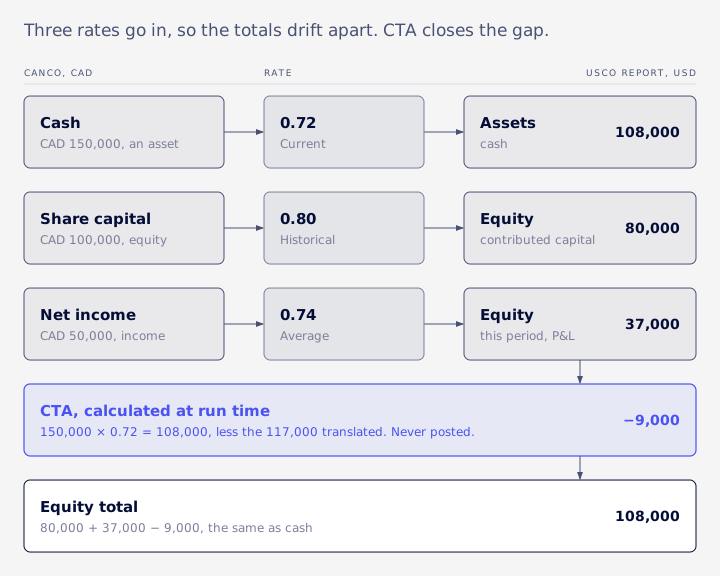
CanCo keeps its books in Canadian dollars and sits under USCo, which reports in US dollars. For one period:
- Share capital of CAD 100,000 was contributed in an earlier period, when that period's historical rate was 0.80.
- Revenue this period is CAD 50,000, all collected in cash, with no expenses. The average rate is 0.74.
- Closing cash is CAD 150,000. The current rate is 0.72.
What NetSuite shows
| Line | CAD | Rate | USD |
|---|---|---|---|
| Cash | 150,000 | 0.72 current | 108,000 |
| Share capital | 100,000 | 0.80 historical | 80,000 |
| Net income | 50,000 | 0.74 average | 37,000 |
| CTA | -9,000 | ||
| Equity total | 150,000 | 108,000 |
In this table equity and CTA are shown as positive credits. Equity plus net income comes to USD 117,000 while assets are USD 108,000. CTA picks up the USD 9,000 shortfall as a negative credit, and the balance sheet balances.
What the spreadsheet shows
A quick rebuild that multiplies everything by the month-end rate of 0.72 gets revenue of USD 36,000 instead of 37,000 and share capital of USD 72,000 instead of 80,000. It balances with no CTA at all. It is also using a different method from NetSuite, so it will never agree with the consolidated report, and NetSuite is the one following its documented rules.
A second subsidiary and an intercompany pair
Add UKCo, which keeps its books in pounds and also sits under USCo. CanCo lent UKCo the equivalent of USD 7,200, so CanCo carries an intercompany receivable of CAD 10,000 inside its cash-and-receivables total, and UKCo carries an intercompany payable of GBP 5,760. UKCo's share capital is GBP 10,000 at a historical rate of 1.30, and the current GBP rate is 1.25. All of these figures are assumed for the illustration.
| Line | CanCo USD | UKCo USD | Sum of both | Elimination | Consolidated |
|---|---|---|---|---|---|
| Cash | 100,800 | 19,700 | 120,500 | 120,500 | |
| Intercompany receivable | 7,200 | 7,200 | -7,200 | 0 | |
| Intercompany payable | -7,200 | -7,200 | 7,200 | 0 | |
| Share capital | -80,000 | -13,000 | -93,000 | -93,000 | |
| Net income | -37,000 | -37,000 | -37,000 | ||
| CTA | 9,000 | 500 | 9,500 | 9,500 | |
| Total | 0 | 0 | 0 | 0 | 0 |
In this table credits are negative, so CanCo's CTA of 9,000 is the same shortfall as the -9,000 above, shown as a debit. Each subsidiary balances on its own, so the consolidated trial balance differs from the sum of the two translated subsidiary trial balances by exactly the elimination lines, and the CTA is the sum of each subsidiary's own CTA. A rebuild that skips the elimination overstates both assets and liabilities by USD 7,200.
Both sides of the pair translate to the same USD figure here, so nothing is left over for the CTA-Elimination account. In real data the two sides rarely match to the cent, and the leftover is the difference Oracle describes going to that account.
The opposite mistake
The other common rebuild translates each balance sheet line at the rate of the period it was posted in. The opening CAD 100,000 of cash goes in at 0.80 and the CAD 50,000 collected this period at 0.74, giving cash of USD 117,000. That is right for the P&L and wrong for assets and liabilities, which NetSuite translates once, at the current rate of the as-of period. The cash line ends up USD 9,000 too high, which is the CTA amount showing up in the wrong place.
What CTA is and what posts
The CTA line is calculated when the report runs, not posted.
Oracle says the CTA shown on consolidated balance sheets, cash flow statements and the consolidated trial balance is calculated dynamically from the different rate types. The amount is not posted to the account. Clicking it opens the CTA Balance Audit report, which audits the calculation rather than listing transactions (Oracle: Cumulative Translation Adjustment (CTA) Overview).
Use that report in step 4 of the check below. Open it from the CTA line on the consolidated balance sheet for the period you are testing, then compare its figure with the per-subsidiary CTA you rebuild. If the two agree, the gap is elsewhere. If they don't, look at rate types and rate rows before you look at transactions.
To rebuild CTA per subsidiary, VCG's consultants use a method that matched NetSuite's output in the accounts they checked: for each subsidiary, take its functional balances times the as-of current rate, then subtract the amounts as actually translated. In the CanCo example that is 150,000 × 0.72 = 108,000, less the 117,000 translated, which gives -9,000. Because CTA is worked out per subsidiary, each subsidiary has to balance on its own. A subsidiary whose books don't balance will show that imbalance rather than have it hidden.
Several things do post, and they are easy to confuse with translation:
- Revaluation posts unrealized gain or loss on open foreign-currency balances inside a subsidiary's own books.
- Realized gain or loss posts when a payment is applied and the rate has moved since the original transaction, by default to the Realized Gain/Loss account (Oracle: Accounting for Fluctuation in Exchange Rates for Closed Transactions).
- Elimination journals post in elimination subsidiaries and use the CTA-Elimination (CTA-E) account as their clearing account.
CTA can also be selected on a manual journal entry. That is rarely a good idea, because it mixes a posted amount into a line that readers assume is calculated.
Revaluation changes a subsidiary's own books. Translation only changes the consolidated view. Both move the consolidated result, through different lines. A large or growing CTA is a reason to look at rate types and history, and on its own it proves nothing.
The historical-rate trap
Equity is where rebuilt balance sheets most often go wrong.
In VCG's rebuilds, historical-rate accounts appear to be translated per posting, at the historical rate of the period each amount was posted in. In one rebuild, multiplying a local equity balance by the current period's historical rate overstated it materially compared with NetSuite. The same balance consolidated as of two dates years apart came back with an identical figure.
You can test this yourself in a sandbox. Run the consolidated balance sheet for one equity account as of two different periods with no postings between them, and compare the translated figure with the balance times each period's historical rate. If NetSuite's figure matches neither and is identical across both dates, your account behaves the same way.
Retained earnings has its own twist: NetSuite has no closing entry. In a consolidated report, retained earnings is every prior fiscal year's P&L, each period translated at its own average rate, plus anything journalled directly to retained earnings. Net income is the current year to date.
When translated equity "won't roll forward", one cause VCG's consultants have met in rebuilds is history that was never loaded. A changed rate type on the account partway through its life is also worth ruling out.
One related note from Oracle's elimination documentation: lines on historical-rate accounts are eliminated only once, because historical rates don't change (Oracle: Calculating Consolidated Exchange Rates Automatically).
Loading legacy balances
A go-live opening-balance journal posts all equity in one period.
So all of it picks up that period's historical rate. That is rarely the rate in force when the capital actually went in, and translated equity is wrong from day one.
Two options, both to be tested in a sandbox first. In this synthetic case CanCo's share capital of CAD 100,000 was contributed in two tranches before go-live, and audited translated equity is USD 80,000.
| Approach | How equity is loaded | Translated equity |
|---|---|---|
| One opening journal | CAD 100,000 in the go-live period, historical rate 0.74 | 74,000 |
| Tranche loads | CAD 60,000 in the first period (historical 0.78) and CAD 40,000 in the second (historical 0.83) | 80,000 |
With the single journal, all equity picks up the go-live period's rate and lands USD 6,000 below the audited figure. Editing that period's rate would fix this one account but changes the rate for everything else on the row. Tranche loads give each amount its own period's rate and keep working as equity grows, provided those earlier periods are open to postings and hold usable rates.
"It balances" proves very little: VCG's consultants have seen a balance sheet that balanced and was still wrong because early years were left unloaded. Load back to the earliest period that still affects translated equity or retained earnings, and tie translated equity per account to the audited schedule.
Opening intercompany balances need the Eliminate flag on their journal lines to be eliminated, whether they are loaded on an advanced intercompany journal or on a standard journal with a customized form (Oracle: Customizing Standard Journal Entries for Intercompany Elimination).
Eliminations
Automated Intercompany Management is a OneWorld feature that can't be turned off.
It is turned on at Setup > Company > Enable Features, Accounting subtab, and it can't be disabled once enabled (Oracle: Setting Up Automated Intercompany Management). It adds an Eliminate Intercompany Transactions box to account records and an Eliminate box to journal lines. On advanced intercompany journals the line box defaults from the account. On standard journal entries you have to customize the form to see it.
Where elimination journals go
Elimination journals are created only for lines with the Eliminate box checked (Oracle: Intercompany Elimination Overview). They post to a dedicated elimination subsidiary: the one under the parent when the pair is a parent and child, or the one under the first common parent when the two subsidiaries are unrelated. Elimination subsidiaries must already exist under the root before the feature is enabled. The parent itself doesn't play that role.
The CTA-E account is created the first time a qualifying transaction is entered and elimination runs, not when you switch the feature on. In Oracle's own example, a CAD 1,000 intercompany receivable worth USD 900 when booked and USD 950 at month end, revaluation posts the USD 50 to Unrealized Gain/Loss and the full USD 950 is eliminated. CTA-E only picks up any unbalanced currency difference between the original entry and the elimination entry (Oracle: Cumulative Translation Adjustment-Elimination (CTA-E)).
How the run behaves
The elimination task covers all subsidiaries at once and can't be run for one subsidiary. It can be re-run within the same period. With Multi-Book Accounting you can run it for all books, the primary book or any one secondary book (Oracle: Key Points for Running Intercompany Elimination). Eliminations of intercompany receivables and payables reverse in the following period, and the next month-end run recalculates on the full open balance at the latest rate.
What VCG has seen in rebuilds
In one rebuild, a consolidated P&L sat close to NetSuite's but wouldn't tie until VCG's consultants found the cause. Every account that differed carried the Eliminate flag, and revenue, which had no flagged accounts, tied. NetSuite was eliminating intercompany activity on the flagged accounts while the raw GL kept both sides of every pair. Dropping the flagged accounts would not have fixed it, because they also carried real third-party activity.
In another, the team built no elimination logic at all. Elimination journals are ordinary posted transactions, so an extract that included the elimination subsidiaries and consolidated through them tied on the P&L without any rebuilt elimination rules.
For finding intercompany mismatches before the run, use the Intercompany Reconciliation report at Reports > Financial. Oracle lists five sections: Unlinked Orders and Returns, Mismatched Amount, Mismatched Inventory Item Quantities, Mismatched Billing, and Standalone Transactions (Oracle: Intercompany Reconciliation Report).
Late postings and reopened periods
Consolidated history moves when someone posts into the past. Oracle doesn't spell this out, so test it in a sandbox.
If the period's Calculate task was marked complete, its rates stay fixed and the new posting is translated at them, so history moves by the new amount. If the period is open and rates are recalculated, the weighted averages shift and every average-rate line in that period moves with them. A late intercompany posting stays uneliminated until the elimination task is run again, and a late posting into an earlier fiscal year changes retained earnings on every later consolidated balance sheet.
Multi-level groups
In the accounts VCG's consultants have checked, the table held a row for each subsidiary-to-ancestor pair in each period.
Oracle marks the grandparent rows as derived, which means they are implied and not editable. Rolling a grandchild up to the top is then a single lookup, which a rebuild should call the direct pair.
Average and historical rates are weighted by transactions, and the product of two weighted averages is generally not the weighted average of the products. In a spreadsheet rebuild, never chain rates through the middle subsidiary. Look up the direct pair.
Reports, books and currencies
Some NetSuite reports don't support consolidation and return one subsidiary at a time.
For those, you restrict the view to one subsidiary in Set Preferences (Oracle: Consolidated Reporting in OneWorld). Run those per subsidiary and combine the results, or use a report that supports a consolidated context.
Consolidated reports already present the parent's or root's currency through the subsidiary context you choose. One documented way to produce statements in a different currency is a full secondary accounting book with Foreign Currency Management (Oracle: Foreign Currency Management). An adjustment-only book must use the same currency as its base book and doesn't support Foreign Currency Management (Oracle: Adjustment-Only Books Overview).
Consolidated rates and elimination are per book. If a primary USD book and a secondary EUR book disagree on a consolidated figure, compare each book's rate rows first: the same CanCo cash balance translates at a different rate and produces a different CTA in each, and both can be correct.
ASC 830 and IAS 21
NetSuite's default rate map follows the current-rate method in the accounting standards.
It is consistent with the current-rate translation method in ASC 830-30 and IAS 21. The "not net income" treatment of CTA comes from those standards, not from Oracle's help pages. The table maps each account class to the NetSuite default and the standards' treatment. Paragraph references are VCG's reading, so confirm them with your auditor.
| Account class | NetSuite default rate | ASC 830-30 | IAS 21 |
|---|---|---|---|
| Assets and liabilities | Current | Current rate (45-3) | Closing rate (39a) |
| Income and expense | Average | Transaction-date rates, or a weighted average (45-3) | Transaction-date rates, average as an approximation (39b, 40) |
| Equity | Historical | Historical rates | Historical rates in common practice |
| Translation difference | CTA, calculated | Other comprehensive income (45-12) | Other comprehensive income (39c) |
| Disposal of a subsidiary | Not documented by Oracle | Release CTA into earnings (40-1) | Reclassify to profit or loss (48) |
What to keep for auditors:
- An export of the consolidated rate table for each period and book, taken when the period closed.
- The CTA Balance Audit report for each balance sheet date.
- The approved policy for any rate you overrode, with who approved it and when.
- The account list showing each account's general rate type.
Some decisions NetSuite leaves to you:
- Functional currency. Set each subsidiary's base currency to it. Oracle says the base currency can't be changed once the subsidiary is saved or once records with currency amounts exist; the route it describes is deleting those records first (Oracle: Setting a Base Currency).
- Remeasurement when a subsidiary keeps its books in a currency other than its functional currency. Under the standards this is a different exercise from translation, with gains and losses going through net income. Highly inflationary economies have their own rules.
- Reclassifying CTA when a subsidiary is disposed of. The standards require it (ASC 830-30-40-1, IAS 21.48). Oracle's pages that VCG reviewed don't describe NetSuite doing it for you, so plan it as an accounting entry and confirm the behaviour in your account.
Treat each of these as a design decision to settle before go-live, and confirm the treatment with your auditor.
VCG's five-step check
When consolidated numbers won't tie, VCG's consultants work through this order. It comes from VCG's rescue work rebuilding consolidations outside NetSuite and reconciling them to the native reports.
- Export the full rate table. It is periods × subsidiaries × books, and in a large group it can run to tens of thousands of rows. A SuiteQL read (SuiteQL is NetSuite's SQL-style query language) silently stops at 5,000 rows with no error, and a truncated table shows up as false "missing rate" zeros. Paginate until no rows come back, and keep a missing rate blank rather than turning it into 0, which would produce a plausible but false balance.
- Join rates on the transaction line's subsidiary. GL line amounts are in the line subsidiary's base currency, not the header subsidiary's. The two can differ on some lines, and those differences can mask or mimic elimination noise.
- Check revenue first. In the rollouts VCG checked, revenue accounts carried no Eliminate flag, so if revenue ties, the average-rate translation is right and any remaining gap points to elimination. If your revenue accounts are flagged, this shortcut doesn't hold. Then compare account by account against the native report and check the Eliminate flag on whichever accounts differ.
- Rebuild the balance sheet properly. Apply the current rate once, at the as-of period. Apply historical rates per posting period. Calculate retained earnings, net income and CTA per subsidiary.
- Only then rebuild eliminations. First confirm the counterparty subsidiary is actually filled in on intercompany transactions. It can be empty, and then a rebuilt elimination isn't possible that way.
The source of truth is the native consolidated report with a "(Consolidated)" context, or BUILTIN.CONSOLIDATE, a SuiteQL function that translates an amount into a target subsidiary's currency using the consolidated rates. The rest of this section is for administrators only.
VCG's consultants have seen BUILTIN.CONSOLIDATE time out on long GL history. What ran in seconds was a literal target subsidiary, one query per parent with the children in an IN list, accounts filtered through a subquery on general rate type, and results grouped by posting period, with periods mapped to months in code. The sketch below groups by account instead, because it covers current-rate balances only. For current-rate accounts, pass the as-of period: passing each line's own posting period gives the wrong answer.
A sketch of that pattern follows. The target subsidiary (1), child subsidiaries (2, 3) and as-of period (45) are placeholders. The argument order and the generalrate column name are as VCG's consultants have used them. Confirm both with the SuiteQL metadata and run it in a sandbox first.
SELECT
  BUILTIN.DF(tal.account) AS account,
  SUM(BUILTIN.CONSOLIDATE(tal.amount, 'LEDGER', 'DEFAULT', 'DEFAULT', 1, 45, 'DEFAULT')) AS usd_amount
FROM transactionaccountingline tal
JOIN transaction t ON t.id = tal.transaction
JOIN transactionline tl ON tl.transaction = tal.transaction AND tl.id = tal.transactionline
WHERE tal.posting = 'T'
  AND tal.accountingbook = 1
  AND tl.subsidiary IN (2, 3)
  AND t.postingperiod <= 45
  AND tal.account IN (SELECT id FROM account WHERE generalrate = 'CURRENT')
GROUP BY tal.account
ORDER BY tal.account
Run it through a pager that keeps reading until no rows come back, because of the 5,000-row cap. The query has a unique sort key, which paged reads need. For the CanCo and UKCo example above, the output would be shaped like this, set against the matching lines on the native balance sheet. These figures are synthetic, not real query output:
| Account | Query, CanCo and UKCo only | Native report, consolidated with elimination subsidiary |
|---|---|---|
| Cash | 120,500 | 120,500 |
| Intercompany receivable | 7,200 | 0 |
The cash line ties. The intercompany receivable differs by design: the query filters to the two operating subsidiaries and leaves out the elimination subsidiary, so it shows the pre-elimination balance. Add the elimination subsidiary to the filter and it should net to 0, matching the native report.
Until a number ties to one of those two sources, treat it as unvalidated.
When to get help
If a gap survives all five steps, the setup is worth reviewing.
Rate types, missing history and the elimination subsidiary placement are the places to look. Fixing those is design work rather than a report tweak, and it is easier to do before another year of postings piles on top.
That is the kind of build VCG is asked to repair. Its multi-subsidiary and OneWorld work and M&A portfolio operations cover structures that change as entities come and go.
FAQ
Can I drill into the CTA line to see transactions?
No. CTA is calculated when the report runs. Clicking it opens the CTA Balance Audit report, which audits the calculation.
Does NetSuite post the translated figures anywhere?
No. Revaluation, realized gain or loss and elimination journals post. Translation and CTA on consolidated reports are calculated each time.
Can a period close without running elimination?
Oracle doesn't say it can't. Elimination is the last Period Close Checklist task, and Quick Close marks checklist tasks complete without running them, so confirm the run happened.
How many subsidiaries can OneWorld hold?
Oracle documents a limit of 250 including the root, excluding elimination and inactive subsidiaries (Oracle: Subsidiaries in OneWorld).
If your consolidated statements still won't tie after these checks, Book an Assessment. An assessment can show whether the build or the check is at fault.