
Why the two totals differ
NetSuite AR aging differs from the balance sheet when the date basis, subsidiary scope, account list or currency differs, or when A/R holds non-customer lines.
When NetSuite AR aging does not match balance sheet totals, start from what each report measures. The A/R Aging lists open customer items as of a date. The Balance Sheet's accounts receivable line sums every posting to every account typed Accounts Receivable through a period.
Both reports are usually working correctly. The ledger view and the customer view part ways at a handful of known points: an allowance account typed as A/R, intercompany due-from accounts, journals posted with no customer, and currency revaluation.
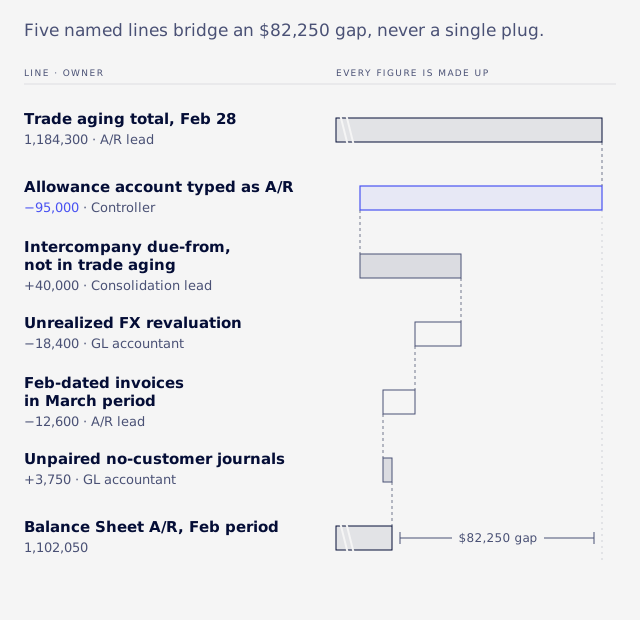
Work through them in a fixed order, cheapest and largest first, and put whatever remains on a short schedule of named reconciling lines, never a single plug. A synthetic example near the end bridges an aging of $1,184,300 to a balance sheet of $1,102,050.
Match the scope first
Run both reports for the same subsidiaries, the same consolidation choice and the same accounting book before comparing a single number.
Tie each subsidiary on its own, then the consolidated total, and check whether child subsidiaries are included on each report. Our guide to consolidated financial statements in NetSuite covers how the consolidated figure is built.
Leave elimination subsidiaries out of the A/R comparison, because their journal lines carry no customer by design. With Multi-Book, compare the primary accounting book on both sides, and rule out non-posting and unposted transactions early.
Build the GL side first, on its own, with a minimal cut: posting lines only, primary book only, summed by account up to the period end. Every later breakdown has to add back to that baseline.
Period and as-of date
The Balance Sheet can run by accounting period while the aging runs by date, and that mismatch is a common cause of variance.
Oracle says the Balance Sheet runs by period when the Report by Period preference applies, and by date range when it does not (Oracle: Balance Sheet Report). The A/R Aging Summary describes only interval and duration buckets, with no period option (Oracle: A/R Aging Summary).
Report by Period
Report by Period is a personal preference at Home > Set Preferences, on the Analytics subtab, with the options All Reports, Financials Only and Never. It needs the Accounting Periods feature, and reports show nothing until periods exist for the whole fiscal year (Oracle: Analytics Preferences).
Because it is per user, two people can run the same Balance Sheet and get different answers. Setting it to All Reports does not make the aging match: Oracle notes that Customer Aging History does not support period reporting even then. At most it aligns the Balance Sheet's date basis.
Dated in one month, posted in the next
A transaction can carry a February date and sit in the March posting period, so a date-based aging at February 28 includes it and the February Balance Sheet does not.
In one reconciliation, VCG's consultants found more than a hundred lines dated in February and posted in March. Filter the GL side on posting periods ending on or before the as-of date, and build the open-item side on the same cut.
As Of Date and Age As Of Date
An aging report has two dates to set, and a prior-period tie-out depends on both.
Oracle's A/R Aging Detail page says it shows transactions by the date they are closed rather than the date they are applied, and that this includes credit memos (Oracle: A/R Aging Detail).
When VCG pulled a past month-end aging through the NetSuite connector, the bucket splits did not match what the client saw at that date. Only the totals matched. Treat totals as the control for a prior period, and rebuild buckets when you need them.
What Aging Reports Use changes
Aging Reports Use changes how items are aged, not which items are open, so it should not move the total.
It is a company-wide setting at Setup > Accounting > Accounting Preferences, General subtab, General Ledger section. Oracle's wording: "Click Due Date to use the due date you assign for aging bills and invoices. Click Transaction Date to age by the date of the bill or invoice no matter when it is due" (Oracle: General Accounting Preferences).
Some guides place it under Set Preferences next to Report by Period, but it lives in Accounting Preferences. If a total does move when you flip it, treat that as a finding and confirm in a sandbox. Record the basis on each reconciliation.
Cash Basis Reporting sits in the same section. It sets standard reports to cash rather than accrual wherever the choice is relevant, and sets the default for custom reports. If it is on, the two sides of your tie-out may not be on the same basis.
List every A/R account
Before chasing any variance, pull every account typed Accounts Receivable and write down what each one is for.
The Balance Sheet's A/R line includes all of them. Filter the chart of accounts by type and label each: trade A/R, unbilled receivable, allowance, intercompany due-from, legacy migration A/R. Deciding up front which accounts the aging should cover saves days later.
The allowance typed as A/R
An allowance for doubtful accounts is sometimes set up with the account type Accounts Receivable, so it sits in the GL A/R total and shows on the aging as journal lines with no customer.
It is a standing balance, not a set of open items, so no payment application will clear it. Observed in client work, confirm in your sandbox: in migrated accounts this has been among the larger differences.
There are two fixes. Retype the account after weighing what that does to your statement layout and saved reports, or carry it as a named reconciling line every month.
Intercompany due-from accounts
Oracle says intercompany A/R accounts can be used only for amounts that are candidates for elimination, and that "NetSuite requires an intercompany customer or intercompany vendor for intercompany A/R and A/P accounts" (Oracle: Intercompany Accounts).
These balances belong in the GL A/R total but not in a trade aging. Reconcile them as pairs between subsidiaries: a pair is square when one side's net plus the other side's net equals zero.
Several A/R accounts
When you have several A/R accounts, tie them one at a time rather than in total.
The A/R Register report at Reports > Customers/Receivables > A/R Register combines data from all accounts receivable accounts, though Oracle does not present it as a reconciliation tool (Oracle: A/R Register). The register you open from a single account in the chart of accounts covers only that account.
On a customer payment, the A/R Account field appears when there are multiple A/R accounts and limits the invoice list to invoices charged to that account (Oracle: Customer Payments).
Journals with no customer
A manual journal posted to A/R without a customer is in the aging, on the No Customer/Project line rather than under any customer.
A common claim is that these journals are excluded from the aging. Oracle says otherwise: A/R entries with no customer or project appear on the No Customer/Project line of the A/R Aging Summary (Oracle: A/R Aging Summary), and the A/R Aging Detail page says the entries grouped there are journal entries.
The one exclusion is narrow. Debit and credit journal lines against identical accounts for the same entity do not affect the GL and so do not appear. They net to zero, so they cannot cause a difference.
The gap appears when someone compares customer by customer, or leaves the No Customer/Project line out of the comparison.
Finding them
Search for posting lines on A/R accounts where the entity is empty, in the primary book, through the period end, grouped by journal.
A transaction saved search can do this, or SuiteQL (NetSuite's SQL query language) if you want the grouping in one pass. The two ? values are the primary accounting book ID and the period end date. The tl.entity column is a placeholder: confirm it against your account's SuiteQL metadata before relying on it.
SELECT t.id, t.tranid, t.type, SUM(tal.amount) AS base_amount
FROM transactionaccountingline tal
JOIN transaction t ON t.id = tal.transaction
JOIN transactionline tl ON tl.transaction = tal.transaction AND tl.id = tal.transactionline
JOIN account a ON a.id = tal.account
JOIN accountingperiod ap ON ap.id = t.postingperiod
WHERE a.accttype = 'AcctRec'
  AND tal.posting = 'T'
  AND tal.accountingbook = ?
  AND tl.entity IS NULL
  AND ap.enddate <= ?
GROUP BY t.id, t.tranid, t.type
ORDER BY t.id
A synthetic result looks like this. The allowance journal is a standing balance, and the two small journals are the unpaired residue.
| Transaction | Type | Base amount |
|---|---|---|
| 9001 | Journal | -95,000 |
| 9042 | Journal | 5,000 |
| 9043 | Journal | -1,250 |
Classify before you clean up
Groups that net to zero need no cleanup, and only the unpaired residue is a real reconciling item.
Never let these lines vanish. Show them in a named Unattributed section, grouped by journal type, so the rows still add up to the GL baseline and a new manual journal cannot hide inside a tied total.
Vendor and employee lines
The Oracle pages we checked do not say whether vendor or employee lines on an A/R account appear on the aging, so test it.
- In a sandbox, post a journal to an A/R account with a vendor on one line and an employee on another.
- Run the A/R Aging Summary and Detail as of that date and note where, if anywhere, each line appears.
- Run the no-customer search with a filter for non-customer entities and compare.
Payments, credits and deposits
Customer deposits stay off the A/R bridge, while payments, credit memos and write-offs change what the aging shows.
Customer deposits. Oracle says deposits "go into your general ledger as a liability until you deliver the goods or services, and they don't affect the customer's accounts receivable balance." The deposit is applied to the invoice when the order is filled (Oracle: Customer Deposits). Reconcile them with the deposit liability, not here.
Unapplied payments. A custom search that only looks at invoices leaves out payments that are not yet applied. Check which account your unapplied payments hit, and include them.
Credit memos. The A/R Aging Detail "shows transactions based on the date they are closed, as opposed to the date they are applied. This includes credit memos." That matters most when you run the report for a past date.
Write-offs. Oracle's method is a journal that credits A/R and debits bad debt expense or the allowance, followed by a zero-amount customer payment that applies the journal to the invoice (Oracle: Writing Off an Uncollectible Invoice). The payment removes the invoice from open invoices and the aging. Skip it and the invoice stays open.
Foreign currency
Compare in base currency only, and treat revaluation as its own reconciling line, because it moves the GL without changing any open amount.
The aging can show a customer's currency while the Balance Sheet is in base currency. For example, a EUR 10,000 invoice at a rate of 1.10 shows EUR 10,000 on a customer-currency aging and 11,000 in the base-currency GL. Sum the GL side with the base-currency accounting line amount, never the foreign amount.
Revalue Open Currency Balances posts unrealized gain or loss to the GL and leaves every invoice's open amount where it was. This follows the accounting rule that foreign-currency receivables are remeasured at each balance sheet date, with the gain or loss in earnings (FASB: ASC 830-20-35).
Applying a payment to a foreign-currency invoice posts the realized gain or loss automatically, through a currency revaluation transaction linked to the invoice (Oracle: Realized Exchange Rate Gain and Loss). Expect to see those linked transactions on the A/R account.
Which exchange rate type drives the revaluation, and which rate converts the aging to base, is not stated on the Oracle pages we checked. Untested: run one foreign invoice through revaluation in a sandbox and compare both rates to your rate table.
Observed in client work, confirm in your sandbox: a subsidiary reported as USD-based can still invoice mostly in another currency, so check each subsidiary's real currency mix.
Location, department and class
Tie A/R at subsidiary and account level, and treat location, department or class views of A/R as analysis rather than a control.
Hypothesis: when an invoice has several locations on its lines, the A/R line may post under the header location while a location-filtered aging splits by line. Oracle does not document this behavior. Test it before relying on it.
- Post a sandbox invoice with two lines at different locations.
- Cut the GL for the A/R account by location, then cut the open items by location, and compare.
- If they differ, reconcile at subsidiary and account level and report location as unallocated analysis.
Posting status, locks and limits
Some differences come from items that exist on one side only because of approval status, period controls or an incomplete data pull.
Pending approval. When journal approval routing is on, a journal waiting in Pending Approval has nothing on the GL, including journals created by an integration. A customer-level item with no matching GL line can trace back to approval routing.
Closed periods. A transaction in a closed period cannot be edited, voided or deleted until the period is reopened. Reopening needs the Manage Accounting Periods permission, and later closed periods reopen too (Oracle: Reopening Closed Periods). A write-off journal in an open but locked period needs the Override Period Restrictions permission.
Locks. The Period Close Checklist has its own Lock A/R task (Oracle: Period Close Checklist). Observed in client work, confirm in your sandbox: reopening a period did not clear Lock All, Lock A/R or Lock A/P, so check the locks separately when a correcting entry will not post.
Void, don't delete. Oracle calls voiding the preferred way to cancel: it sets the total and every line to zero and keeps the record. With the Using Reversing Journals preference on, a void posts a reversing journal instead (Oracle: Voiding, Deleting, or Closing Transactions).
Extraction limits. A SuiteQL pull that is not paged stops at 5,000 rows without warning, and the shortfall looks exactly like a reconciliation variance. Page until no rows remain, sort on a unique key, and check the count. The SuiteQL 5,000 row limit guide explains the ceilings.
Rebuilding a past-date aging
When native buckets for a past date cannot be trusted, rebuild open items from application dates.
Take each GL A/R line and subtract the payment links dated on or before the as-of date. This applies to any open-item rebuild, because a payment applied after the as-of date has already reduced today's unpaid amount and would otherwise be wrongly removed.
Worked example, all synthetic: an invoice for 10,000 dated January 10, due January 25. A payment is applied on March 5. Rebuilt as of February 28, the invoice is still open at 10,000 and sits 34 days past due, in a 31 to 60 day bucket. Today's native report shows it paid.
Application dates count as the later of the two documents' dates, and revaluation journals are never treated as open items. Observed in client work, confirm in your sandbox: the test of a rebuild is that each line agrees with NetSuite's own unpaid amount and the total ties to the native aging at the as-of date.
A worked bridge
A bridge with named lines, each with an owner and an action, turns a variance into something a controller can sign.
Every figure is made up. The starting point is the trade aging the A/R team works from: customer lines only, with the No Customer/Project line and intercompany customers left out, run by date at February 28. The target is the February Balance Sheet A/R line.
| Line | Amount | Owner | Evidence | Action |
|---|---|---|---|---|
| Trade aging total, Feb 28 | 1,184,300 | A/R lead | Aging export | None |
| Allowance account typed as A/R | -95,000 | Controller | Account list, GL balance | Retype or accept as standing |
| Intercompany due-from, not in trade aging | 40,000 | Consolidation lead | Paired subsidiary balances | Reconcile as pairs |
| Unrealized FX revaluation | -18,400 | GL accountant | Revaluation journals | Accept, re-run monthly |
| Feb-dated invoices in March period | -12,600 | A/R lead | Period vs date search | Run both sides on period |
| Unpaired no-customer journals | 3,750 | GL accountant | Unattributed list by journal | Correct or reclass |
| Rounding | 0 | |||
| Balance Sheet A/R, Feb period | 1,102,050 | Balance Sheet |
The five lines and a zero rounding row bridge an $82,250 gap with nothing left unexplained. Each line can be tested on its own and has someone who owns it next month.
What an auditor needs
An auditor wants the same cut on both sides, a schedule that explains the difference, and evidence that someone reviewed it.
Keep these for each month: the GL baseline by account and subsidiary with the cut stated, the aging at the same cut with the Aging Reports Use basis, the bridge, the no-customer lines with their classification, and a sign-off with name and date.
For controls, use the Period Close Checklist including Lock A/R, void rather than delete, and review changes posted to A/R after close. The month-end close checklist puts these into a close sequence.
A monthly routine and tolerance
Run the same checks every close, then write the tolerance into your close policy.
The order is: scope, GL baseline, aging at the same cut, A/R accounts, no-customer lines, revaluation journals, approvals and locks, then a signed bridge. VCG offers no benchmark number, because the threshold is a decision for you and your auditor. A fill-in structure:
- Tolerance per A/R account: ______
- Tolerance per subsidiary: ______
- Nothing unexplained is carried forward to the next month.
- Differences above tolerance go to: ______ (owner), within ______ days.
Show sub-dollar rounding on the schedule but don't flag it.
When the build is the problem
If the same reconciling lines come back every month, the gap is usually a symptom of how the account was set up.
The signs are familiar: an allowance or migration account typed as A/R, an integration that keeps posting journals with no customer, aging numbers nobody trusts after a migration, or a tie-out that takes days. Monthly reconciliation only manages these. Our NetSuite rescue work fixes them at the source, and the GRNI reconciliation guide shows the same bridge approach applied to accruals.
If your aging still will not tie after these checks, Book an Assessment. VCG reviews the account setup, how A/R is being posted and the reconciliation itself, and tells you which lines can be removed and which belong on the schedule.