
The short answer
Most NetSuite MCP connection errors aren't bugs.
There are four common causes. The connector's role is missing a permission, and the error often says "Record not found". The sign-in has expired. The query is too wide to finish before the AI client gives up. Or the account's shared concurrency pool is full, which shows as "Too Many Requests". Before changing anything, check the server URL and the role, then read the integration record's Execution Log to see what actually failed.
The Model Context Protocol (MCP) is the open standard that lets an AI assistant such as Claude or ChatGPT call tools in another system. Anthropic released it in November 2024 (Anthropic: Introducing the Model Context Protocol).
NetSuite's AI Connector Service makes NetSuite available through MCP, and Oracle's free MCP Standard Tools SuiteApp supplies the standard set of tools: run a report, run a saved search, run SuiteQL (NetSuite's SQL dialect), read and write records, and so on. Oracle announced the service at SuiteWorld in October 2025 (Oracle: NetSuite Expands SuiteCloud Platform with New AI Innovations).
This guide is about what happens after setup, once the connector is part of daily work.
What we saw
VCG reviewed about 2,570 SuiteQL calls made through the connector.
Roughly 12% of them failed, which is around 300 calls. Most of those failures came from a few repeatable causes: role gaps, queries too wide to finish, and throttling when the account was busy.
Results were small, so the costly part was usually the repeat attempts that followed a failure, such as the same query resent after a timeout. Sign-in expiry is a fourth, separate pattern, and it costs the most in unattended use, where nobody is there to sign back in.
A five-point setup check
If the connector has never worked, or stopped working after someone changed a role, go through these five points before anything else. Each one comes from Oracle's own documentation.
- Features. Under Setup > Company > Enable Features > SuiteCloud, turn on Server SuiteScript and OAuth 2.0. Both are required. REST Web Services is needed to install and use the MCP Standard Tools SuiteApp. SuiteQL isn't on Oracle's prerequisite list (Oracle: NetSuite AI Connector Service FAQ; Oracle: Setting Up the AI Connector Service).
- Role. Administrator won't work, and neither will any role with full permissions. Oracle blocks both on purpose, in case an AI client is ever compromised. The role needs MCP Server Connection and "Log in using OAuth 2.0 Access Tokens". Oracle warns that this is a different permission from "Log in using Access Tokens", and the two are easy to mix up. Since the October 2026 release, a custom role based on Specialized User: CRM is an option too. The full checklist is in the next section.
- Server URL. Use
https://<accountid>.suitetalk.api.netsuite.com/services/mcp/v1/allto get custom tools from every SuiteApp and customization project. Oracle says that without/allthe connection will appear disconnected. To get only the standard tools, use/services/mcp/v1/suiteapp/com.netsuite.mcpstandardtoolsinstead (Oracle: Connecting to the AI Connector Service). Copy the account domain from the Company URLs subtab of Company Information rather than typing it. Sandbox IDs change form in the domain:123456_SB1becomes123456-sb1(Oracle: Account-Specific Domains). - Integration record. Look under Setup > Integration > Manage Integrations. For Claude, NetSuite creates the record on first connection, with the NetSuite AI Connector Service scope, and enables it automatically. Records created for other clients may start in Pending, and an administrator has to enable them. If the scope is missing, delete the record and recreate it. For ChatGPT, Oracle says a new integration record may be needed for each connection, because ChatGPT uses dynamic callback URLs.
- AI client plan. Oracle says Claude needs the Pro plan or higher (Oracle: Get Started with the NS AI Connector in Claude). Oracle also says some ChatGPT plans need Developer Mode turned on, but doesn't name which plans. The connector and the SuiteApp cost nothing extra. Only the AI client subscription costs money.
If the connector looks connected but shows no tools, Oracle's causes are a missing /all, an uninstalled SuiteApp, or a misconfigured role. A wrong account ID in the URL is another thing to rule out: Oracle says to copy the domain from Company Information instead of typing it, and in our view a mistyped domain would fail the same way.
Role permission checklist
These are the permissions that decide what the AI can do. Add them to a custom role, never to Administrator.
| Permission | What it unlocks | How its absence shows up |
|---|---|---|
| MCP Server Connection | The connection itself | Sign-in or connection fails |
| Log in using OAuth 2.0 Access Tokens | Sign-in through the AI client | Sign-in fails. Not the same as "Log in using Access Tokens" |
| REST Web Services | Creating, retrieving and updating records through the SuiteApp | Record tools fail while other tools work |
| Record permissions for your data | What the AI can read or change | "Record not found" |
Oracle documents the first three (Oracle: Setting Up the AI Connector Service). If the saved-search tools fail while record tools work, check the role's search permissions next. Oracle doesn't state a permission level for any of them, so give each the least level that works.
Where to see what failed
The AI client's chat window gives you a summary of the error, and summaries lose detail.
The full record is on the integration record. Open it and go to Execution Log > AI Connector Service (MCP), which sits alongside the SOAP, REST and RESTlet subtabs. Calls are logged with its time, duration, status, user, HTTP status code, HTTP method and URL path (Oracle: Connecting to the AI Connector Service).
Retention is short: 21 days in production and 7 in a sandbox. Copy or screenshot what you need as soon as you start looking. Read the raw status and path before you touch the query, because one symptom can come from any of the four causes.
Record not found is usually a role gap
The connector can only see what its role can see.
Oracle says the MCP Standard Tools SuiteApp uses the same access controls as the NetSuite UI and gives no access beyond what the role already has (Oracle: MCP Standard Tools SuiteApp). In practice, a record the role can't see looks to the connector as if it doesn't exist. That's why "Record 'X' was not found" so often turns up for tables you know are there.
VCG's consultants most often see this on script and deployment records, system notes, roles, accounting periods and custom segments. Write gaps are just as common: roles that can't edit items or vendor bills, or can't change anything in a locked period. If someone has promised a bulk update through the connector, check the role's write permissions first.
The fix
Stop renaming the table. If the AI keeps trying transaction, then transactions, then a guessed custom record name, it's working around a permission it doesn't have.
- Confirm access one table at a time with a one-row query.
- Where a gap matters, add that one permission to a least-privilege role, or use another route such as a token-based REST role or a script.
- Write down the role's known gaps.
Don't grant Full on everything to see whether the problem goes away. Oracle blocks full-permission roles from the connector anyway, and it breaks least-privilege practice.
Missing tools follow the same rule. The Standard Tools SuiteApp currently lists about 25 tools in seven groups, and because Oracle manages and updates it, check the live list rather than relying on a number (Oracle: MCP Standard Tools Available Tools).
Why you keep being asked to sign in
The connector uses OAuth 2.0 Authorization Code Grant with PKCE (Oracle: NetSuite AI Connector Service FAQ).
In plain terms, a person signs in through a browser and the AI client holds a token on their behalf, not their password.
Oracle's connector pages don't publish how long that session lasts, so we won't guess a number. When the AI client says it needs you to sign in again, sign in again. Retrying the same request will fail the same way.
Scheduled or unattended AI jobs need more care. VCG's recommendation is to make one cheap call first, such as listing subsidiaries, and stop with a clear "not signed in" status if it fails. Work that has to run with nobody watching belongs on a token-based REST integration or a script.
If the error appears during sign-in itself, look at the role and the integration record first. The setup check above covers the usual suspects.
How to narrow a query that times out
The row and time limits belong to the AI client, not to NetSuite.
Oracle's FAQ says AI clients usually handle up to about 5,000 rows per call, that token limits may apply, and that large queries may time out. No duration is published. Note whose limit this is: it belongs to the AI client, not to NetSuite (Oracle: NetSuite AI Connector Service FAQ).
VCG sees timeouts cluster in the same places: transaction-line and accounting-line scans, wide GROUP BYs, consolidation over full history, and unfiltered deleted-record tables. The narrowing order that works:
- Add a posting-period or date range, plus a subsidiary filter.
- Wrap the query in
COUNT(*)to see whether it finishes at all. - Split it by period or by ID range. A year per chunk works for P&L summaries.
- If it's still slow, move it to SuiteQL over REST or to a reporting copy of the data.
Don't resend the same query after a timeout.
A before and after
Here is a synthetic example. The first query scans every transaction line in the account:
SELECT tl.account, SUM(tl.netamount) AS total
FROM transactionline tl
JOIN transaction t ON t.id = tl.transaction
GROUP BY tl.account
The narrowed version limits it to one posting period and one subsidiary:
SELECT tl.account, SUM(tl.netamount) AS total
FROM transactionline tl
JOIN transaction t ON t.id = tl.transaction
WHERE t.postingperiod = 123
  AND tl.subsidiary = 2
GROUP BY tl.account
Run it as SELECT COUNT(*) first to see whether the filtered set is a sensible size.
Too Many Requests and bursts of failures
The connector shares the account's concurrency pool with every other integration.
That holds unless an administrator gives its integration record a dedicated limit. Oracle's example: an account limit of 5, with 2 assigned to a REST integration, leaves 3 for everything else. Each tool call counts as one main request plus the extra MCP protocol requests that come with it. The pool's size depends on your service tier and how many SuiteCloud Plus licenses you have (Oracle: AI Connector Service Concurrency Governance).
When the pool is full, Oracle says you'll see "Too Many Requests" and should ask the AI client to retry. Oracle doesn't document a status code or a backoff interval.
VCG's consultants have noticed a related pattern. When queries that worked minutes earlier start failing in a burst, often with HTTP 400 errors, the cause has sometimes been throttling rather than bad SQL. Another session or a nightly integration was hitting the same account. Oracle doesn't document that link, so treat it as a field observation.
To test, run a query you know works, such as a one-row lookup. If that fails too, the SQL isn't the problem. Wait and retry, and if it keeps happening, review a dedicated limit or the account's concurrency tier.
The quoting trap
This one catches developers rather than finance users, but finance users end up with the broken script.
VCG has observed that string literals sent through the connector arrive URL-encoded, so a query that works in the connector contains %27 where a single quote would be. Oracle doesn't document this.
Paste that query into SuiteScript's query.runSuiteQL (the N/query module) and %27 is a syntax error, because N/query expects plain quotes. Copying a query from one context to the other silently changes what it means, so rewrite the quotes rather than pasting.
The same synthetic WHERE clause in both forms:
-- As it appears in a working connector call
WHERE t.type = %27VendBill%27 AND t.postingperiod = 123

-- As SuiteScript's N/query needs it
WHERE t.type = 'VendBill' AND t.postingperiod = 123
The rule: write the script version from scratch with ordinary quotes. To test, run a one-row query with a string filter in both places, using a value you know exists, and confirm both return that row before you run anything larger. Do this in a sandbox first.
Report dates are not posting periods
This trap matters most to controllers.
Oracle says the connector's report tools don't support accounting periods and ignore the Report by Period preference. Oracle also advises against rebuilding financial reports with SuiteQL, because NetSuite's standard reports apply business rules that SuiteQL can't (Oracle: MCP Standard Tools Best Practices).
VCG's consultants have seen date-range reports differ from posting-period totals because of back-dated bills, accruals and reclass journals. To tie a period, compare against the native report, or against SuiteQL filtered on posting period. Any total that comes out of the connector is unvalidated until it matches the native report.
When to stop using the connector
The connector suits metadata, single records, small lookups and one-off writes. Large paged reads, joins across several queries and unattended jobs belong somewhere else.
| Task | Connector | SuiteQL over REST | Script | Reporting warehouse |
|---|---|---|---|---|
| Look up one record or its fields | Yes | Possible | Overkill | No |
| Small lookup, a few hundred rows | Yes | Possible | Overkill | No |
| One-off write, approved by a person | Yes | No, SuiteQL is read-only | Possible | No |
| Paged read of thousands of rows | No | Yes | Yes | Yes |
| Totals or joins across queries | No | Yes, totals computed in code | Yes | Yes |
| Scheduled or unattended job | No | Yes, token-based | Yes | Yes |
| Reporting beyond native NetSuite | No | No | No | Yes |
For big reads, VCG has found a read-only REST helper most reliable: it writes every page to a file, prints only the count and a few sample rows, and lets code compute the totals. For reporting beyond what NetSuite does natively, a replicated data warehouse is the longer-term answer, and it is the kind of work VCG does under system integration.
Traps on the REST route
SuiteQL over REST has its own problems. These are VCG observations:
- SuiteQL requests over REST need the
Prefer: transientheader. - The OAuth 1.0a signature has to include the query string, or you get a 401 invalid login.
- The JSON response leaves out null fields, and booleans come back as
TandF. - A PATCH can return 204, which means success, and still drop a value. After any bulk update, re-read what you wrote and compare.
Don't cap a paged REST read with ROWNUM. VCG has seen it return more rows across pages than the reported total. Bound reads by a key or date range, and make the fetch loop fail loudly when the row count and the reported total disagree.
Is it safe for finance data
Oracle builds several controls into the service.
MCP tools never run with the Administrator role or a full-permission role. They can't call Suitelets. "Run as role" is disabled, so tools can't run SuiteScript with elevated privileges. And they can't make HTTP requests to outside destinations (Oracle: AI Connector Service Risks).
The SuiteQL tools are read-only. Writes go through the record tools, under the role's own permissions. Calls are logged on the integration record's Execution Log, which keeps 21 days in production and 7 in a sandbox.
On health data, Oracle says the service hasn't been assessed for HIPAA compliance. You shouldn't send ePHI through it unless your own assessment has decided that use fits your HIPAA obligations (Oracle: NetSuite AI Connector Service FAQ).
The practical control is the role: give each job its own least-privilege role.
Symptom-to-fix table
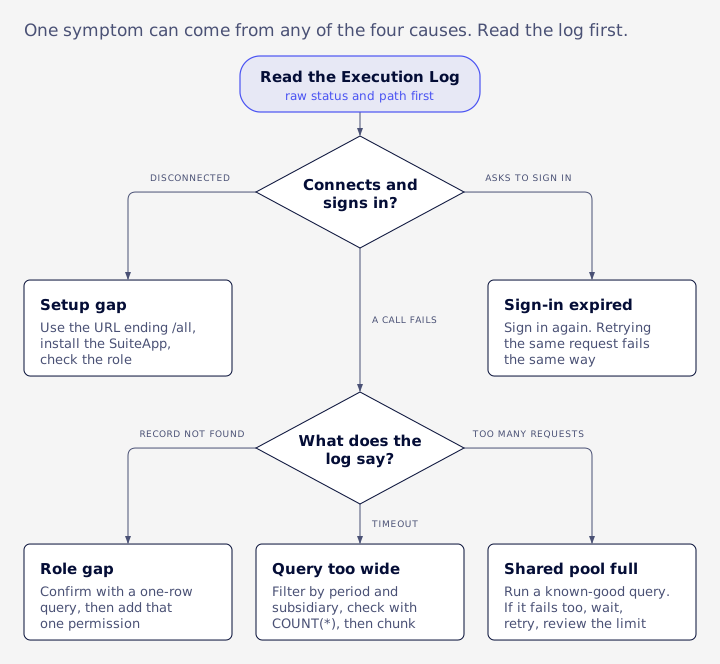
| What you see | Likely cause | First check | Fix |
|---|---|---|---|
| Connector shows disconnected | URL missing /all | Server URL | Use the /all URL |
| Empty or missing tools | SuiteApp not installed, or role lacks permissions | SuiteApp install, role permissions | Install the SuiteApp, add the tool's permissions |
| Connector shows disconnected, URL looks right | Wrong account ID or domain in the URL | Compare with Company URLs | Copy the domain from Company Information |
| Tools missing after connecting | URL missing /all, SuiteApp not installed, or role misconfigured | URL, SuiteApp, role | Fix whichever applies |
invalid_grant or 401 on the tool list | Likely an expired or rejected sign-in, or a disabled integration record | Integration record state and scope, then sign in again | Enable or recreate the record, sign in again |
| ChatGPT says the search action is not found | ChatGPT connection setup | Oracle's ChatGPT steps and SuiteAnswers article 1025062 | Reconnect following those steps |
| Administrator sign-in refused | Administrator and full-permission roles are blocked | Role used to sign in | Sign in with a least-privilege custom role |
| "Record not found" on a record that exists | Role can't see that record type | One-row query per table | Add the permission, or use REST or a script |
| Writes refused while reads work | Role lacks write permission, or period is locked | Role write permissions, period status | Adjust the role, or write by another route |
| "Needs you to sign in again" | Session expired | None needed | Sign in again; don't retry |
| Timeout | Query too wide for the AI client | Filters and COUNT(*) | Narrow, chunk, or move to REST |
| "Too Many Requests" or a burst of 400s | Shared concurrency pool full | A known-good control query | Wait, retry, review the dedicated limit |
| Query fails after copying into SuiteScript | %27 encoded quotes | Look for %27 | Rewrite with plain quotes |
| P&L doesn't match the GL for a period | Report tool uses dates, not posting periods | Compare by posting period | Tie to the native report |
Frequently asked questions
Why does the connector say Record not found when the record exists?
Usually because the connector's role can't see that record type. Confirm with a one-row query and check the role's permissions.
Why does ChatGPT say the search action is not found?
Oracle's pages don't cover that message. Oracle points to SuiteAnswers article 1025062 for ChatGPT, and says some plans need Developer Mode and a non-administrator role. Start there.
What do invalid_grant or a 401 on the tool list mean?
Oracle doesn't document either message. Start by checking that the integration record is enabled and has the AI Connector Service scope, then sign in again.
Why is NetSuite MCP not working with Claude?
Work through the setup check: features, role, URL ending in /all, integration record, and a Pro plan or higher.
Is there a row limit?
Oracle says AI clients usually handle up to about 5,000 rows per call. That limit comes from the AI client.
Does the connector cost extra?
No. Oracle says the connector and the MCP Standard Tools SuiteApp are free. You pay for the AI client's plan.
What to do next
Find the cause before you retry.
Check the URL and role, read the Execution Log, narrow wide queries, and move heavy or unattended work off the connector. Tie every number to the native report.
Sometimes the connector is only where the trouble shows. If the real problem is the account underneath, with permission sprawl, roles nobody can explain, or reports that don't tie, fixing the connector won't help much. VCG's assessment looks at the account itself, including its integrations, scripts and day-to-day support. If that sounds like your situation, you can book an assessment.