
The short answer
Yes, NetSuite has AI invoice capture, and it is called Bill Capture. It reads vendor bills and suggests the vendor, items and PO, but a person still creates the bill.
You email or upload vendor bills as PDF, JPEG or PNG files, and NetSuite reads them with Oracle's OCI Document Understanding Custom Generative Model (OCI is Oracle Cloud Infrastructure), a large multimodal model that handles complex layouts. The Review Scanned Bill page shows a "Built with Llama" notice. Bill Capture suggests the vendor, the items and any matching purchase orders (POs) pending billing. A person checks those suggestions on the Review Scanned Bill page and then creates the bill (Oracle: Bill Capture).
The AI only suggests. A user creates the bill, and Oracle says 3-Way Match, approval workflows and SuiteApprovals are not part of Bill Capture. They still apply once the bill exists, exactly as they would for a bill keyed by hand. System Notes on the bill record that it came from Bill Capture.
On price, Oracle's Bill Capture help pages state no per-bill price or usage charge. Ask your Oracle account rep for a quote. Oracle tracks usage of some other AI features as AI Units under Setup > Company > AI > AI Preferences (Oracle: AI Preferences and AI Units), but its Bill Capture pages don't tie Bill Capture to that allowance.
The rest of this guide argues one point. Reading the invoice is the easy part. Whether you can trust the result depends on the matching, the holds and the review queue built around the model.
Where Bill Capture stops
Oracle publishes its limits on a considerations page (Oracle: Bill Capture Considerations).
| Area | Oracle's documented limit |
|---|---|
| Country | The considerations page says US only. A 2025.1 release article adds the UK when used with SuiteTax |
| File types | PDF, JPEG, PNG |
| Pages | PDF up to 30 pages. JPEG and PNG one page only |
| File size | 8 MB per file, one bill per file |
| Upload batch | No more than 50 files per upload is recommended for performance. It is not a hard cap |
| Up to 20 attachments, 8 MB each, under 10 MB per email | |
| Bills with no PO | No serial or lot items, bins, inventory status, or mandatory line-level custom fields |
| Matrix items | Parent matrix items can't be selected; subitems can |
| Review page | Can't be customized |
The considerations page and the 2025.1 release article disagree on country. Confirm availability in your own account before you plan around it.
Email intake runs through the Transaction Email Capture SuiteApp (Oracle: Uploading Vendor Bills). Files you email or upload land on Transactions > Payables > Scanned Vendor Bills.
Some things the considerations page simply doesn't state: a maximum number of lines, supported languages or supported currencies. It lists supported date formats and nothing more. That is not the same as "no limit", so test your own long or foreign-language invoices before you rely on them.
Learning and templates
Oracle says "NetSuite also learns from user corrections, making better suggestions with time." Because suggestions come from matches against your vendor, item and PO records, clean records give better suggestions. Settings live at Setup > Accounting > Bill Capture Preferences, and templates save values per vendor and subsidiary pair, with a linked PO overriding the template (Oracle: Bill Capture Preferences).
For builders: N/documentCapture
If you are building your own capture in SuiteScript, the N/documentCapture module (since 2025.2) returns pages, fields, lines, tables and words with confidence scores. It runs synchronously up to 5 pages and accepts PDF, PNG, JPG and TIFF. By default it extracts only text and tables. You have to ask for field extraction (Oracle: N/documentCapture Module).
Matching in plain English
Two terms first. A 2-way match compares the bill with the PO. A 3-way match adds the item receipt, which is NetSuite's record of the goods actually received.
What NetSuite gives you natively
Bill Capture matches against POs pending billing and supports partial billing and Bill in Advance of Receipt. The actual match check comes from elsewhere.
The NetSuite Approvals Workflow SuiteApp (bundle 537941) ships three workflows: Vendor Bill Approval, 3 Way Match Vendor Bill Approval and Invoice Approval. It is English only. Accounts using Multi-Language should use SuiteApprovals (bundle 203059) instead (Oracle: NetSuite Approvals Workflow SuiteApp).
The 3-way workflow compares the bill with the PO and the item receipt. It uses tolerance fields such as VB-PO Amount Tolerance and VB-PO Quantity Difference, and requires Advanced Receiving.
When you use tolerances, Oracle tells you to turn off other quantity and amount exception criteria. Clean bills are approved automatically. Bills with discrepancies go to Pending Approval for the creator's supervisor, so every bill creator needs a supervisor set. Oracle notes one gap: "Item receipts that have been partially received are not supported" (Oracle: 3 Way Match Vendor Bill Approval Workflow). With Bill in Advance of Receipt enabled, receipt-based exceptions are skipped (Oracle: 3 Way Match Workflow Validation).
Match Bill to Receipt is a separate setting: a checkbox on each PO line, defaulted from the item record and off by default. It posts quantity, price and exchange-rate variances through Transactions > Payables > Post Vendor Bill Variances, for inventory, non-inventory, other charge and service items (Oracle: Match Bill to Receipt).
One bill for several POs is also native. The Bill Purchase Orders page (Transactions > Payables > Bill Purchase Orders) puts the items from several unbilled POs onto one vendor bill, as long as they share vendor, subsidiary and currency (Oracle: Bill Purchase Orders).
Choosing tolerances
NetSuite has no built-in dollar-threshold policy such as "3-way match everything over $5,000". The Approvals Workflow offers its own tolerance fields; any other rule is custom. A sensible way to pick numbers:
- Start tight.
- Run for a month and read the real exceptions.
- Loosen per vendor where the exceptions are noise. Don't loosen globally.
As an illustration, a team might set a header tolerance of 5% of the PO amount against the invoice total and adjust it per vendor. That is an example of a rule you could build, not NetSuite behavior.
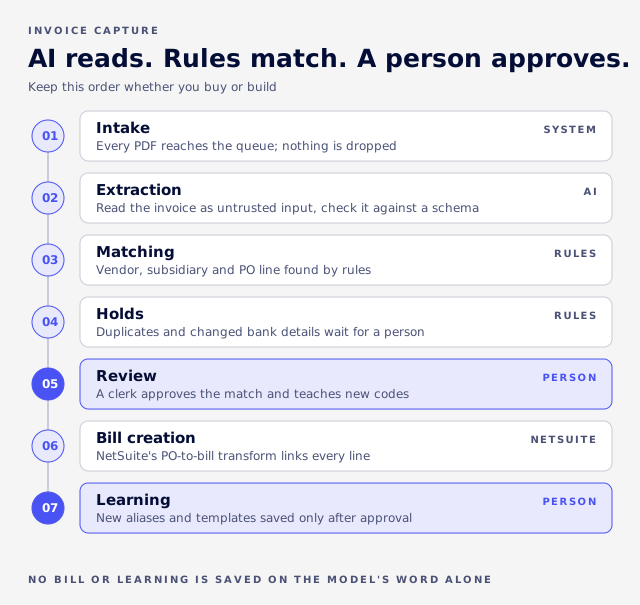
AI reads, rules match, a person approves
The model has one job: turn a PDF into structured fields that pass a schema check.
A schema check is an automatic test that the output has every required field in the right format. The model should not decide the vendor, the PO line, the GL coding or the approval. Those decisions follow fixed rules you can test, and a person signs off.
Vendor matching
One design VCG's consultants use for vendor matching is a fixed sequence of checks, stopping at the first that holds:
- A saved vendor template
- Tax ID
- Exact vendor name
- Legal name
- Fuzzy name (close but not exact text), verified against the candidate records so a near-miss is not accepted blindly
- Address
- Email domain
A loose "contains" search is never accepted on its own.
PO line matching
PO lines can go through tiers in order: exact item, vendor part code, learned alias (a vendor code a person has confirmed), normalized code, fuzzy description with a guard against ambiguous hits, then quantity and amount together. The model should only see the lines the rules couldn't settle, and anything it proposes that doesn't point to a real, unused PO line should be dropped. When two PO lines look identical, the matcher should leave the line for a person rather than guess.
Route on what was captured
Send a bill to review because a core field is missing or the vendor didn't match, not because a confidence score dipped. In VCG's design, anything short of fully clean goes to a person, and only a failed model call or a response that fails the schema check counts as an error. Any confidence thresholds belong in configuration rather than in code.
Two cheap arithmetic checks after extraction catch errors a confidence score misses. Line amounts must add up to the subtotal, and subtotal plus tax must equal the total within a cent.
One more rule: reprocessing must never overwrite a clerk's saved choice. If a clerk saved a PO or vendor and the auto-matcher runs again, it has to skip that bill. Otherwise "save draft, then process" quietly resets the PO.
Vendor codes that don't fit
Vendors often print their own item codes, and nothing in their wording matches your item master.
A synthetic example. A vendor invoices "SKU-AB-1042, 3 CS". Your NetSuite item is "AB1042", bought and stocked as each, 12 to a case.
The fix is learning that a person confirms. When a clerk links that invoice line to the PO line, the vendor's code becomes an alias on that vendor's template, and the next invoice matches at the alias tier without help. A confirmed vendor code can also be written back to the item's vendor code field, which helps native matching too.
In VCG's experience, vendors split into two groups. Vendors whose codes equal the NetSuite item names match almost from the start. Vendors with altered codes match close to nothing until each has aliases, and after that they match about as well as the first group. Where two PO lines are identical, the matcher should leave them unmatched rather than guess.
That is an observation, not a benchmark. Your own vendors will differ, which is why the measurement section below has you run the same test on your invoices.
Invoices that carry descriptions and no stable code get no alias. They need model help every time, so budget review minutes for them.
Charges that aren't items, such as freight or fees, go through GL routing rules (per vendor or global, matched on line text) that set account, tax code, department and class.
Duplicates and bank-detail fraud
NetSuite's own duplicate control is a preference called Duplicate Number Warnings. Only one of its settings actually blocks a duplicate bill.
It sits under Setup > Accounting > Preferences > Accounting Preferences, Items/Transactions subtab. Its three options are "No Warnings", "Warn" and "Warn and Block". For vendor bills, only Warn and Block stops a duplicate from saving (Oracle: Duplicate Number Warnings). Oracle's page doesn't say whether the check is scoped to vendor plus number, so test it in your account. Oracle's help lists no preference called "Enforce Unique Reference", whatever some guides say.
A capture pipeline needs its own checks before the bill exists. VCG's consultants use two independent ones:
- Same vendor and invoice number against posted bills.
- A hash of the file (a fingerprint of the exact file's contents) to catch the same PDF uploaded twice while it is still in the queue.
Running vendor plus number against the queue itself falsely flags rejected and unbilled rows, which is why the second check uses the file. Both checks put the invoice on hold. Neither rejects it.
Bank details printed on the invoice get compared with the vendor's stored payment details, and a mismatch is held for a person. That is aimed at payment-redirect fraud, where someone sends a real-looking invoice with new bank details. Extraction accuracy does nothing against it.
How capture builds fail quietly
The failures below share one trait: nothing throws an error. VCG's consultants have seen each of these when repairing AP capture in NetSuite.
Invoices lost at intake
Forwarded email chains often attach PDFs with a generic file type (application/octet-stream), so a type allow-list drops them without a word. Detect PDFs by file extension, queue only PDFs so signature images don't flood the queue, and archive every email that produced no queue record. A PDF nested inside an attached email can't be reached automatically and needs manual recovery. Files saved from script also have a hard 10 MB limit.
Truncated extraction data
Long-text fields can truncate. A field defined as long text can behave in the live account as plain text with a hard 4,000-character cap. A real invoice's cleaned-up data can run to about 7,000 characters, and the raw model output to over 100,000. Cut-off data fails to parse, and the bill opens with no lines and no error. Store the payload as a File Cabinet file and keep only the file id on the record.
The wrong PO line billed
PO line numbers restart at 1 on every PO. On a bill spanning two POs, line 3 of each collides in anything keyed on the bare number. The wrong PO line gets billed, the received-not-billed accrual clears against the wrong line, the intended line stays open, and no error appears. Key lines on PO plus line. Tests can stay green throughout if that path was never tested.
Billed or closed lines winning matches
A fully billed PO line can win a fuzzy or quantity-and-amount match and steal it from the line that is actually open. A closed line can still show open quantity, so "billed less than ordered" isn't enough. Exclude both from matching but keep them visible. Treat a blank quantity on a service line as "no quantity", not zero, or amount-only lines become unbillable.
Create the bill through NetSuite's own PO-to-bill transform so lines arrive linked to the PO. A link set by script on a new line is ignored. If the PO is closed or fully billed, fall back to a plain expense bill rather than block the clerk.
Learning loops that do nothing, or damage
Two patterns recur. A correction log whose vendor field points at the wrong record type fails every write and stays empty, so the learning loop never runs. A rebuild step can replace hand-trained examples with an empty list on every bill save. The fixes: regenerate only after a successful log write, merge examples instead of replacing them, skip empty writes, and snapshot long-text fields first, since NetSuite keeps no history for them.
Tests that pass while production fails
Rules can pass every unit test and never fire live, because mocked search results use the documented value shapes while real searches return internal ids for list fields, booleans for checkboxes and native arrays for multi-selects.
Build test fixtures from real responses. Then smoke-test on a real bill in a sandbox before deploying, with a person approving what a passing test should prove, as in our guide to AI-assisted NetSuite implementation. A smoke test on a real bill also catches problems mocks can't, such as a button added to a standard sublist that crashes the whole bill form with a generic error.
Scheduled jobs with no schedule
A retry job for failed invoices that is deployed with no schedule never runs, so errored invoices sit in the queue indefinitely. Check that every scheduled piece is actually scheduled.
Taxes, units and currency
Oracle doesn't state supported languages or currencies for Bill Capture. Confirm both in your account before you plan outside the US or UK.
Tax: SuiteTax or legacy
Canada is a good example of what a custom build has to handle, from VCG's own work. SuiteTax is NetSuite's newer tax engine, and an account runs either it or the legacy tax framework, never both.
A custom build should detect which one is active, store the answer on its settings record, and branch on it. The difference matters on bill lines. Under SuiteTax, item lines have no writable tax code field, so a script that sets one gets the field rejected, and the build has to rely on the PO's own tax handling instead.
- Recoverable GST/HST goes on the line tax code or tax group, never a manual expense line. Provinces that charge GST plus a provincial tax use a tax group so each component posts to its own account.
- Non-recoverable PST/QST becomes expense lines routed by rules and is not counted in the tax total. One global extraction rule worked better than patches per vendor.
Units of measure: case versus each
A synthetic example. The vendor invoices 3 CS (cases). Your PO says 36 each, because the item is bought by the case of 12. Quantities no longer equal, so a quantity-based match fails or reports a variance.
In VCG's design the extractor copies the unit exactly as printed and does not convert it. The pack-size conversion is recorded against that vendor as a note the model and the clerk can both see, and a person confirms the match. When the units conflict and the conversion is not on file, the line stays unmatched for a clerk. Check unit settings before changing them on an existing bill line, because changing the unit afterwards can silently rescale the line quantity.
Multiple currencies
When a bill is created from a PO through NetSuite's own transform, the bill takes the vendor currency, so the PO and the bill share it. VCG's matcher compares amounts in that transaction currency and does no conversion. Exchange differences then belong to NetSuite: Oracle's Match Bill to Receipt posts price, quantity and exchange-rate variances to the accounts you choose, through Post Vendor Bill Variances, for inventory, non-inventory, other charge and service items.
Create any custom field in the account before mapping extracted data to it. Mapping to a field that doesn't exist throws an error on every bill load, and that error gets swallowed.
VCG's consultants use this order for subsidiary: the queue record's value first, then a vendor with only one subsidiary, then a fuzzy match on the bill-to name.
Security and what the AI learns
Invoice text is untrusted input. Anyone can put anything on a PDF, including text written to steer an AI model.
That attack is called prompt injection: planting instructions in the content the model reads. In practice:
- Mark document content as data in the prompt.
- Give the model no tool access.
- Validate the output against a schema before saving it.
Anything that persists as learning, such as extraction hints or templates for a vendor, should wait in a queue until a person approves it. Otherwise one crafted invoice can plant instructions that quietly degrade extraction for that vendor from then on.
Keep the learning itself (aliases, templates, corrections) in your own NetSuite account.
Read your model provider's data-use and retention terms rather than assuming them.
What it costs to run
Model usage is usually the small number. Review time is the big one.
VCG's custom design reads each invoice twice: a general read to identify the vendor, then a second read using what it has learned about that vendor's layout. That runs about five to eight cents an invoice.
That works out to roughly $10 to $16 a month at 200 bills and $20 to $32 at 400. NetSuite scripting itself was assumed to add no per-invoice charge, which you should confirm with Oracle. Rates change, so re-check your model provider's and OCR provider's price pages before you budget.
Bill Capture itself is different: Oracle's pages state no per-bill charge, so ask your Oracle rep.
The real costs are engineering, training vendor templates and the minutes people spend in the exception queue. A formula you can fill in with your own numbers:
Monthly cost = (invoices × share needing review × minutes per review ÷ 60 × loaded hourly rate) + model cost + upkeep
An illustration with assumed inputs, not data. Take 400 invoices a month, 30% needing review, 3 minutes per review and a $45 loaded hourly rate. Review time costs 400 × 0.30 × 3 ÷ 60 × $45, which is $270. Add up to $32 of model cost and the total is about $300 a month before upkeep. Review time is around 90% of it, so cutting the review share does far more than shaving model fees.
Two cheaper ideas that don't pay off
Batch processing (submitting invoices in bulk to run later) can cost less per invoice. At a few thousand invoices a year the saving is small next to the risk. It also adds state to track: a billed invoice can reappear in the queue, one failing row can block intake, and rows can be stranded. In AP, a failure you notice late can cost you a duplicate bill, so a synchronous pipeline (each invoice handled while the clerk waits) is the safer default.
Guessing the vendor from the sender's email domain before extraction is also a false economy. Forwarded mail, shared AP inboxes and parent companies made it wrong in believable ways, with no second pass to catch the error.
Measuring accuracy yourself
Vendors publish accuracy figures without a stated method, so measure on your own invoices.
Routable claims 92% extraction accuracy (Routable: NetSuite Invoice Automation) and Zone claims 90%+ fewer errors "when you start with clean data" (Zone & Co: ZoneCapture). Neither page states how it was measured.
A simple test:
- Take a month of real invoices from your top vendors.
- Key the correct answers by hand.
- Run them through the tool and measure field accuracy, vendor match rate, PO line match rate, and the share of bills nobody had to touch.
- Report results per vendor. Clean vendor codes match almost from day one and altered codes need aliases first, so a blended number hides the vendors that will cost you time.
A per-vendor table might look like this. The figures are a synthetic example, not client results:
| Vendor | PO lines matched before aliases | After aliases |
|---|---|---|
| A (altered codes) | 0 of 19 | 19 of 19 |
| B (altered codes) | 0 of 10 | 10 of 10 |
| C (altered codes) | 0 of 7 | 7 of 7 |
| D (codes equal item names) | About 100% | About 100% |
What touchless rate to expect
There is no honest public figure. The share of bills nobody has to touch depends on the vendor mix: how many invoices carry a PO, how clean the item codes are, how many are scans, and how many arrive with unusual layouts or units. Vendor percentages are not comparable because no vendor page states how it was measured. Compute your own from the test above. VCG does not publish a touchless benchmark, and it would not mean much for your vendors if it did.
Implementation time has the same problem. A fixed range would hide the drivers listed in the last section, so size the work after the per-vendor test, not before it.
After go-live, track the exception rate. A rising rate usually points to a vendor master or PO discipline problem rather than the model.
Who owns the exception queue
An exception queue without an owner grows. A workable split of roles:
- AP clerk: works the queue daily, confirms vendor and PO matches, and teaches the system by linking unmatched lines.
- Buyer or purchasing: fixes PO problems, such as a missing line, a wrong price or a closed PO that should be open.
- Approver: handles bills the approval workflow routes for a quantity or amount difference.
- NetSuite admin or controller: reviews pending template suggestions, holds for duplicates and bank-detail changes, and watches the exception rate.
Native, SuiteApp or custom
| Option | Fits when | Watch for |
|---|---|---|
| Native Bill Capture | US (or UK with SuiteTax), PO-based buying, the standard review page is acceptable | Documented limits above; review page can't be changed |
| Third-party capture product (such as Zone or Routable) | You'd rather buy than build, and the product covers your tax and vendor needs | Zone's page lists no prices. Ask each vendor for pricing, its exception workflow and how accuracy was measured |
| Custom build | Canadian or other tax rules, odd vendor codes or units, your own review queue, learning kept in your account and approved by a person | You own the upkeep |
VCG gives no standard timeline, because the effort depends on these drivers: how many vendors you have, how clean the item vendor codes are, the tax regime, the number of subsidiaries, and how many invoices arrive with no PO. Treat vendor training claims, such as Routable's 1 to 5 invoices per vendor, as claims.
Whichever you pick, keep the order:
- Intake that can't lose an invoice
- Schema-checked extraction with untrusted-input controls
- Rule-based vendor, subsidiary and PO matching
- Duplicate and bank-detail holds
- A review queue where a person approves and teaches
- Bill creation through NetSuite's PO-to-bill transform
- Learning stored in your account and gated by approval
If capture isn't working now
These symptoms point back to the failures above:
- Bills open with no lines.
- GRNI (goods received, not invoiced) doesn't clear, or clears against the wrong PO line. Our GRNI reconciliation guide shows how to trace it.
- Duplicates get through.
- The review queue never shrinks.
- The learning log has nothing in it.
VCG fixes NetSuite builds that went wrong, and AP capture is one of the places the damage stays quiet longest. For custom capture and matching logic, see SuiteScript automation. For third-party capture tools that don't sync cleanly, see system integration. If your capture setup is producing these quiet failures, Book an Assessment with VCG for a first look at where the pipeline breaks.
FAQ
What is NetSuite Bill Capture?
Bill Capture reads vendor bills that are emailed or uploaded as PDF, JPEG or PNG files, using Oracle's OCI Document Understanding Custom Generative Model. It suggests the vendor, items and matching POs pending billing, a person reviews them on the Review Scanned Bill page, and the person creates the bill.
How do I enable it?
Settings live at Setup > Accounting > Bill Capture Preferences, and email intake needs the Transaction Email Capture SuiteApp. Licensing and pricing go through your Oracle account rep.
Can NetSuite read PDF invoices?
Yes. PDFs up to 30 pages and 8 MB, one bill per file. JPEG and PNG files are one page only.
Does NetSuite work with outside OCR?
Yes, through SuiteApps, integrations, or the N/documentCapture module in SuiteScript.
What is 3-way matching in NetSuite?
Comparing the bill with the PO and the item receipt. The NetSuite Approvals Workflow SuiteApp includes a 3 Way Match Vendor Bill Approval workflow with amount and quantity tolerances. It requires Advanced Receiving and doesn't support partially received item receipts.
Can AI post bills without a person?
Not natively. A user creates the bill, approvals still apply, and System Notes record that the bill came from Bill Capture.
Can I bill several POs, bill partially or bill before receipt?
Yes. Bill Capture supports partial billing and Bill in Advance of Receipt. The Bill Purchase Orders page puts several POs on one bill when they share vendor, subsidiary and currency.