
Does Next switch on with 2026.2?
No: an administrator turns NetSuite Next on role by role, in the same account, as Oracle makes it available in phases.
For the NetSuite Next rollout existing customers will see, Oracle expects most scripts to keep working but flags page-level client scripts, form customizations and portlet scripts for review.
Your first step has nothing to do with Next. The 2026.2 upgrade sets exact bank matches to submit automatically, so the controller should decide whether that stays. If manual review stays, an administrator clears the preference, as covered under bank matching below.
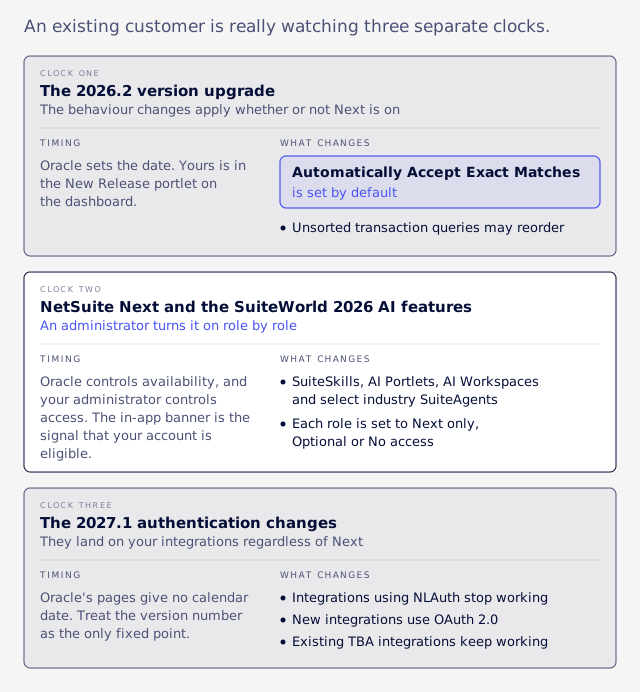
An existing customer is really watching three separate clocks:
- The 2026.2 version upgrade. Oracle sets the date, and the behaviour changes apply whether or not Next is on.
- NetSuite Next and the SuiteWorld 2026 AI features. Oracle controls availability, and your administrator controls access, one role at a time.
- The 2027.1 authentication changes. They land on your integrations regardless of Next.
This article is current as of November 2026.
Clock one: the 2026.2 upgrade
Several changes arrive with the 2026.2 upgrade whether or not anyone turns Next on, and the bank matching default matters most to a controller.
Your upgrade date is in the New Release portlet on the dashboard, according to Oracle: NetSuite Version 2026.2. Eligibility for Next is a separate signal, so don't read one date as the other.
Bank matching
Under 2026.2, the Automatically Accept Exact Matches preference is set by default. When matching rules produce one unambiguous match suggestion and the user importing data or running the rules has Reconcile access at Create or higher, NetSuite submits it automatically, and the Review subtab shows System under Submitted By, per Oracle: August Monthly Release.
That may suit your team. The risk is that a review step your reconciliation control describes can disappear without anyone deciding it should. The controller should make this call and record it. To keep manual review, an administrator clears the preference at Setup > Accounting > Accounting Preferences, under Bank Matching and Reconciliation.
If you have already upgraded, ask what was submitted automatically. Review the items showing System under Submitted By, then record the decision.
Queries and scripts
SuiteQL is NetSuite's SQL-style query language. For generic transaction queries with no sort specified, the fallback order moves from Transaction.tranDisplayName to Transaction.tranDate, per Oracle: SuiteAnalytics 2026.2 release notes. Results may come back in a different order, and explicit sorts are unaffected, so add an ORDER BY where order matters. Our guide to the SuiteQL 5,000-row limit covers why paged reads need a unique one.
The ociConfig setting, used to supply Oracle Cloud credentials for extra AI usage, is no longer supported in N/llm, N/documentCapture and N/task. Values are ignored with no error, so a script that relied on it gets no warning.
Record customization overrides
Advanced Record Customization, at Customization > Advanced Record Customization, adds an account-level override layer that can block changes made elsewhere or by partner solutions. The first attribute it covers is the AI Description. Overrides can be reverted, but an inherited account will puzzle its next owner unless someone records who set them.
Clock two: when Next reaches you
Oracle publishes no per-account dates, so the in-app banner is the signal that your account is eligible for NetSuite Next.
Administrators of eligible accounts see a NetSuite Next banner, and Oracle says its wording may change. It leads to a Preview Account, Ask Oracle, or turning Next on in production, and Oracle: August Monthly Release describes Next as made available to customers in phases. Oracle: NetSuite Next FAQ adds that "some exclusions may apply" and doesn't list them, so we can't tell you who is excluded.
Geography comes from trade press, because Oracle's documentation gives no country dates. The US and Canada came first, with the rollout reported as starting on 15 July 2026 in ERP Today: Oracle Begins NetSuite Next Rollout; Ask Oracle Moves into ERP Workflow. A UK rollout was reported on 27 October 2026, with Ask Oracle going into existing accounts first and Spain, Sweden and Benelux following in a phased 2027 rollout, in IT Brief UK: Oracle launches NetSuite Next AI rollout in the UK.
Ask Oracle, the conversational assistant, can also run alongside the current experience, but Oracle limits that to US and Canada customers for now (NetSuite: NetSuite 2026.2 Brings Ask Oracle Capabilities to NetSuite). Oracle: What's New in Ask Oracle says it is arriving in phases over the coming months, needs an administrator to turn it on, and may not appear in every account yet.
Is this a migration?
No. Per the Next FAQ, data stays in the same underlying account and records saved in Next are visible in the current experience.
Will customizations keep working?
Oracle expects most customizations to keep working, and it names page-level client scripts, form customizations and portlet scripts as the ones to review.
Scripts, custom records, workflows, and other customizations are expected to continue working. Most custom scripts do not require changes, although some client scripts, form customizations, or portlet scripts that directly manipulate HTML or page structure may need review.
"Expected" is a fair word for a typical account, but it can only be checked against an account you can describe. Code that manipulates page structure reaches into the screen itself to hide a button or change a label. If the screen is redesigned, it can lose its target. VCG's engineering judgment is that the likely symptom is no error at all, just a rule that quietly stops applying.
| Risk | What falls here | Why |
|---|---|---|
| Higher | Browser code touching the page, inline HTML fields, portlets, Suitelets drawing their own HTML | These depend on what the screen looks like |
| Lower, still sampled | User event, scheduled and Map/Reduce scripts, RESTlets | These run on the server |
| Unknown | SuiteApps, PDF templates and printing, SuiteCommerce | We found no Oracle statement, so ask each vendor in writing: "Is version X supported on NetSuite Next, and what is the fix date if not?" |
These tiers are VCG's engineering judgment, and Oracle hasn't promised any of them.
For code that must behave differently, N/runtime.isNextActive() arrived in the 2026.2 August Monthly Release. It returns true when Next is active for the user running the script, on client and server. Treat a branch on it as a bridge, because the longer-term fix is to remove the page-level dependence.
In an inherited account, the first problem is not knowing what exists. VCG's consultants start by listing scripts, deployments, workflows, custom forms and SuiteApps before anything changes, the same order our first two weeks guide walks through. Your repository is not the full list: VCG has traced a usage limit error on record save to a bundle's library and not to custom code at all.
Where can I test first?
Use the Next Preview Account or a sandbox for Next, and the 2026.2 Release Preview for the version, because they test different things.
| Next Preview Account | Sandbox | 2026.2 Release Preview | |
|---|---|---|---|
| Tests | NetSuite Next | NetSuite Next, plus your usual sandbox work | The version, without Next |
| Timing | 30 days of use from setup | For eligible customers, at the same time as the primary account | Not covered by the Next FAQ |
| Worth knowing | A new one can be requested through the banner, though a request isn't a guarantee | It doesn't get Next ahead of production; role access is managed there too | Don't read a pass here as a Next pass |
The preview and sandbox details come from the Oracle: NetSuite Next FAQ, which describes the preview as a copy of production with a snapshot of data, workflows and customizations, with roles and permissions copied. Since the 30 days start at setup, write the test list before you request a preview.
VCG's sandbox refresh work offers a useful warning for any copy. After a refresh, scheduled deployments come back switched off, sandbox-only records go, and hard-coded internal ids can break. We found no Oracle statement on how a preview copy treats schedules or outbound integrations, so check them before reading silence as a pass, and make sure a copy can't send to live endpoints.
For a sandbox, work in this order:
- Refresh the sandbox.
- Switch scheduled jobs back on deliberately.
- Re-point integrations.
- Test the new features.
A regression test list
Oracle publishes no formal test plan we could find, so this list applies VCG's test method to the items Oracle names.
Start before anything changes. Export the inventory, then capture known-good outputs: row counts and totals from key saved searches and reports, sample documents such as an invoice PDF, and the order of any report built on an unsorted transaction query.
| Area | Owner | Test | If it fails |
|---|---|---|---|
| Bank matching | Controller | Run a statement import; record the on or off decision | Clear the preference, then review items showing System under Submitted By |
| Unsorted transaction queries | Administrator | Compare against baseline order | Add ORDER BY |
AI scripts using ociConfig | Administrator | Search code for the setting, run each hit and compare AI Units used | Remove the setting and re-plan that usage |
| Page-touching client scripts | Administrator | Run each rule as a real role | Rewrite it, or branch with isNextActive() |
| Forms, portlets and Suitelets | Administrator | Open every subtab and compare output to baseline | Review the page-level code |
| Workflows and user events | Administrator | Create each key record through the UI, an import or integration, and a script | Check which save paths the workflow or script is set to run on |
| Integrations and bank-feed plug-ins | Integration owner | Call each endpoint from outside NetSuite with production-style credentials | Check the credential type and owner |
| SuiteApps and PDF templates | Administrator | Run each SuiteApp's main task, print sample documents and compare to baseline | Send the vendor the supported-version question |
| Record customization overrides | Administrator | Note which overrides exist and who set them | Record an owner or revert the override |
| Reports and searches | Controller | Compare row counts and totals to baseline | Check for capped or changed results |
| Ask Oracle answers | Controller | Tie a sample answer to a native report | Don't rely on that answer type yet |
Test with end-user roles, because an Administrator login can hide permission problems. Oracle itself says to switch out of Administrator to a role with Ask Oracle access before prompting, in Oracle: Ask Oracle.
Why every save path
Where a workflow fires depends on how the record was saved. VCG's consultants have seen records saved inside a user event fail to start a workflow, and workflow-button saves that didn't run user event scripts. Nothing we have read says Next changes these rules, but a test run only on the screen misses most of the paths.
What failure looks like
The failure to look for in reporting is a report that returns without an error but with fewer rows. VCG's consultants have seen queries stop silently at 5,000 rows, which is why totals belong in the baseline. Before anyone relies on an AI answer, tie a sample to a native report, as our guide to AI connector report accuracy explains.
Failures can also leave no trace. In one 2026.1 case, a client script calling a RESTlet (a custom API endpoint inside NetSuite) began failing with a 500 page before the RESTlet ran, and no execution log entry appeared. The cause was a missing header that NetSuite had tolerated until then.
An illustrative example
Take a fictional distributor with a client script that hides a discount field from non-managers by finding the field's position in the page. On a redesigned screen, it could lose that target, raise no error, and leave the field on view.
An administrator opening the order sees nothing wrong, since Administrators were meant to see that field anyway. The test that catches it logs in as a sales rep, opens an order, and confirms the rep cannot enter a discount that saves. A test only counts if it has been seen to fail, and it should prove a business outcome such as a posted amount or a created record, beyond a page loading.
Can I roll back by role?
Yes: an administrator can change a role's setting, and going back changes the experience while the data stays where it is.
Each eligible role has one of three settings on the Manage access to NetSuite Next page, per Oracle: Managing NetSuite Next Access by Role. Only the Administrator role manages the page.
| Setting | What users get |
|---|---|
| NetSuite Next only | A forced switch at next login |
| Optional | The choice to move between experiences |
| No access | The current experience |
Users with several roles see "Switch to NetSuite Next" in the roles menu, and Next inherits the permissions of the current role (Oracle: NetSuite Next FAQ). An Exit option appears in the profile menu only in accounts that show it, so check yours before promising it to anyone.
Advanced Partner, Customer, Employee, Partner and Vendor center roles aren't eligible, so plan support and training for two experiences at once. Records saved in Next live in the same account and stay visible in the current experience.
VCG's suggested sequence is Optional for a small pilot role, broader roles after a clean period, and NetSuite Next only last. Try moving one pilot user back before you promise anyone a way out, and don't change a finance role's setting during close.
Oracle says Ask Oracle respects existing roles and permissions, so VCG's view is that role design becomes the main control. If your roles have drifted, begin with our access review guide, and decide who may build workflows or agents before such features reach you.
During the pilot, check AI Units monthly, because Ask Oracle draws on a shared pool. The budgeting questions are in our SuiteWorld 2026 overview.
Clock three: 2027.1 authentication
The 2027.1 authentication changes have nothing to do with Next, but they land on the same integrations you are about to test.
Make a list now of every integration, its owner and its authentication method, using our TBA and OAuth 2.0 guide, which holds every date. Test with the real credential type from outside NetSuite, because a check run from a logged-in browser proves little.
If the inventory stalls
If the inventory stalls, resolve the unknown scripts and credential owners before any Next test.
That problem would exist without Next. A clean, documented account can move at its own pace: pilot with one Optional role, watch AI Units, and expand when the results hold. It is a different situation when nobody knows what the scripts do or who owns the credentials, and Oracle's "expected to continue working" can't be checked against an account in that state.
VCG's NetSuite rescue work starts at that point. If that's your account, book an assessment to establish what's in it and what it would take to make it testable.