
The short answer
A NetSuite month-end close checklist has two layers.
The first is NetSuite's own Period Close Checklist. You open it from the checklist icon on each period under Setup > Accounting > Manage G/L > Manage Accounting Periods, and it runs in a fixed order: lock A/R, A/P and payroll (or Lock All), resolve date/period mismatches, review inventory, create intercompany adjustments, revalue foreign currency balances, calculate consolidated exchange rates, eliminate intercompany transactions, and then Close (Oracle: Period Close Checklist).
The second layer is a pre-close pass that the checklist doesn't do for you. It covers five checks: transactions posted to a different period from their date, accruals that never reversed, lines with no department, class or location, one-sided intercompany entries, and a tie-out of the general ledger (GL, the book of accounts every transaction posts to) by posting period.
The pattern is familiar: every box on the checklist is ticked, the period is closed, and then the profit and loss (P&L) statement moves, or a department report doesn't agree with the trial balance. The checklist was never designed to catch that. It confirms that the system tasks ran (or were marked as run). It doesn't confirm that the numbers are right.
One distinction runs through the rest of this guide. Every NetSuite transaction carries two dates that matter at close:
- The transaction date is the date printed on the document.
- The posting period is the accounting month the transaction hits in the general ledger.
They usually agree. When they don't, reports built on one disagree with reports built on the other, and nobody can say which is wrong.
Oracle's checklist, in order
The Period Close Checklist is system-defined.
Which tasks appear depends on the features enabled in the account, and the tasks run in a set order. You can't add your own tasks to it, so the team's own checks (including the five later in this guide) need to live somewhere else: a close tracker, a task list, or saved searches on a dashboard.
Here is the order Oracle documents, with the dependencies from Oracle: Period Close Checklist Task Dependencies.
| # | Task | What it does | Depends on |
|---|---|---|---|
| 1 | Lock A/R, Lock A/P, Lock Payroll, or Lock All | Locks that module against GL-affecting postings | None documented |
| 2 | Resolve Date/Period Mismatches | Lists transactions dated outside their posting period | Lock All |
| 3 | Review Negative Inventory | Inventory review | Resolve Date/Period Mismatches |
| 4 | Review Inventory Cost Accounting | Inventory review | Review Negative Inventory |
| 5 | Review Inventory Activity | Inventory review (OneWorld with Inventory) | Review Inventory Cost Accounting |
| 6 | Review Custom GL Plug-in Executions | Review of custom GL plug-in runs | None documented |
| 7 | Create Intercompany Adjustments | Intercompany expense adjustments | Lock All |
| 8 | Revalue Open Foreign Currency Balances | Currency revaluation | Create Intercompany Adjustments |
| 9 | Recognize Revenue / Reclassify Revenue | Revenue tasks (Advanced Revenue Management only) | None documented |
| 10 | Calculate Consolidated Exchange Rates | Fills the consolidated rate table | Revalue Open Foreign Currency Balances |
| 11 | Eliminate Intercompany Transactions | Posts elimination entries | Calculate Consolidated Exchange Rates |
| 12 | Create Period End Journals | Period end journal entries | None documented |
| 13 | GL Audit Numbering | GL audit numbering | None documented |
| 14 | Close | Closes the period | All earlier periods closed |
"None documented" means the Oracle dependency page lists no prerequisite task for that row. Which rows you see depends on the features turned on.
The inventory tasks form a chain. Only Review Negative Inventory depends directly on the mismatch task. Each later inventory review waits on the one before it.
What Resolve Date/Period Mismatches does
Open it from the checklist icon on the period, then the Go To Task arrow beside the task. Pick a period and the Transactions with Date/Period Mismatch page lists every transaction posted to that period but dated outside its start and end dates, showing type, number, date, period name, period start and period end. Edit a transaction there and change either its date or its posting period so the two agree, then save (Oracle: Inventory Tasks on the Period Close Checklist).
Two cautions from the same page. NetSuite lets you mark the task complete with mismatches still open, and logs the date and user when you do. And the task only opens after Lock All. To stop new mismatches at the source, the Allow Transaction Date Outside of Posting Period accounting preference can be set to Disallow or Warn. The task page is a one-period review; the searches in Check 1 do the same job earlier in the month.
Permissions
To complete every task you need Edit or Full level of the Manage Accounting Periods permission, plus Override Period Restrictions. Individual tasks add their own requirements, such as Journal Entry, Currency Revaluation (Create) and Currency (Oracle: Period Close Checklist).
Rules worth knowing before day one
- Earlier periods come first. Oracle says that while previous periods are open, you can complete the lock tasks for a period but no other task, including Close.
- Consolidated rates freeze. Once Calculate Consolidated Exchange Rates is marked complete, that period's rates can't be changed. Get the rate table right before you tick it.
- Revaluation can be skipped by mistake. Oracle strongly recommends running it before close, but the task can be marked complete without running. In OneWorld it runs per subsidiary.
- Intercompany adjustments only need a review. The checklist asks you to review the Create Intercompany Adjustments page, and you can mark the task complete without posting anything. If you never use the adjustments, changing the Intercompany Expenses preference from "Allow and Auto Adjust" to "Allow" removes the task.
- Cross-period conditions differ. Create Intercompany Adjustments needs at least one book closed in the prior period. The later tasks in that chain need the primary book closed (Oracle: Period Close Checklist Task Dependencies).
Locked vs closed
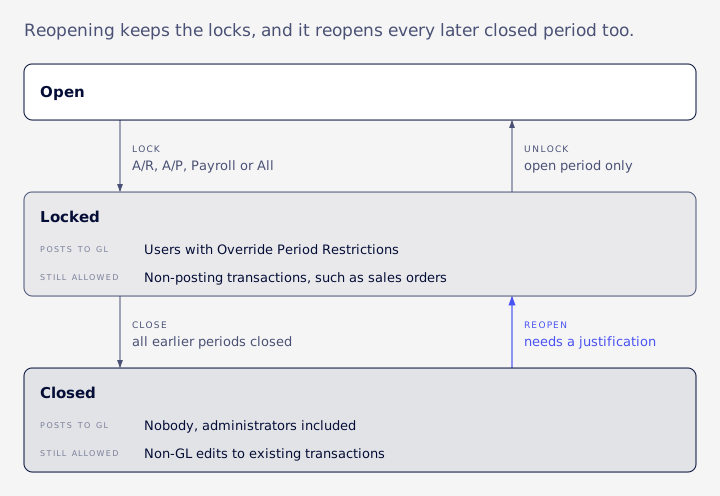
Lock and Close are separate states, and they block different people from doing different things (Oracle: Closing Accounting Periods).
| State | Who can still post to the GL | What stays possible |
|---|---|---|
| Locked (A/R, A/P, Payroll or all) | Users with Override Period Restrictions | Non-posting transactions such as sales orders |
| Closed | Nobody, administrators included | Non-GL edits to existing transactions, for users with the Allow Non G/L Changes permission, when the period's Allow Non-G/L Changes box is checked |
A few points the table can't hold:
- Locking stops GL-affecting postings in that module for ordinary users (Oracle: Locking Transactions). Locking A/R or A/P locks that module, and in OneWorld locks are set per subsidiary.
- A closed period blocks GL posting "for any dates included in the period, by anyone." Override Period Restrictions applies to locked periods, not closed ones. To post to a closed period, reopen it first.
- Allow Non-G/L Changes is about edits. It lets permitted users change existing posting transactions in ways that don't touch the GL. It doesn't let anyone enter new transactions in a closed period. Address changes are never allowed in a closed period.
- Non-posting transactions such as sales orders and return authorizations aren't subject to these permission restrictions.
- Unlocking A/R or A/P on an open period means opening the period's checklist, clicking the Lock A/R or Lock A/P icon, then clicking Unlock. A closed period can't be unlocked without being reopened (Oracle: Closing a Period).
What VCG sees after a reopen
Reopening a period doesn't clear its Lock All, Lock A/R or Lock A/P settings. A team reopens a period to post a late adjustment and is still blocked, or believes the period is open while a sub-ledger lock still applies. Scripts and connectors writing into a locked period fail too, and their errors look like role-permission problems, so the investigation starts in the wrong place. Check the lock flags separately from the open or closed status.
One suggestion: give Override Period Restrictions to as few roles as you can, and review who holds it on a regular schedule, such as quarterly.
Check 1: date vs period
Oracle notes that for journal entries you choose the posting period before approval.
For other posting transactions, the period may be set at approval and can differ from what the entry form showed (Oracle: Closing Accounting Periods). Users can also pick a past or future posting period on purpose (Oracle: Accounting Periods). Either way, you end up with a bill dated 3 April that posts to March, or the reverse.
Approval adds a second way to miss the period. Journals that sit in Pending Approval or Rejected haven't posted, so they appear in no search that filters on posting. This lists them for the month being closed:
SELECT t.id, t.tranid, t.approvalstatus,
       TO_CHAR(t.trandate, 'YYYY-MM-DD') AS trandate
FROM transaction t
JOIN accountingperiod ap ON ap.id = :closing_period_id
WHERE t.type = 'Journal'
  AND t.posting = 'F'
  AND t.approvalstatus IN (1, 3)
  AND t.trandate BETWEEN ap.startdate AND ap.enddate
ORDER BY t.id
Approval status 1 is Pending Approval and 3 is Rejected in the usual list; confirm the values in your account. Synthetic example: a journal dated 29 March sits in Pending Approval until 4 April. If it is approved then, it may post to April, so March closes without it.
The symptom is two reports that disagree. In one engagement VCG saw it when an API-driven report filtered on transaction date while the financial statements used posting period. A period P&L pulled that way won't tie.
The checklist's Resolve Date/Period Mismatches task depends on Lock All, so it arrives late. Run your own search during the month so the fixes happen while the period is still open to ordinary users.
Saved search version
- Create a Transaction saved search.
- Criteria: Main Line is true, Posting is true, Posting Period is the month you're closing.
- Add a Formula (Numeric) criterion equal to 1:
CASE WHEN {trandate} < {accountingperiod.startdate}
       OR {trandate} > {accountingperiod.enddate}
     THEN 1 ELSE 0 END
- Results: date, posting period, type, number, entity, amount.
- Run a second copy with the criteria flipped: transaction date within the month, posting period anything else.
SuiteQL version
SuiteQL is NetSuite's SQL query language, used by analysts and integrations. This finds posting transactions in a period whose date falls outside it:
SELECT t.id, t.tranid, t.type,
       TO_CHAR(t.trandate, 'YYYY-MM-DD') AS trandate,
       t.postingperiod
FROM transaction t
JOIN accountingperiod ap ON ap.id = t.postingperiod
WHERE t.posting = 'T'
  AND t.postingperiod = :closing_period_id
  AND (t.trandate < ap.startdate OR t.trandate > ap.enddate)
ORDER BY t.id
Use a reader that pages until no rows come back, ordered by a unique key, because a single SuiteQL call can stop at a row cap without any error.
Treat the queries in this guide as starting templates. Table and column names differ between accounts and features, so run each one in a sandbox first and confirm the columns with your account's SuiteQL metadata before relying on it.
For each hit, decide one of three things: move the date, move the period, or accept it and record why.
Check 2: accruals
An auto-reversing journal is a journal entry with a Reversal Date.
If Defer Entry is checked, NetSuite creates the reversing entry on that date; if not, the reversal is entered straight away and dated on the reversal date.
Accruals get counted twice, or never cleared, in a few predictable ways:
- A manual accrual saved without a reversal date, so nothing reverses it.
- An accrual keyed again the next month on top of its own reversal.
- An accrual loaded by script or integration that sits in Pending Approval and never posts.
The last one deserves its own line on the close calendar. VCG's consultants have seen journals loaded by a script or integration that set the approval status directly and bypass the approval workflow. Depending on the account's journal approval routing, they can sit in Pending Approval with nothing on the GL. The accrual you believe is posted isn't in the trial balance. After any bulk journal load, count posting lines in the GL, not records created.
Finding the unreversed ones
Two separate checks cover the failure modes above. This guide matches on reversal date and total debits instead of relying on a stored link between a journal and its reversal; treat that match as a starting rule, not a guarantee.
First, period accruals saved with no reversal date. Identify accruals by whatever convention your team uses, such as a memo prefix:
SELECT o.id, o.tranid, o.memo
FROM transaction o
WHERE o.type = 'Journal'
  AND o.posting = 'T'
  AND o.postingperiod = :closing_period_id
  AND o.reversaldate IS NULL
  AND o.memo LIKE '%' || :accrual_memo_text || '%'
ORDER BY o.id
Second, journals whose reversal date has already passed with no matching reversing entry. With Defer Entry checked, a correctly set accrual has no reversal before its reversal date, so this check leaves those out:
SELECT o.id, o.tranid, TO_CHAR(o.reversaldate, 'YYYY-MM-DD') AS reversaldate
FROM transaction o
WHERE o.type = 'Journal'
  AND o.posting = 'T'
  AND o.postingperiod = :closing_period_id
  AND o.reversaldate IS NOT NULL
  AND o.reversaldate <= TRUNC(SYSDATE)
  AND NVL(o.isreversal, 'F') = 'F'
  AND NOT EXISTS (
    SELECT 1
    FROM transaction r
    WHERE r.type = 'Journal'
      AND r.isreversal = 'T'
      AND r.reversaldate = o.reversaldate
      AND (SELECT SUM(tal.debit) FROM transactionaccountingline tal
           WHERE tal.transaction = r.id)
        = (SELECT SUM(tal.debit) FROM transactionaccountingline tal
           WHERE tal.transaction = o.id)
  )
ORDER BY o.id
To catch double reversals, count reversing entries per reversal date and total debit, and look for more than one:
SELECT r.reversaldate,
       (SELECT SUM(tal.debit) FROM transactionaccountingline tal
        WHERE tal.transaction = r.id) AS total_debit,
       COUNT(*) AS reversing_entries
FROM transaction r
WHERE r.type = 'Journal'
  AND r.isreversal = 'T'
  AND r.postingperiod = :closing_period_id
GROUP BY r.reversaldate,
         (SELECT SUM(tal.debit) FROM transactionaccountingline tal
          WHERE tal.transaction = r.id)
HAVING COUNT(*) > 1
ORDER BY r.reversaldate, total_debit
In a saved search, the first two checks need two searches each: journals in the period, and reversing journals with the same dates. Compare them by date and amount.
Where the leftovers end up
VCG's consultants have seen accrual and reversal pairs add noise to receivable and payable aging in some accounts. Open items with no customer, or that net to zero, turn out to be manual accrual journals and their reversals, posted to AR or AP and never applied. Sort the net-zero pairs separately from the unpaired leftovers. Only the leftovers are real cleanup, and an accrual that never reversed shows up as exactly that kind of leftover.
Revenue has its own version. A manual reclass posted ahead of the revenue module's own run has to be reversed once that run happens, or the revenue is counted twice. When revenue recognition itself is the problem, the close can't fix it. At Cyderes, the revenue setup couldn't support a timely close until VCG rebuilt it.
Check 3: untagged lines
Segments are the tags on each transaction line that let you slice the P&L: department, class, location, and any custom segments the account has.
A line with no department still posts, and the trial balance is still in balance. The damage shows up on every segment P&L, and usually only after close, when someone runs the department report and the totals don't match.
Untagged lines get in through three doors:
- Forms where a segment isn't mandatory.
- Imports and integrations that don't send the value.
- Journals and other records created by scripts.
VCG's consultants have traced two less obvious causes. A value set by script on a sublist column that the form doesn't display is dropped at save: it reads back correctly before save, and the stored line department is blank. And a record created by a user event script doesn't start its workflow or run validation scripts. A generated intercompany journal, for example, can skip approval and save with a line missing its location.
The check looks at posting lines in the period, on P&L accounts, with an empty segment, grouped so you can see where they came from:
SELECT t.type,
       COUNT(*) AS untagged_lines,
       SUM(tal.amount) AS amount
FROM transactionaccountingline tal
JOIN transaction t ON t.id = tal.transaction
JOIN transactionline tl
  ON tl.transaction = tal.transaction AND tl.id = tal.transactionline
JOIN account a ON a.id = tal.account
JOIN accountingbook ab ON ab.id = tal.accountingbook
WHERE tal.posting = 'T'
  AND t.posting = 'T'
  AND ab.isprimary = 'T'
  AND t.postingperiod = :closing_period_id
  AND a.accttype IN ('Income', 'COGS', 'Expense', 'OthIncome', 'OthExpense')
  AND (tl.department IS NULL OR tl.class IS NULL OR tl.location IS NULL)
GROUP BY t.type
ORDER BY t.type
Then drill into the biggest group and look at who or what created those transactions. Fixing the source beats fixing lines every month.
Prevention, in order of effort: make segments mandatory on the forms and accounts where they matter, test integrations by reading the stored values after save, and add custom validation only where configuration can't cover the case.
Check 4: intercompany
Start with the setup, because several of the facts are often stated wrongly.
- Intercompany Preferences (Setup > Accounting > Preferences > Intercompany Preferences) holds one set of account-wide default intercompany accounts, such as receivables, payables, income and expense (Oracle: Intercompany Preferences). The auto-balance defaults for advanced intercompany journals sit in Accounting Preferences instead.
- Elimination accounts are flagged with the "Eliminate Intercompany Transactions" box on the account record. Elimination posts to dedicated elimination subsidiaries, and in deeper hierarchies to the elimination subsidiary of the lowest common parent (Oracle: Intercompany Elimination Setup).
- Under Automated Intercompany Management, the buyer creates the intercompany purchase order, and the seller generates the paired sales order from the Manage Intercompany Sales Orders page (Oracle: Automated Intercompany Management). The feature can't be turned off once enabled.
Before Eliminate Intercompany Transactions runs, reconcile:
- The Intercompany Reconciliation Report.
- Journals posted to an intercompany account in one entity with no counterpart in the other (query below).
- Corrections made in one entity and not the other.
- Currency differences. Oracle says a currency residual may need a manual journal, and elimination entries reverse automatically (Oracle: Intercompany Elimination).
Oracle also recommends dedicated elimination accounts and advanced intercompany journal entries over standard journals, which need a customized form to show the Eliminate field (Oracle: Intercompany Elimination Accounts).
Finding one-sided entries
Intercompany accounts flagged for elimination should offset across entities. This sums posting lines on those accounts by account and subsidiary, then keeps accounts where the entities do not net to zero:
SELECT a.id AS account_id, a.acctnumber,
       tal.subsidiary,
       SUM(tal.amount) AS entity_balance,
       SUM(SUM(tal.amount)) OVER (PARTITION BY a.id) AS account_net
FROM transactionaccountingline tal
JOIN transaction t ON t.id = tal.transaction
JOIN account a ON a.id = tal.account
JOIN accountingbook ab ON ab.id = tal.accountingbook
WHERE tal.posting = 'T'
  AND t.posting = 'T'
  AND ab.isprimary = 'T'
  AND a.eliminate = 'T'
  AND t.postingperiod = :closing_period_id
GROUP BY a.id, a.acctnumber, tal.subsidiary
ORDER BY a.id, tal.subsidiary
Read the result by account. An account with a large entity balance and an account net far from zero has one side missing. Because amounts are in each subsidiary's base currency, a small residual can be currency, not a missing entry. To find which counterparty is missing, group by the line-level counterparty field on advanced intercompany journals; confirm that field's name in your account's metadata. Expected output is one row per account and subsidiary. Synthetic example: a 10,000 receivable in Entity A with no matching payable leaves account_net at 10,000.
In a saved search, build a Transaction search with Posting true, Posting Period equal to the closing month and Account restricted to the elimination accounts. Summarize by Account and Subsidiary with the sum of Amount, then compare the totals per account.
Why the raw balances differ
Raw ledger intercompany balances won't match the consolidated report on accounts flagged for elimination, because elimination removes activity on those accounts while the raw GL keeps both sides. VCG's consultants have seen the accounts that differ from the consolidated report turn out to be the ones carrying the elimination flag, while unflagged accounts tie. If revenue ties and only flagged accounts drift, the gap is elimination, not currency. Don't fix it by excluding flagged accounts, because they also carry real third-party spend.
Two more traps from the same kind of work. On advanced intercompany journals, the counterparty subsidiary sits in its own line-level field, so any rule that reads the header subsidiary attributes both sides to the same entity. And translation differs by account: historical-rate accounts such as equity are translated per posting at each period's own rate, so applying this month's rate to the balance gives a different number. Check each account's translation method before calling a consolidated difference an error.
When the structure itself keeps changing, the close inherits the problem. That is the structural work covered under multi-subsidiary and OneWorld.
Check 5: GL tie-out
The rule: cut by posting period, never by transaction date.
Establish the GL balance first, with the smallest query that can produce it: posting lines only, the primary accounting book, periods ending on or before the cutoff. Build drill-downs only after the subledger total equals that figure. NetSuite gives you the pieces. The posting period is on the transaction, and the accounting book and posting flag are on the accounting line. Select the primary book by its primary flag rather than hard-coding a book id.
SELECT tal.account,
       SUM(tal.amount) AS balance
FROM transactionaccountingline tal
JOIN transaction t ON t.id = tal.transaction
JOIN accountingperiod ap ON ap.id = t.postingperiod
JOIN accountingbook ab ON ab.id = tal.accountingbook
WHERE tal.posting = 'T'
  AND t.posting = 'T'
  AND ab.isprimary = 'T'
  AND ap.enddate <= TO_DATE(:cutoff, 'YYYY-MM-DD')
GROUP BY tal.account
ORDER BY tal.account
The amount on the accounting line is in the subsidiary's base currency. In a multi-subsidiary account, add the subsidiary to the grouping or filter to one subsidiary at a time.
The usual reasons a balance won't tie:
- A date cut instead of a period cut.
- Non-posting lines included.
- Lines from secondary accounting books included.
- One journal touching several purchase orders, counted once per order.
- Foreign-currency amounts used where base-currency amounts were needed.
When it doesn't tie, narrow it down in order:
- Find the month where the two figures first diverge.
- Within that month, find the transaction type.
- Within that type, find the transactions.
Some lines have no grouping key, such as manual journals in a subledger built around vendors or orders. Put them in a visible "Unattributed" bucket so the residual is explained instead of dropped.
Last, prove the extract is complete. Debits must equal credits per period, to the cent. A query that silently stops at a row cap can still pass a row-count check, but it won't balance.
Closing, reopening, multi-book
Four rules cover year end, reopening a period, Quick Close and multiple books.
Year end. No formal year-end closing is needed. NetSuite closes the year automatically once every period in it is closed, and Oracle strongly recommends that over a manual closing journal. No balances move: reports calculate retained earnings as of the balance sheet date, from every prior year's P&L. If you must post year-end GL entries, Oracle points to Period End Journal Entries (Oracle: Year-End Closing).
Reopening. You need the Manage Accounting Periods permission and a Justification, which NetSuite saves as a user note. Oracle's close page lists no password for closing or reopening (Oracle: Reopening a Period). Reopening one period reopens every later closed period, so plan to re-close the whole run, and remember the lock flags from earlier.
Quick Close. Quick Close marks checklist tasks complete without running them. It needs the Allow Quick Close of Accounting Periods preference. Administrators get it automatically; other roles need the Period Closing Management permission. One run is limited to 60 open periods (Oracle: Closing Accounting Periods). VCG's view is that it suits catching up on old periods. Using it for a live close means revaluation, rates and elimination may never have run, which matters to auditors.
Multi-Book Accounting. Some tasks run per book and some apply to every book (Oracle: Period Close Checklist Task Dependencies):
| Runs per book | Applies to all books |
|---|---|
| Revalue Open Foreign Currency Balances | Lock tasks |
| Calculate Consolidated Exchange Rates | Resolve Date/Period Mismatches |
| Eliminate Intercompany Transactions | Inventory review tasks |
| Create Period End Journals | Create Intercompany Adjustments |
| GL Audit Numbering | |
| Close |
The all-books tasks show as complete in every book once done. A per-book task affects later tasks only in the same book.
A working close calendar
There's no reliable universal benchmark for how many days a close should take, and this guide won't invent one. A better target is a close you don't have to reopen.
Synthetic example, not a benchmark. The day counts are illustrative. It assumes a single accounting book, about five subsidiaries, moderate transaction volume and three preparers (AP, AR and a controller); adjust it for anything bigger.
| When | Work | Owner |
|---|---|---|
| Mid-month | Run the date/period mismatch and untagged-line searches; fix what's found | NetSuite admin |
| Day 1 | Lock A/P, A/R and payroll, then Lock All once final entries are in | AP lead, AR lead |
| Days 1-2 | Accrual reversal check; Pending Approval journal count | Controller |
| Day 3 | Intercompany reconciliation, adjustments, revaluation, consolidated rates, elimination | Controller |
| Day 4 | GL tie-out by posting period; review | Controller |
| Day 5 | Close | Controller |
Record a sign-off for each check before anyone clicks Close. Because the checklist can't hold your own tasks, the sign-off has to live wherever the team tracks the close.
What other checklists get wrong
These claims appear on various close checklists published online. Oracle's documentation doesn't support any of them:
- An "Intercompany Journal Generator." No feature by that name appears in Oracle's documentation. The native steps are the Intercompany Reconciliation Report, Create Intercompany Adjustments and Eliminate Intercompany Transactions on the checklist (Oracle: Intercompany Elimination).
- Override Period Restrictions opens closed periods. It applies to locked periods. A closed period blocks GL posting by anyone until it is reopened (Oracle: Closing Accounting Periods).
- A password is needed to close or reopen. Oracle lists the Manage Accounting Periods permission and a Justification, with no password (Oracle: Reopening a Period).
- The sales order creates the buyer's purchase order. Under Automated Intercompany Management it runs the other way: the buyer's purchase order comes first (Oracle: Automated Intercompany Management).
- Year end needs a closing entry. It doesn't; NetSuite closes the year automatically and reports compute retained earnings (Oracle: Year-End Closing).
FAQ
Can administrators post to a closed period?
No. A closed period blocks GL posting by anyone. Reopen it first.
Does Override Period Restrictions work on closed periods?
No. It lets users add and edit posting transactions in locked periods only.
How do I unlock A/R or A/P?
Open the period's checklist, click the Lock A/R or Lock A/P icon, then click Unlock. If the period is closed, reopen it first.
Does reopening one period reopen others?
Yes. Every later closed period reopens too.
Can I close a period while the prior period is open?
No. Until every earlier period is closed, only the lock tasks can be completed.
Does Quick Close run the tasks?
No. It marks them complete without running them.
If the checklist passes every month and the numbers still move after Close, Book an Assessment and we will look for where that comes from in the account's setup.