
The short answer
To reconcile deferred revenue in NetSuite Advanced Revenue Management (ARM), do three things in order.
First, run the month-end journals: revenue recognition, then the deferred revenue reclassification. Next, run and save the Deferred Revenue Waterfall. Then bridge the waterfall's full balance, including the Prior Unrecognized and Unplanned amounts, to the general ledger (GL) account balance for the same period end, subsidiary and accounting book. Whatever is left over gets a name: a manual journal, an unposted plan, FX, a migration gap. It never gets a plug.
There is an official answer to which numbers should agree. Oracle says the eight ARM reconciliation reports are "designed for revenue reconciliation purposes. The balances in these reports tie directly to the general ledger account balances." The Forecast Summary and Forecast Detail reports are different. They are built on revenue recognition plans and don't link directly to posted transactions, so direct postings to deferred revenue or revenue accounts can make them differ from the GL (Oracle: ARM reports).
This guide is for the controller, revenue accountant or CFO whose subledger and balance sheet disagree at month end, and for the NetSuite admin who has to produce the reports. You'll leave with a close order, a bridge layout and a list of the breaks VCG's consultants see most often.
A few terms first. Deferred revenue is billed but not yet earned. Unbilled receivable is earned but not yet billed. A revenue arrangement is the contract record, a revenue element is one performance obligation inside it, and a revenue recognition plan is the schedule that says when that element's revenue is earned.
How deferred revenue moves through ARM
ARM is a separately licensed NetSuite feature in two tiers.
The tiers are ARM (Essentials) and ARM (Revenue Allocation), an add-on that requires Essentials; confirm licensing with Oracle. The chain runs from source transaction to arrangement, then element, then plan, then revenue recognition journal, then GL. Only the last step posts. Arrangements and plans are non-posting records, and revenue reaches the GL only when someone generates revenue recognition journal entries from the plans (Oracle: ARM overview).
Source transactions are sales orders, standalone invoices, cash sales, cash refunds, return authorizations, credit memos and project arrangements (Oracle: arrangement sources). Journal entries are not on that list. A journal posted straight to a deferred revenue account never becomes part of an arrangement, which matters later.
Each element gets at least one forecast plan and one or more actual plans by default. Only actual plans control when revenue posts, which is why forecast reports drift away from the GL (Oracle: revenue plans).
Plans are created when the event named in the item's Create Revenue Plans On field happens. The options include revenue arrangement creation, billing, fulfillment, project progress (with Project Management) and subscription events (with SuiteBilling). Oracle notes that plans aren't always created right away if the trigger event hasn't happened yet.
Timing also depends on the Revenue Plan Update Frequency preference. Set to Automatic, it runs about every three hours with administrator permissions and ignores subsidiary restrictions. A manual run follows the running user's subsidiary restrictions, so a user who can't see a subsidiary won't update its plans. The manual path is Financial > Other Transactions > Update Revenue Arrangements and Revenue Recognition Plans (Oracle: update frequency).
VCG's consultants work this chain one seam at a time:
- Arrangement total against the element allocations.
- Each element against whether a plan exists.
- Plan amount against the sum of its planned lines.
- Planned lines against whether a journal posted.
VCG's consultants usually find the break at one of those four points. Diagnosing one arrangement completely tells you more than a 1,000-row exception list that nobody reads.
The month-end order
Oracle's Month-End Revenue Processing page sets the sequence (Oracle: month-end processing):
- Create revenue recognition journal entries from plans.
- Run Reclassification of Deferred Revenue.
- Recalculate forecast plans, only if you use them.
- Run and save the Deferred Revenue Waterfall.
The order matters. Oracle says to run the waterfall after the recognition and reclassification journals for the period exist. If month-end recognition isn't complete, Prior Unrecognized includes amounts that should already have posted (Oracle: waterfall detail).
Before you suspect the data, check for journals waiting on approval. Planned lines with no journal usually mean the job didn't run or the journals are still pending.
We recommend locking the period only after the waterfall is saved. The saved run is a snapshot your auditor is likely to ask for. Consolidation and eliminations are a separate exercise; Oracle doesn't include them in this sequence.
Which ARM report ties to the GL
| Report | Ties to GL per Oracle? | Use it for |
|---|---|---|
| The eight reconciliation reports | Yes, "tie directly" to GL account balances | Subledger-to-GL tie-out |
| Deferred Revenue Waterfall Detail | Oracle describes it as reconciling the balance sheet deferred revenue balance | The bridge, by customer |
| Deferred Revenue Waterfall Summary | Grouped by deferred revenue account and revenue account | Tying by account |
| Forecast Summary and Forecast Detail | No, plan-based | Forecasting only |
| Reclassification and Reclassification Activity | Not listed as tying | Monitoring and auditing reclass activity |
Check Oracle's report list for the exact names of the eight in your release.
The Detail report sits under Revenue > Revenue Reports > Deferred Revenue Waterfall > Detail. The As Of date defaults to the current period. Filters are Subsidiary Context (OneWorld accounts with more than one subsidiary) and Accounting Book (Multi-Book only). It groups by customer.
The Summary report is the better place to tie account by account (Oracle: Deferred Revenue Waterfall Summary Report). Where you need to drill down, switch to the Detail report or to GL lines that carry a customer.
Month columns run up to the Number of Short-Term Revenue Periods preference (default 12), and anything later lands in Thereafter. You may see fewer columns if no plan reaches that far. Oracle's own pages call the preference "Revenue" in one place and "Expense" in another, so check the label in your account. Only elements with a deferred revenue balance appear on the report.
Prior Unrecognized and Unplanned
These two columns are often the confusing ones.
Prior Unrecognized
This is revenue planned on or before the as-of period that hasn't posted. Oracle says it picks up amounts when month-end recognition is incomplete. Once the journals have run, VCG's consultants find the remainder is usually plans placed on hold. List them, find out who held each one and why, and get it released or explained before close. A hold is a deliberate pause, so don't release one without asking.
Unplanned
Unplanned deferred revenue is billed and unrecognized but not yet in a plan. Oracle says it usually equals the deferred revenue balance minus total unrecognized amounts (prior unrecognized plus short-term plus long-term), and it is capped at each element's total revenue.
A large Unplanned balance is not always an error. Plans aren't always created right away: an element whose plan is triggered by fulfillment (third-party licences, hardware) or project progress has none until that event happens, so an amount billed before then sits in Unplanned in the meantime. Sort each row by plan status and the item's Create Revenue Plans On setting before calling anything an error.
The figure that ties
A total that leaves out Unplanned won't equal the balance sheet whenever Unplanned is not zero. Tie the full balance: Unplanned, plus Prior Unrecognized, plus every future period. Column labels vary by layout, so check what your chosen column actually adds up before you use it.
Here is how big that can look, with our own made-up numbers. A company's future-period columns total $310,000 and the GL shows $465,000. That looks like a $155,000 break. The Unplanned column holds $155,000. Once it's included, the gap is zero.
A worked roll-forward and bridge
These are our own example numbers.
A company signs a 12-month subscription for $72,000, billed upfront in January, with straight-line release of $6,000 a month. The same contract has a $9,000 implementation element, recognized $3,000 a month from March to May and billed at the end. The company migrated to NetSuite at the start of the year and its opening balance left $2,300 of legacy deferred revenue in the GL that ARM knows nothing about.
ARM's deferred balance on the subscription after May is $72,000 minus five months of $6,000, or $42,000.
Roll-forward, GL basis
| March | April | May | |
|---|---|---|---|
| Opening deferred revenue | 62,300 | 56,300 | 50,300 |
| Billings | 0 | 0 | 0 |
| Recognition (subscription and services) | (9,000) | (9,000) | (9,000) |
| Reclass to unbilled receivable (services) | 3,000 | 3,000 | 3,000 |
| Manual adjustments | 0 | 0 | 700 |
| Closing deferred revenue | 56,300 | 50,300 | 45,000 |
The services element is recognized before it's billed, so this is the recognition-leads case. Recognition debits deferred revenue $3,000 a month. The reclass then credits deferred revenue and debits unbilled receivable for the same amount, which is why it shows as +3,000. May's $700 is two items posted outside ARM: a $1,500 manual journal credited to deferred revenue, and an $800 credit memo posted with no revenue element.
Bridge, waterfall to GL, end of May
| Line | Amount |
|---|---|
| Waterfall future periods (June to December) | 42,000 |
| Unplanned | 0 |
| Prior Unrecognized | 0 |
| Full waterfall balance | 42,000 |
| Manual journals to deferred revenue with no arrangement | 1,500 |
| Credit memos with no element | (800) |
| Contract netting reclass booked in GL | 0 |
| FX | 0 |
| Migration cutover gap | 2,300 |
| GL deferred revenue balance | 45,000 |
| Check (should be zero) | 0 |
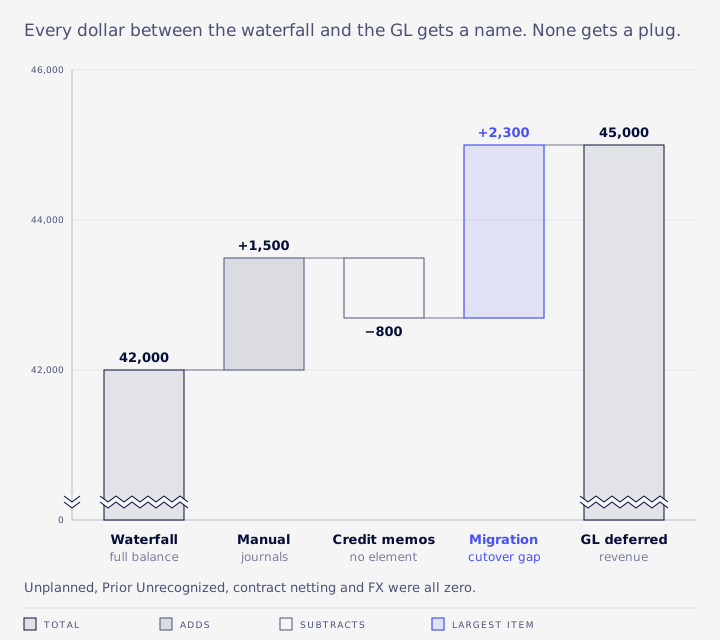
If May's recognition journals hadn't run before the waterfall, $6,000 would show as Prior Unrecognized and the GL would be $6,000 higher too. The bridge still balances, but you'd be reconciling an incomplete close.
Two rules hold this together. A line with no grouping key, such as an orphan journal, goes in an explicit Unattributed bucket. It is never dropped and never plugged. And prove the drivers add up to the variance before you name a cause.
Ten reasons deferred revenue won't tie
VCG's consultants see these when they take over a broken ARM setup. The cut comes first. The rest are in no particular order.
- The cut. Tie by accounting period end date, not transaction date, using posted lines only and one accounting book. On a Multi-Book account, a missing book filter can mix books in the totals. Quick test: lift the period cut. If the variance disappears, it's timing.
- Unposted plans. Recognition journals weren't generated, or they're pending approval.
- Manual journals to deferred accounts. Oracle says direct postings make plan-based reports differ from the GL. Search for approved journals to deferred revenue accounts with no arrangement.
- Credit memos with no element. Also watch for invoices that start their own standalone arrangement instead of joining the order's.
- Gross unbilled receivable posting. ARM posts the unbilled receivable adjustment element by element and doesn't net within a contract. In the example above, the contract is a net $33,000 liability, but ARM shows $42,000 deferred and $9,000 unbilled. Compared with a contract-net aging, both accounts are overstated by the same $9,000. Reconcile with an explicit contract netting line, never one account on its own.
- A missing unbilled receivable adjustment. Recognition debited deferred revenue and nothing reclassed it, so an unbilled amount sits inside the deferred balance. Re-run the update or the reclass rather than chasing it as an allocation problem.
- Closed sales orders. With Create and Maintain Revenue Element Upon Closed Order cleared, NetSuite stops updating closed orders and lines, including their plans (Oracle: closed orders).
- Voided arrangements. They keep their elements and plans and show up as phantom breaks in every check. Exclude them.
- Item rule changes. Changing an item's rule only affects new elements. Regenerating a plan that has already recognized revenue changes prior periods, so escalate it and get sign-off.
- Totals tie but accounts don't. Legacy loads were mapped to a different deferred account than ARM uses. Reconcile by account and by month. Separate journal lines that carry a customer (ARM) from lines with no entity (loads, reversals, manual entries).
Reclassification and unbilled receivable
When billing runs ahead of recognition, Reclassification of Deferred Revenue debits deferred revenue and credits unbilled receivable.
Oracle describes only that direction (Oracle: month-end processing). When recognition leads, VCG's consultants see the opposite entry, element by element: debit unbilled receivable, credit deferred revenue.
The accounts come from ARM accounting preferences: Default Deferred Revenue Account, Default Deferred Revenue Reclassification Account and Unbilled Contract Asset Account. The system Unbilled Receivable account can't be remapped, so you set a separate account in the preference. Items can override the default deferred account. The Unbilled Receivable Adjustment Journal Grouping preference supports net presentation of contract assets and liabilities (Oracle: ARM preferences).
VCG uses a control line that still works before any netting reclass is booked:
(GL deferred minus GL unbilled) minus (ARM deferred minus ARM unbilled)
The gross-up cancels out, so whatever remains should be explained by off-ARM balances, the cutover gap and any FX revaluation on unbilled receivable. In the example, (45,000 minus 9,000) minus (42,000 minus 9,000) is $3,000: the $700 of off-ARM items plus the $2,300 gap.
If your presentation calls for net contract balances, a practical fix many teams adopt is a monthly reversing reclass for the full contract netting amount. Agree it with your auditor first. In VCG's experience, skipping the reclass leaves both accounts overstated by the contract netting amount compared with a contract-net view.
Multi-currency, OneWorld and Multi-Book
Run the waterfall and the GL with the same Subsidiary Context and Accounting Book.
If the base-currency total ties and the transaction-currency total doesn't, it's a consolidated-rate difference, not an ARM error. Compare amount against foreign amount before opening a support case. FX revaluation on unbilled receivable gets its own bridge line. After a book migration, evaluate recognized and billed amounts at the same sales order rate, so two different rates don't create a false variance.
With Revenue and Expense Management enabled, recognition is fully book-specific, and the ARM Create Revenue Plans On setting must match between the primary and secondary books (Oracle: Multi-Book). For multi-entity setups, see our OneWorld service.
Credit memos and contract changes
Credit memos and return authorizations are arrangement sources, so a credit memo with no element is a break worth finding every month.
ARM handles contract changes two ways. A prospective merge locks the original arrangements and creates a new one carrying the remaining values from the effective date. A combined (retrospective) merge leaves the originals editable. A prospective merge is blocked if recognition or reclassification journals have already posted after the effective date (Oracle: merges).
SuiteBilling's Create Revenue Elements for Subscription Revisions creates a separate element and arrangement for each subscription change. It can't be changed once set, and it isn't compatible with Prepay with Drawdown.
Never edit a plan that recognized revenue in a closed period without sign-off, because that restates prior financials. If you must change a plan, VCG's sequence is:
- Snapshot the current schedule.
- Place the plan on hold so the three-hourly update can't overwrite your edits.
- Change the end date in its own save.
- Change only unrecognized lines.
- Release the hold, including when something fails.
After a migration
Once netting and off-ARM items are on the bridge, the remaining difference should be the same number every month until someone posts a legacy correction.
Add a cross-month check that it hasn't moved. Don't plug it. It goes back to whoever built the opening trial balance, who has to supply the account mapping.
Off-ARM deferred balances booked by manual journal with no customer, such as a prepaid voucher drawn down by usage, stay outside ARM. Keep a backup schedule with every usage journal and have the company's accountant confirm it.
Classic revenue recognition isn't available to new implementations, and Oracle points to ARM (Essentials) as the replacement (Oracle: classic revenue recognition). The waterfall is an ARM report, so accounts still on classic rev rec shouldn't expect this workflow.
Finding variances yourself
Start from the GL balance and make the subledger match it before grouping anything.
Pull the GL balance with one minimal database-style query (NetSuite's SQL-style query tool is called SuiteQL). Make the subledger grand total match it before you group anything. If it doesn't, diff by accounting period to find the month that diverges, then by transaction type, then by transaction.
Define "recognized" as planned lines that have a posted journal. The plan's own total recognized field can lag, so use it for triage only.
Three saved searches pay for themselves:
- Approved journals to deferred revenue accounts with no arrangement.
- Posted credit memos with no revenue element.
- Plans on hold, and planned lines in closed periods with no journal.
If you use SuiteQL, know that a direct query returns at most 5,000 rows and gives no error when it stops. Subledger totals come up short without warning. Page through the results with a sort order that is unique for every row, or bound the query to one subsidiary or arrangement.
Compare element dates to transaction line dates. VCG's consultants compare against line dates rather than header dates, because header dates can produce false mismatches. Verify every field and record ID in your own account before relying on it. The revenue plan record, for instance, appears as revenueplan in the Records Browser.
Prior month-ends need care. VCG's consultants have seen a waterfall labelled as a past period return current balances. Rebuild prior periods from GL lines that carry a customer, and compare any second export against the first.
Tolerance, sign-off and the audit pack
Tolerance is a company policy and audit decision, not a NetSuite setting.
A workable standard is no unexplained variance and every rounding difference explained. Per-element versus per-contract rounding belongs in the netting walk as its own line.
The revenue accountant prepares, the controller reviews, and the CFO signs off any prior-period plan change.
Give the auditor:
- The saved waterfall for the period.
- The GL balance by account, subsidiary and book.
- The bridge, with evidence for every line.
- Backup for off-ARM balances.
- An explanation of the cutover gap.
The workbook layout VCG recommends is a summary tab per month with one plain-English sentence per line, a "Check (should be zero)" row after each subtotal, and one detail tab per line. Only true inputs such as GL balances and report totals are hardcoded and marked. Everything else is a formula.
The waterfall's future periods can be a starting point for the remaining performance obligations disclosure (ASC 606-10-50-13), which still needs finance review.
When the build is the problem
Some reconciliations fail every month for the same reasons.
The breaks repeat, a large Unplanned balance has no explanation, the rules don't match the contracts, and the reporting can't support the close. At that point the issue is configuration, and better close discipline won't fix it.
That was the situation at Cyderes. VCG took over a broken ARM setup, rebuilt the configuration so arrangements, elements and plans followed the contracts, and restructured the revenue reporting so finance could tie deferred and recognized revenue to the GL at month end. Finance closes on time again, and the numbers held up at audit (case study).
If your deferred revenue still won't tie after the steps above, Book an Assessment and we'll review your ARM setup and the tie-out. More on our ARM and revenue recognition work.
FAQ
Does the waterfall work without ARM?
It's one of ARM's revenue reports. Classic revenue recognition is legacy and uses its own schedules, so check which feature your account has.
Why does the Waterfall Summary have no drill-down?
It groups by deferred revenue account and revenue account, so there is no customer level to open. Use the Detail report, or GL lines that carry a customer.
Does sharing deferred accounts with non-ARM items break the reports?
It breaks the plan-based ones. Postings without an arrangement exist only in the GL, so either use separate accounts or give those postings their own bridge line.
What's an acceptable variance?
Zero unexplained. Any threshold beyond that is set by the company and its auditor.