
The short answer
After a deal closes, the seller's books have to tie to the cent in your account.
NetSuite has no native way to merge one company's NetSuite account into another. When you buy a company that runs its own NetSuite account, folding it into yours is a data migration. You extract from the seller's account, map it to your configuration, and load it record by record through CSV Import, REST or SOAP web services (NetSuite's programming interfaces), or SuiteScript (its scripting language).
The acquired business commonly lands as a new subsidiary in your OneWorld account (NetSuite's multi-entity edition), with its subsidiaries and chart of accounts mapped first (Oracle: CSV import FAQ).
Each kind of data moves in a different form. Customers, vendors, items and employees move as records. Closed history moves as journal entries by posting period. Open receivables and payables move as open transactions. Deferred revenue moves as open revenue arrangements. And every subledger is proven to tie to the general ledger (GL) before the load and again after it.
This has more moving parts than a first implementation. You have two live sets of books, two sets of internal IDs, two configurations that grew up separately, and audited balances that must not move by a cent. Treat it as a finance project with a technical pipeline underneath. The pipeline is there so finance can re-run it, check it and sign it off.
The sections follow the order of the work; the last section maps symptoms back to causes.
Decide the target shape first
Before anyone extracts a row, decide what the acquired company becomes in your account.
Option one: a new OneWorld subsidiary
This is a typical choice. Oracle describes each OneWorld subsidiary as a unique legal entity with its own nexus (the tax jurisdiction it is registered in) and base currency (Oracle: OneWorld overview). The seller keeps its own books inside your account and rolls up into your consolidation.
Option two: keep separate accounts
Keeping the seller on its own account and consolidating outside NetSuite can be reasonable for a short hold, a planned resale or a minority stake. Oracle lists 100% ownership by the root parent as one of the traits of companies that get the most from OneWorld. It is a trait, not a requirement, and Oracle notes that joint ventures and shared-ownership entities need more specialised accounting.
No OneWorld yet
If your own account isn't on OneWorld, plan that upgrade before anything else. Oracle says plainly that it is "a one-time upgrade to your NetSuite implementation that can't be reversed" (Oracle: OneWorld Overview).
Multi-Book, only if you need it
Multi-Book Accounting posts the same transaction to parallel books, for example US GAAP and IFRS. It needs OneWorld, allows at most five active books including the primary, and Oracle expects Professional Services or an authorised partner to set it up (Oracle: Multi-Book). If you don't need a second GAAP, leave it alone.
Asset deal or stock deal
The deal structure sets the scope. In an asset purchase you move only the assets, liabilities and contracts you bought, with none of the seller's history. In a stock purchase or merger you also move the entity's history, open items and equity. Write the answer into the plan, because every later decision depends on it.
Scope: what moves, and in what form
| Item | Recommended form | Why |
|---|---|---|
| Customers, vendors, items, employees | Records | They need to exist before any transaction can reference them |
| Closed history | Summarised journal entries by period and account, with segments | Keeps the income statement comparable without reloading every transaction |
| Open AR and AP | Open invoices, bills, credits and payments | Aging, due dates and partial payments survive |
| Open revenue | Revenue arrangements in Advanced Revenue Management (ARM) | ARM needs arrangement and element detail to keep recognising |
| Fixed assets | Fixed Assets Management imports | They have their own import rules for mid-life, fully depreciated and disposed assets (Oracle: Importing DATR Depreciable Assets Using CSV Import) |
| Inventory | Quantity and cost adjustments | Puts stock on hand at the right value |
| Open sales and purchase orders | Live documents | Staff keep fulfilling and billing them after go-live |
Full history or balances
VCG's default is summarised history by period. It gives you comparable financials, and the source account stays available as the record of detail for anyone who needs to drill down.
The double-count trap
Oracle says not to put balances in the chart of accounts import and to load opening balances as journal entries at go-live instead (Oracle: CSV import FAQ). That advice is right, but it hides a trap. If the opening-balance journal carries AR, AP and deferred revenue, and you then load the open invoices, bills and arrangements as well, your control accounts double.
One way to avoid this is to load the open items against a migration clearing account. The history journals already carry the account balances, so the open items post against migration entities and the clearing account instead of adding to them a second time. The clearing account must end at zero. If it doesn't, something was loaded twice or not at all, and the residue tells you where to look.
Open sales orders
If open sales orders are moving into billing in the target, scope them by the unbilled amount left on each line, not by order status. A partly fulfilled order may already be fully invoiced, so a status filter can pull in orders with nothing left to bill. The unbilled remainder is the line amount minus what has actually been invoiced against it, counting only non-zero invoice links, since an invoice carries every line of its order and the unbilled ones still get a zero-amount link.
Freeze date and period map
Close the source first
The freeze date comes before the final extract. The source closes its last period in full, including its revenue recognition and amortisation runs. Extracting from a half-closed period means extracting numbers that will change.
Cut the GL by posting period
Cut the GL by posting period, never by transaction date. Some transactions are dated in one period and posted to another. Subledgers age by date and the GL reports by period, so the gap between them has to appear as an explicit timing line in the reconciliation. For example, an AP bill dated in the last day of the old period but posted in the new one needs its own timing line before the tie closes.
Map the fiscal calendars
A calendar-year seller folding into an acquirer whose year ends mid-year is common. Build a period map from every source period to a target period, including any stub periods the target uses around the acquisition date.
Check locked periods early
Closed or locked periods in the target can stop history journals from loading, as can months the target splits into stub periods. Check lock state first, before building history, and plan any unlock with the controller.
Map everything first
Chart of accounts crosswalk
Every source account maps to exactly one target account plus its segments (department, class, location and any custom segments). Keep the crosswalk as a versioned mapping loaded from finance's own workbook, so when the controller changes a mapping the pipeline picks it up on the next run. Hard-coding it in scripts means every change is a developer task and nobody can audit what changed.
Oracle's account rules
A few documented rules shape the crosswalk:
- Bank and credit card accounts can belong to one subsidiary only (Oracle: Account Setup in OneWorld). Other account types can be shared.
- If you merge general ledger accounts after the load, both need the same account type and no subaccounts on the account being merged, and summary accounts can't be merged.
- System accounts can't be merged at all. That covers Accounts Receivable, Accounts Payable, Inventory Asset, Undeposited Funds, COGS and Opening Balances (Oracle: Merging Accounts). Merging bank or credit card accounts also un-reconciles reconciled transactions.
Subsidiary on every import
In OneWorld, the Subsidiary column is required when importing the chart of accounts, customers, vendors, employees, contacts, partners and similar records. Values use the full hierarchy, for example Parent Company : UK Subsidiary : Euro Subsidiary (Oracle: CSV import FAQ).
Duplicate customers, vendors and items
The two companies probably share some customers and vendors, and maybe items. Decide per record whether to merge or keep them separate, and make that a finance decision. A safe default is to suffix colliding names with the source company's name until finance decides, so nothing is merged silently.
IDs and cross-references
Internal IDs never carry over. Give every loaded record an external ID (a label you set yourself, which NetSuite can match on later) built from the source account and the source internal ID, and keep a cross-reference table. It is how you link transactions to their customers, how you re-run a load without creating duplicates, and how an auditor traces a target record back to its source.
Customisations
Inventory the custom fields, lists, custom segments, forms, scripts, workflows and SuiteApps the seller relies on, and compare them with what the target already has. Then check which of the target's scripts and workflows will fire on loaded records. A target workflow that emails customers when an invoice is created is a bad surprise on load day.
Irreversible switches
Two target features can't be turned off once committed, so decide them before the first test load:
- ARM (Essentials) can't be disabled once ARM Configuration Mode is turned off (Oracle: Enabling the Advanced Revenue Management (Essentials) Feature).
- Automated Intercompany Management can't be disabled once enabled (Oracle: Setting Up Automated Intercompany Management).
Extract the source without gaps
The usual tools are saved searches and SuiteQL, NetSuite's SQL-style query language, run against the source account.
Both work. Both also have quiet ways of losing data. NetSuite has no native account-to-account transfer, so the loads below are built from these extracts and the tools in the load section.
Traps to plan for
- VCG's consultants have seen
SELECT *queries leave out class, location and custom segment columns on transaction and line tables. Name every column you need, and check the result against the record. - Large result sets page with an offset, and VCG's consultants have seen long extracts stall at high offsets. As a working rule of thumb rather than an Oracle limit, chunk by key range into modest batches with a unique sort order, and compare what you received with the total reported. If that total moves mid-extract, re-fetch the chunk.
- Some schedule records, such as amortisation schedules and classic revenue recognition schedules, can't be queried in every account or role. Plan to rebuild open schedules from the transaction lines instead.
- Attachments need a search with a file join, which returns one row per line, so de-duplicate the record and file pairs. The system notes table is too big to pull whole, so decide up front which audit trail stays in the source.
Sandbox volumes
A sandbox reflects production only as of its last refresh. Anything after that is test data. Don't quote volumes from it.
Stage it in layers
Stage the extract in your own database in layers: raw extract, typed GL lines, the account mapping, rebuilt subledgers, and the reconciliation. Layering is what makes every run repeatable. When the mapping changes, you rebuild from the layer below it and re-run the ties.
Move open AR and AP intact
Load at the open amount, keep the original dates
Load each open invoice or bill at its remaining open amount, with the original transaction date, due date, terms and reference number. Aging in the target then matches the source.
Calculate the open amount as of cutover
The open amount at cutover is the original AR or AP line amount minus the payment-type applications dated on or before cutover. Each application is dated at the later of the two documents it links. A few details matter:
- Only payment-type links reduce an open item. Fulfilment, return and deposit links don't.
- Link amounts are in the document's currency, so convert them at the line's exchange rate.
- Currency revaluation lines are never open items.
Test the rebuilt open amounts against the totals on NetSuite's own aging reports before anything loads.
Unapplied cash and credits load separately
Unapplied customer payments, open credit memos, customer deposits and vendor prepayments load as their own open documents. Netting them into invoices loses the audit trail and breaks aging.
One tooling catch: the CSV Import Assistant doesn't support Credit Memos or Return Authorizations (Oracle: CSV import FAQ). An open-AR plan built only on CSV files will stall on credits, so those need one of the other load options in the table below.
Clean up before you load
A source account can hold AR lines with no customer, and many turn out to be accrual and reversal journal pairs that were never applied to each other. Classify them and skip the groups that net to zero. An allowance account typed as Accounts Receivable shows up on aging as customer-less journal lines; it is a balance and loads with the history, not as open items. Only the unpaired residue goes back to the seller's team for cleanup.
Tie to the aging totals
Tie the rebuilt open items to the native aging report totals rather than bucket by bucket. VCG's consultants have seen the native aging report, read through the NetSuite MCP, age its buckets from today instead of the as-of date, so the buckets shift even when the total is right. Sub-level reports can also exclude child subsidiaries, so run the report at the level that matches your scope.
Carry deferred revenue without doubling it
A short primer
In Advanced Revenue Management (ARM), a revenue arrangement is the contract record. A revenue element is one obligation inside it. A revenue plan is the schedule that says when that element's revenue is earned. Deferred revenue is billed but not yet earned. Unbilled receivable is earned but not yet billed.
Why one balance isn't enough
You can load deferred revenue as a single balance, but then nothing releases it. ARM needs the arrangement and element detail to keep recognising revenue in the target after go-live.
Tie the whole scope
Tie deferred and unbilled revenue across the whole scope, not account by account. Billing can credit one deferred account while revenue recognition debits another, because an item's deferral account changed or a manual journal moved balances. A customer's invoices can bill to one deferred account while ARM recognises them from another. Include long-term deferred revenue held on a long-term liability account.
In VCG's experience the Deferred Revenue Waterfall is a useful benchmark: it can be tied to the GL per account, reports gross deferred revenue without unbilled, and its Thereafter column should equal the long-term reclass. Confirm each of these in your own account before relying on it.
Look for deferred revenue outside ARM
An acquired company's deferred revenue can have lived outside ARM at some point, as opening-balance journals or monthly trial balance uploads. When it was later moved into ARM, it can leave a static residue that nothing ever releases. Stale residue like this can sit in an account whose activity has simply stopped, so look for accounts that stopped moving.
How to load it
There are two routes. Open invoices on items with revenue recognition rules create new revenue elements in the target. Or journal entry lines on deferred revenue accounts: Oracle documents that "a revenue element is created for each line in the journal entry that has a deferred revenue account," provided the income accounts use deferred revenue accounts as their deferral accounts (Oracle: Creating Revenue Elements from Journal Entries). Oracle doesn't describe this as a migration method, so test it before relying on it.
Where the source's amortisation method can't be recovered, one option is to load the remaining balance as a journal and build the arrangement from it, rather than try to recreate the original schedule.
Unbilled receivable
The unbilled receivable account holds ARM's deferred-to-unbilled reclass journals, which net to zero across the two accounts, plus manual month-end accruals that often reverse the next month. Once the target's own ARM runs, reverse the source's reclass in the target, or unbilled doubles. The general rule: anything the target will recognise itself from go-live must not also arrive as history.
Item traps
New items in the target may default to deferred revenue. An invoice that mixes direct-posting items with deferred items is rejected. And an item's direct-posting flag locks once the item has been used on an ARM transaction, so inactivate it and create a replacement instead of trying to change it.
What the failure looks like
A tie that stays off should be shown as an unexplained difference until it is traced, never forced to zero.
Load order and tools
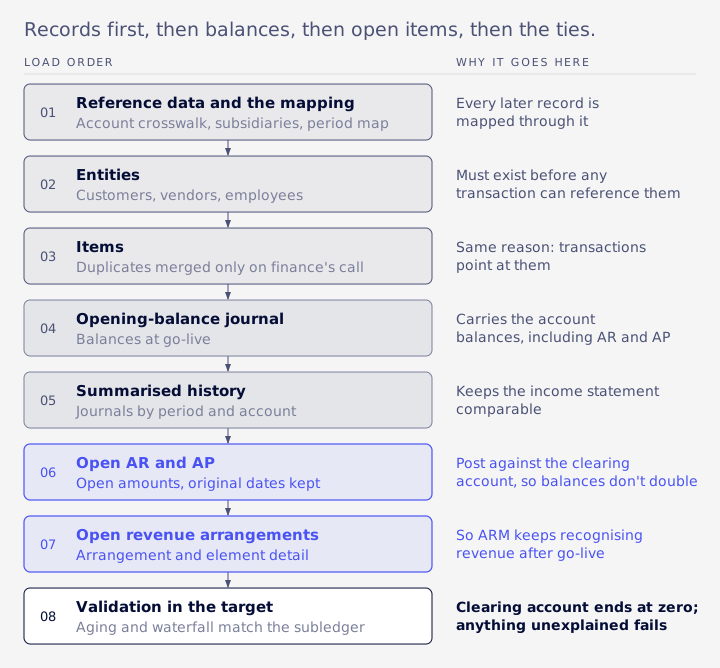
The order
- Reference data and the mapping.
- Entities: customers, vendors, employees.
- Items.
- The opening-balance journal.
- Summarised history.
- Open AR and AP, against the clearing account.
- Open revenue arrangements.
- Validation in the target.
The tools
| Tool | Documented limits | Best for |
|---|---|---|
| CSV Import Assistant | 25,000 records or 50 MB per import job, combined across files in a multi-file upload (Oracle: General CSV File Conventions); 5,000 lines per transaction; 10,000 lines per journal entry | Small to medium master data and supported transactions |
| REST or SOAP web services | Oracle points to these for big or ongoing migrations and record types CSV doesn't support | Credit memos, large volumes, repeatable loads |
| SuiteScript (for example Map/Reduce, a script type built for large batches) | Governed by SuiteScript limits | Loads that need logic inside NetSuite |
A plan that splits files at 25,000 rows each can still break the job limit if several files go up together.
Server scripts and workflows
The Import Assistant has an advanced option called Run Server SuiteScript and Trigger Workflows. Turning it off skips user event scripts and workflows, including defaulting and validation you might actually need. Oracle notes that records imported without it have to be re-saved later to fire that logic (Oracle: Setting CSV Import Preferences). Decide per record type, and know what you are skipping.
Make loads safe to re-run
Pre-flight every file against the target's reference data: missing, inactive or summary values, wrong subsidiary, closed or locked period. Refuse to write the file if any check fails. After loading, re-read what was written and diff it against what you sent, because a success response can still drop values. Skip records whose payload hasn't changed since the last run.
Intercompany, currency and tax
Intercompany
Balances between acquirer and acquired become intercompany on day one. Map them to intercompany accounts with Eliminate Intercompany Transactions ticked, and set up an elimination subsidiary. Existing transactions aren't marked automatically when an account is converted, so migrated history lines may need editing (Oracle: Intercompany Elimination Overview).
Elimination also isn't automatic on load. It is the last task on the Period Close Checklist, after currency revaluation and Calculate Consolidated Exchange Rates.
Currency
Base currency is set per subsidiary. Consolidated exchange rates come in three types: Average, Historical and Current (Oracle: Consolidated Exchange Rate Types). Revaluing open foreign-currency balances is a checklist step someone runs. If you translate the seller's history, load its exchange-rate history too.
Sales tax and VAT
Tax liabilities move as balances, but nexus and tax setup must exist in the target before any transaction posts. NetSuite's native engine is SuiteTax; Avalara, Vertex and Sovos are paid partner engines, and SuiteTax can use different engines per nexus (Oracle: Partner Tax Engines). Confirm which engine each account uses before mapping tax codes.
Prove it ties
The rule
VCG uses one rule for every tie:
GL = subledger + explained differences + unexplained differences
An explained difference belongs to a named class, such as a manual journal, a reclass or a timing line. Anything unexplained fails the run. Each investigation ends as a new named class in the reconciliation, so the explanation is written into the method and the next run checks it.
Before the load
Every subledger ties to the source GL at cutover: AR, AP, deferred revenue and unbilled receivable, plus inventory and fixed assets where in scope.
After the load, in the target
- The target trial balance and income statement match the mapped source trial balance per account and per segment.
- Every clearing account is at zero.
- Target aging and the Deferred Revenue Waterfall match the subledger as of cutover.
One trap here: when the extract holds data from more than one account, filter by account on every lookup, or rows will double.
Sign-off
Build a reviewer workbook from the same definitions the pipeline uses, so finance can check each tie without relying on anyone's narrative. Get finance sign-off per period.
Test loads, delta and rollback
Run at least one full test load into a sandbox.
Remember the sandbox reflects production only as of its last refresh. Then re-run the whole pipeline on a fresh extract before go-live.
Transactions keep arriving between the test load and go-live. Freeze the source, re-extract, load only new or changed records (unchanged ones are skipped by the payload check), and re-run every tie.
Agree rollback criteria up front. Typical ones are an unexplained tie difference above the threshold you and your auditor agreed, a clearing account that isn't at zero, or a failed pre-flight. Give each criterion a named owner on the finance side, so go or no-go is a recorded decision. If the source stays live until sign-off, rollback can mean not cutting over, but any loaded target data still has to be reversed or left unused.
Timeline and cost drivers
Timelines vary too much to quote a benchmark. Timing depends on scope.
What drives effort is easier to name:
- ARM and deferred revenue.
- How much history moves.
- Number of subsidiaries and currencies.
- Fiscal calendar mismatch and locked periods.
- Duplicate master data.
- Custom segments, scripts and workflows.
- The state of the seller's own reconciliations.
A narrow scope, masters plus open AR and AP with no ARM, can be short. A fold-in with open revenue arrangements and audited history takes materially longer, because every tie has to be explained. A real estimate starts with profiling the source account.
Retiring the old account
Keep read-only access through the audit cycle before the licence ends. Export attachments and the reports auditors will ask for, because the system notes are too large to pull whole.
Reverse any source-side reclasses the target now generates itself, close out the clearing accounts, and file the final ties with the audit evidence.
When it already went wrong
If you are reading this mid-project, the symptom usually points to the step:
| Symptom | Where it usually starts |
|---|---|
| Deferred revenue doesn't tie | Tied per account instead of whole scope, or residue outside ARM |
| Unbilled AR doubled | Source reclass not reversed once target ARM runs |
| Aging totals off | Open amounts not rebuilt from payment links, or a GL cut by date |
| Clearing account won't zero | Open items also carried in the opening-balance journal |
| Intercompany won't eliminate | Accounts not flagged, or history lines not marked |
| History stuck | Closed or locked target periods, or an unmapped stub period |
| Every row doubled | A lookup missing its account filter |
| Duplicate customers or vendors | Names merged or collided without a finance decision |
| Missing segments or odd mapping | One source account mapped to more than one target, or SELECT * extracts |
| Tax or foreign-currency balances off | Nexus or tax setup missing in the target, or no revaluation run |
On the revenue side, at Cyderes, VCG took over a broken ARM setup and reworked the configuration so arrangements, elements and recognition plans follow the contracts (case study). The entity half is covered under VCG's multi-subsidiary and OneWorld work.
Related reading: M&A and portfolio operations work and ARM and revenue recognition work.
FAQ
Can NetSuite merge two NetSuite accounts?
No. NetSuite can merge two general ledger accounts inside one chart of accounts, but it has no tool that merges one company's NetSuite account into another's. The seller's data is migrated record by record, commonly into a new subsidiary.
How much of the seller's history should we bring across?
Usually summarised journals by period and account, with segments, plus open items. Transaction detail stays in the source account, which you keep read-only through the audit cycle.
Can we load AR, AP and deferred revenue in the opening-balance journal?
Only if you don't also load them as open items. The safer pattern is history journals for balances, open items against a clearing account, and a clearing account that ends at zero.
Can the CSV Import Assistant load everything?
No. It doesn't support Credit Memos or Return Authorizations, and each job is limited to 25,000 records or 50 MB. Use web services or SuiteScript for the rest.
How do we prove to auditors the books tie?
Show GL = subledger + explained + unexplained for every subledger, before the load in the source and after it in the target, with unexplained differences cleared or explicitly accepted, and per-period sign-off.
What tolerance is acceptable?
Anything unexplained fails a run. The threshold that triggers rollback is set by you and your auditor before the load.
If your fold-in is stuck or the numbers won't tie, Book an Assessment.