
The short answer
In NetSuite Advanced Revenue Management (ARM), revenue reaches the general ledger (GL) only after five links complete in order.
The links are the source transaction, the revenue arrangement, its revenue elements, the revenue recognition plans, and the run that creates revenue recognition journal entries. When this month's revenue is missing, one of those links is broken or simply hasn't run yet.
The usual suspects are an arrangement that was never created, elements with blank dates, a plan waiting on a trigger event such as billing or fulfillment, a plan on hold or in Plan Failed, or a journal run nobody did.
Four terms come up constantly, so here they are in one place:
- A revenue arrangement is a non-posting record that groups a contract's performance obligations.
- A revenue element is one line on that arrangement, one per obligation.
- A revenue plan is the period-by-period schedule for an element.
- A revenue recognition journal entry is what actually moves money from deferred revenue to revenue.
This guide assumes ARM (Essentials). Classic revenue recognition isn't available to new NetSuite implementations, and Oracle names ARM as its replacement (Oracle: classic revenue recognition). Where Multi-Book Accounting, SuiteBilling or ARM (Revenue Allocation) change the answer, the section says so.
Five-minute triage
Open the source sales order or invoice, open its revenue arrangement, and walk forward one link at a time: arrangement, elements, plans, journals.
If you have a similar contract that recognizes correctly, open it side by side. The difference between the two is usually the answer.
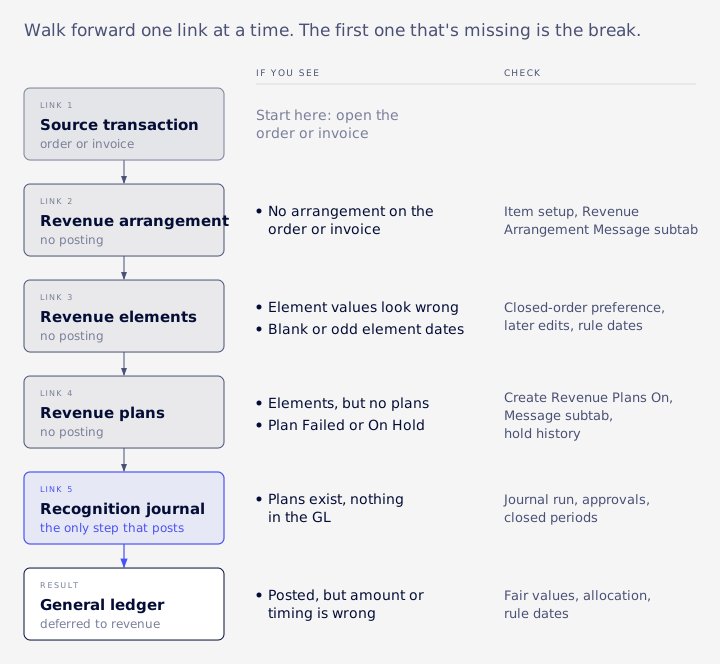
| What you see | Broken link | Where to look | Section |
|---|---|---|---|
| No arrangement on the sales order or invoice | 2, arrangement | Item setup, Revenue Arrangement Message subtab | No arrangement on the transaction |
| Arrangement exists, element values look wrong | 3, elements | Closed-order preference, later edits | Elements look wrong |
| Elements have blank or odd dates | 3, elements | Transaction lines, rule date sources | Blank or mismatched element dates |
| Elements exist but no plans | 4, plans | Create Revenue Plans On, rule type | Elements but no plans |
| Plan status is Plan Failed or On Hold | 4, plans | Message subtab, hold history | Plan statuses |
| Plans exist, nothing in the GL | 5, journals | Journal run, approvals, closed periods | Plans but nothing posted |
| Revenue posted, amount or timing wrong | Allocation or dates | Fair values, rule dates | Allocation out of balance |
Before you change anything, write down three things: which arrangement, which accounting book and which period you're checking. ARM problems are easy to make worse, and a one-line note stops you from "fixing" the wrong book or the wrong month.
No arrangement on the transaction
Arrangements aren't created by a checkbox on the sales order.
They're created when the update process runs, found at Financial > Other Transactions > Update Revenue Arrangements and Revenue Recognition Plans, or through the Update Revenue Plans link on the Revenue menu (Oracle: updating revenue plans). Arrangements come from sales transactions such as sales orders, invoices and cash sales.
If the process has run and there's still no arrangement, check the item setup, since gaps there can stop arrangements or plans from being created:
- It has both an actual and a forecast revenue recognition rule. These can be the same rule (Oracle: revenue recognition plans).
- Its Deferred Revenue Account on the Accounting subtab is an account of type Deferred Revenue.
- Create Revenue Plans On, on the Revenue Recognition/Amortization subtab, has a value (Oracle: item setup for ARM).
Then read the Revenue Arrangement Message subtab. Invalid combinations of Create Revenue Plans On and Amount Source are logged there.
VCG's consultants see a few repeat patterns here. An element with no arrangement is never fixed by editing the element; the fix is to re-run arrangement creation from the source transaction, one contract at a time.
An invoice can create its own stand-alone arrangement instead of joining the sales order's, which looks like a missing arrangement until you check the invoice. And a credit memo that doesn't reduce revenue has often been posted with no element at all, so it's worth searching for posted credit memos in open periods with no element attached.
Elements look wrong
An arrangement can exist with elements whose amounts or dates don't match the transaction any more. Two causes account for most of it.
First, later edits don't automatically travel. Values are copied from the transaction when the elements are created. Changing the transaction afterwards doesn't change the element, which is covered in detail for dates in the next section.
Second, closed sales orders stop updating. If the preference Create and Maintain Revenue Element Upon Closed Order is clear, NetSuite stops processing updates to closed sales orders and closed lines, and that includes revenue plans. There's one exception: a line that was open, billed and then closed still has its element sales amount updated to invoice quantity times the sales order rate (Oracle: updating revenue plans). If your question is "why don't closed orders update their plans any more," this preference is usually why.
Blank or mismatched element dates
How dates get onto an element
If someone enters Rev. Rec. Start Date and Rev. Rec. End Date on the transaction before elements are created, NetSuite copies them to the element's Start Date, End Date, Forecast Start Date and Forecast End Date. Those transaction fields appear only when both Revenue Recognition and ARM (Essentials) are enabled. Changes to the transaction dates after elements exist don't affect the elements; element dates are changed by editing the revenue arrangement (Oracle: rev rec dates on transactions).
Why plan dates can differ from element dates
A plan uses element dates only when its rule's Start Date Source is Revenue Element Start Date, or its End Date Source is Revenue Element End Date. The other start sources are Arrangement Transaction Date, Event Date and Source Date, plus Subscription Event Start Date when SuiteBilling is on (Oracle: revenue recognition rules). So a plan whose dates don't match its element may be behaving exactly as the rule says.
The reverse case is a real break. If a rule takes its dates from the element and those dates are empty, NetSuite doesn't create a plan at all (Oracle: updating revenue plans).
Finding blank dates in bulk
Oracle documents a saved search for this (Oracle: finding elements with missing dates):
- Go to Lists > Accounting > Revenue Recognition Rules and note every rule with Start Date Source set to Revenue Element Start Date or End Date Source set to Revenue Element End Date. These rules depend on element dates, so they're the ones at risk.
- Go to Lists > Accounting > Revenue Elements > Search and choose Use Advanced Search.
- Filter on Revenue Recognition Rule (the rules from step 1) and on empty Start Date, End Date, Forecast Start Date and Forecast End Date.
- Show the Revenue Arrangement column in the results, then save the search.
Fixes that quietly do nothing
VCG's consultants run into three of these often enough to call them out.
On sales orders and invoices, the rev rec dates live on the transaction line. The header start and end date fields are blank, and setting them does nothing. Compare element dates with line dates, not header dates, or you'll chase mismatches that aren't real.
Editing the dates on the revenue element record saves without an error and changes nothing, because the arrangement owns those fields. Edit the element through the arrangement instead, or fix the source line and run Update Revenue Arrangements again so the element picks up the new dates.
Wrong element dates usually mean the source line is wrong. Fix the line first. To stop it recurring, VCG recommends rules that take dates from the element, so line dates flow into plans, and turning on automatic updates of the target fields.
Elements but no plans
The trigger hasn't fired
Create Revenue Plans On is an event on the item, not a date. The options are Revenue Arrangement Creation, Billing, Fulfillment (which needs Advanced Shipping), Project Progress and Subscription Events (Oracle: item setup for ARM). Until that event happens, there's no actual plan. Oracle also says that, depending on the rule, actual plans may not be created until a later event such as fulfillment (Oracle: revenue recognition plans).
Working as designed
Before you call a planless element broken, sort it. VCG's consultants often find that "no plan" rows include two groups that are correct:
- Fulfillment or event rules on items that were billed but not yet delivered, such as hardware or third-party licences. The plan arrives when the event does.
- Percent-complete rules, where ARM never schedules revenue forward.
A percent-complete rule on a transaction for a plain customer rather than a project produces no usable plan. Reassign the transaction to a project or change the rule.
Forecast versus actual
Each element gets at least two plans by default, a forecast plan and an actual plan. Only the actual plan controls posting. The forecast plan feeds forecasting and forecast reports. The Disable Creation of Forecast Plans preference skips forecast plans entirely (Oracle: revenue recognition plans). A missing forecast plan in an account with that preference on is expected.
Configuration before data
VCG's view, from repeated repairs, is that a missing plan is usually a configuration problem. Check the rule and the trigger before hand-repairing anything. Also remember that changing an item's rule doesn't touch existing plans. They keep the old rule until someone regenerates them, and if an element is genuinely stuck, rerun Update Revenue Arrangements.
Plan statuses
Oracle documents five Revenue Plan Status values for an arrangement.
They are Not Started, In Progress, On Hold, Complete and Plan Failed (Oracle: revenue plan status). Some guides list Draft or Cancelled. Oracle doesn't.
| Status | What it means | What to do |
|---|---|---|
| Not Started | Plan exists, nothing recognized yet | Check plan dates and the journal run |
| In Progress | Plan has started recognizing | Normal |
| On Hold | Someone held it on purpose | Find out who and why before releasing |
| Complete | Fully recognized | Normal |
| Plan Failed | The plan update failed | Read the Revenue Arrangement Message subtab |
For Plan Failed, open the arrangement's Revenue Arrangement Message subtab. On the Planning process row, the Message column links to the error count (Oracle: updating revenue plans).
On Hold deserves more attention than it gets. VCG's consultants find held plans are a frequent reason revenue that should have posted hasn't. Plans on hold are left out of the journal run, and the hold was set deliberately, so ask before you release it. In reconciliation, report held plans separately so the same money isn't counted twice alongside plans that are past their end date with a balance remaining.
If an arrangement sits In Progress and never completes, check three things: plans on hold, plans with scheduled lines but no journal because the run never happened, and end dates that are still in the future. Any of these keeps the arrangement from reaching Complete.
For script authors: the internal status values carry no underscores (NOTSTARTED, INPROGRESS, ONHOLD, COMPLETED). A check against NOT_STARTED matches nothing and quietly hides every plan.
Plans but nothing posted
Plans existing is not the same as revenue posting.
Oracle is plain about this: revenue isn't recognized until revenue recognition journal entries are generated from the plans (Oracle: revenue recognition plans).
Revenue managers run it from Revenue > Revenue Recognition Journal Entries > Schedule Revenue Recognition Journal Entries; administrators find it under Transactions > Financial > Schedule Revenue Recognition Journal Entries. It can run now or on a schedule built on a revenue recognition plan saved search (Oracle: creating revenue recognition journal entries). Two limits apply:
- Plans on hold aren't included.
- Entries can't post to closed or locked periods. Oracle says an entry approved on creation posts to the next open period instead.
When plan lines are scheduled but nothing is in the GL, VCG's consultants count a period as recognized only when its planned-revenue line has a linked journal. The plan's total-recognized field can lag, so it's fine for a first look and unreliable for a tie-out. Scheduled lines with no journal mean one of two things: the run hasn't happened, or the journals are waiting in approval. The second is a workflow issue, and the fix is to approve them.
Forcing a plan update
With Revenue Plan Update Frequency set to Automatic, a background process updates plans about every three hours.
It runs with administrator permissions and ignores subsidiary restrictions, and under Multi-Book it ignores accounting book status. A manual update between runs covers only the subsidiaries your role can see (Oracle: updating revenue plans). That explains the common complaint that one person's manual run "missed" plans. Running the update with a role that can access every subsidiary avoids it.
Clicking Update Revenue Plans a second time with overlapping filters before the first run finishes can throw an error. NetSuite checks for overlapping date ranges and matching filters within the previous seven days. Wait for the first run.
One more limit, from VCG's field work: fixing element dates rebuilds the plan only while it's Not Started. Once any period has recognized revenue, the dates are locked and a date edit won't move the schedule. The reliable test for "started" is whether recognized planned-revenue lines exist, not the status label. For a plan that has started, use the procedure further down.
Allocation out of balance
With ARM (Revenue Allocation), revenue is spread across elements by fair value.
Each item has an Allocation Type of Normal, Exclude or Software, and Software uses a residual method (Oracle: revenue allocation).
A synthetic example shows the arithmetic. A bundle sells for $1,800. Its three items have fair values of $1,000, $600 and $400, a total of $2,000.
| Item | Fair value | Share | Allocated |
|---|---|---|---|
| A | $1,000 | 1,000 / 2,000 = 50% | $900 |
| B | $600 | 600 / 2,000 = 30% | $540 |
| C | $400 | 400 / 2,000 = 20% | $360 |
| Total | $2,000 | 100% | $1,800 |
If an item has a missing or zero fair value, the split goes wrong. Fix the fair value price on the item, then re-run allocation. VCG's consultants see the same mistake repeatedly: someone edits the element amount by hand, and it drifts back on the next recalculation, or breaks it. Repair allocation by regenerating, never by patching amounts.
Fixing a plan that has started
Regenerating a plan that has already recognized revenue changes prior-period numbers. That needs controller sign-off before anyone touches it, not a quiet fix in the background.
VCG uses this order when a recognizing plan has to be rescheduled:
- Snapshot the planned-revenue lines somewhere you control. There's no undo.
- Put the plan on hold, so the three-hourly update doesn't overwrite your work halfway through.
- If the end date changes, change it in a save on its own. In VCG's experience, combining it with line edits drops the end-date change without warning.
- Leave recognized lines alone. Zero the unrecognized lines outside the new range and spread the amount over the target periods.
- If a locked period's recognized amount differs from the new target, add a new unrecognized line in that period for the difference. It's the only way to adjust a locked period.
- Release the hold, on every path, including when something fails. A plan left on hold stops recognizing with no warning.
- Check that the lines still add up to the plan amount.
Do it in a sandbox first, and work on one arrangement at a time. Bulk changes regenerate plans in ways that are hard to unwind.
Percent-complete plans have their own trap. Each project override line replaces the calculation only for its own period. A period with no line doesn't inherit the previous override; it falls back to NetSuite's own calculation. Because the values are cumulative, a gap shows up as revenue moving in and out month to month. VCG's advice is to maintain a line for every period, including the ones that didn't change.
A genuine change in completion also produces a catch-up. As an illustration, if an element is worth $120,000 and cumulative completion moves from 40% to 55%, the current period picks up the 15 points of difference, $18,000. That is correct when the project really progressed. It points to a bad override when the next period reverses it, or when a period with no line makes the figure swing back.
When the subledger and GL won't tie
Sometimes revenue did post and the real complaint is that the ARM numbers don't match the balance sheet. A few causes are working as designed.
Gross unbilled receivable. ARM posts unbilled receivable gross, element by element, and never nets inside a contract. A contract with one unbilled element and one billed-ahead element shows both in full, so unbilled receivable and deferred revenue each look overstated by the same amount. VCG reconciles the two accounts together, with a contract-netting line, rather than each alone.
Unplanned deferred revenue. VCG's consultants see four normal causes: percent-complete rules, completed plans still carrying deferred balance from billing above allocation, fulfillment-rule elements with no plan yet, and small straight-line rounding.
The waterfall's columns. On the native Deferred Revenue Waterfall, the Total column leaves out unplanned deferred revenue. The Balance column is the one that ties to the GL. VCG has also seen inconsistent results on whether the report honours the period filter for balances, so test it each time.
Four filters stop most false findings:
- Filter one accounting book. Without it, Multi-Book accounts double count.
- Exclude voided arrangements, which keep their elements and plans.
- Compare by posting period, not transaction date.
- Rerun without the period cut. If the variance disappears, it's timing and needs no fix.
Multi-Book. Once Multi-Book is in use, arrangements, elements and plans are always book-specific. Edits and Hold Revenue Recognition on the primary book don't carry to secondary books, and the item's Same as Primary Book Rev Rec setting decides whether a secondary book's plans can differ by design (Oracle: ARM with Multi-Book). The exception is history: transactions processed before Multi-Book was enabled can leave secondary books without plans, and that's a real gap.
A query for admins
Admins can list elements that have no plan with SuiteQL, NetSuite's SQL-style query language.
This version joins the element to its arrangement for customer and subsidiary, and leaves out voided arrangements.
SELECT re.id AS element_id,
       re.recordnumber,
       ra.tranid AS arrangement,
       ra.entity,
       ra.subsidiary,
       re.revenueplanstatus
FROM revenueelement re
JOIN transaction ra ON ra.id = re.revenuearrangement
LEFT JOIN revenueplan rp ON rp.createdfrom = re.id
WHERE rp.id IS NULL
  AND NVL(ra.voided, 'F') = 'F'
ORDER BY re.id
Three cautions before relying on it:
- Results over 5,000 rows are cut off without warning, so page the query until it's exhausted. The unique
ORDER BY re.idkeeps pages stable. - In a Multi-Book account, add a filter for one accounting book, or the counts double.
- Table and field names vary, so confirm each one in your own account's Records Catalog first.
Then sort the rows into the groups from earlier: fulfillment and event rules waiting on their trigger, percent-complete rules, and the ones that are actually broken.
On scripting generally: the plan record's enum is record.Type.REVENUE_PLAN (record ID revrecplan), not REVREC_PLAN. Scripts can read, update and search plans but can't create, copy or delete them, and the planned-revenue sublist uses plannedperiod, not postingperiod (Oracle: revenue recognition plan record).
When it's the setup
If the same failure shows up across many contracts, the cause is usually the rules, items or allocation setup rather than data entry.
Elements regularly missing dates, plans failing in batches, and a deferred revenue balance that never ties all point that way. Fixing transactions one by one keeps the close moving, but the next month brings the same list.
That was the situation in the Cyderes ARM rebuild. VCG reworked a broken ARM configuration and rebuilt the revenue reporting. Finance closes on time again, and the numbers held up at audit.
If your account looks more like that than like one bad transaction, a VCG assessment reviews the ARM setup and the open findings before the next close. More on the work itself is on the ARM and revenue recognition page.
FAQ
Why does a transaction have no revenue arrangement?
Arrangements are created by Update Revenue Arrangements and Revenue Recognition Plans, not by a setting on the sales order itself. If that has run, check the item's rules, deferred revenue account and Create Revenue Plans On value, then the Revenue Arrangement Message subtab.
Why did changing dates on the sales order not change revenue?
Dates are copied to elements only if entered before the elements exist. After that, change them through the revenue arrangement. On sales orders and invoices the dates that count are on the line, not the header.
Why do plan dates differ from element dates?
Plans use element dates only when the rule's date source is Revenue Element Start Date or Revenue Element End Date. Other sources produce different dates by design.
Why are there schedules but nothing in the GL?
Revenue posts only when revenue recognition journal entries are created from the plans, manually or on a schedule. Held plans are skipped, closed periods can't take entries, and journals awaiting approval haven't posted.
Why did my manual plan update miss some plans?
Manual updates cover only the subsidiaries your role can access. The automatic run uses administrator permissions and covers all of them.
Why did Update Revenue Plans throw an error the second time?
NetSuite checks for overlapping date ranges and matching filters within the previous seven days. Wait for the first run to finish.
Why don't closed sales orders update revenue plans any more?
With Create and Maintain Revenue Element Upon Closed Order clear, updates to closed orders and lines stop, including plan updates. Lines that were open, billed and then closed still get their element sales amount updated.
Can I fix an element by editing it directly?
Usually not. Date edits on the element record save and change nothing, and hand-edited amounts drift back. Fix the source line, the item's fair value or the arrangement, then regenerate.
If the same problems keep returning each month, book an assessment and VCG will review the ARM configuration before your next close.