
A NetSuite access review for auditors comes down to four findings and two proofs. Who holds Administrator, and why? Can one person both create and approve the same transaction, journals included? Can anyone who has left still log in? And what can each integration role do? The proofs are a log showing your user list was complete, and a sign-off from each role's business owner.
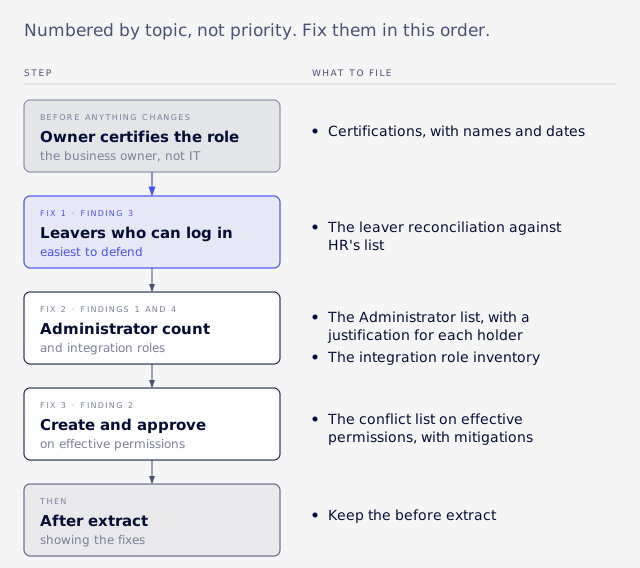
The findings are numbered by topic, not priority. Fix them in this order, starting with the easiest to defend: leavers with working logins, then Administrator and integration roles, then create-and-approve conflicts. Get each role's business owner to certify it before anything changes. This guide covers how each finding shows up, how to measure it, how to fix it and what to file as evidence.
A few terms first. A role is a bundle of permissions. Each permission has a level. System notes are NetSuite's automatic change log on a record. Segregation of duties (SoD) means no one person controls a transaction from start to finish.
What auditors ask for
The request list is usually the same six items, and each one needs a source you can name.
- A complete list of active users and the roles each holds.
- The permission matrix for each role.
- The list of people who hold Administrator.
- Leavers during the period, and the date their access ended.
- The SoD conflict list, with the mitigation for each conflict.
- Evidence that a review happened: who reviewed, when, what they found and how each exception was fixed.
Expect the follow-up, "how do you know this list is complete?" Keep a log of every search you ran, with its criteria and its row count. That log is your answer.
Someone with enough access has to run the exports. By default only Administrator can view the Login Audit Trail (Oracle: Login Audit Trail). The Transaction Audit Trail is available by default to the CEO, CEO (Hands Off), CFO and Support Administrator roles, or to a custom role with the audit trail permission (Oracle: System Notes Overview).
Pulling a complete population
Build the population from role assignments, one row per user and role pair, and review those pairs rather than people.
An employee saved search limited to people with login access, with one row per assigned role, gives you the user side. Field and filter names vary by account and release, so confirm them in your own account and save the search criteria with the extract. For the role side, open each role and read its permission subtabs, or export custom role definitions with SuiteCloud Development Framework (SDF, Oracle's tool for exporting account configuration as files).
Do not build the list from login history. A role someone holds but has never used produces no row in a login-based report, and those never-used grants can be risky because they never show in login reports. The full matrix also surfaces roles assigned to nobody, which belong on the findings list.
Export traps
Check export row counts against what NetSuite shows on screen, because an auditor who reconciles them will find any gap.
- Some export formats turn the level "None" into a blank. A blank reads as "not checked", which is a different statement.
- Some tools cap rows without saying so. The same trap applies to queries, covered in why SuiteQL stops at 5,000 rows.
- Never fill in a missing identifier by hand.
Report findings per role, not per user. Ten people sharing one over-permissioned role is one finding with one owner, not ten rows.
Finding 1: Administrator count
Administrator is judged on how many people hold it, because its permissions are fixed and grant everything.
Oracle says the standard Administrator role shows every permission at Full, or the highest level available, and cannot be customized (Oracle: Administrator Role). Other standard roles can be customized, so the lock is specific to Administrator. Oracle's guidance on the same page:
- Create and use a custom administrator role instead of the standard one.
- Give Administrator to at least two people, so one absence does not lock you out.
- Give it only to people who need full functionality.
- Check what those people do through system notes.
Oracle sets a floor of two holders and no ceiling, so set your own. Count the holders, report that number as its own line, and keep only those who pass a simple test: a named owner, and a duty that no restricted role covers. Oracle also offers Core Administration Permissions on a restricted role as an alternative to handing out Administrator.
Keep Administrator out of the conflict test
Because Administrator grants everything, it trips every SoD pair by construction. Take all-access roles out of the conflict test and report the number of Administrator holders as its own line, or the real conflicts get buried.
Justify the ones you keep
For each Administrator you keep, file a named owner, a business reason, two-factor authentication (2FA) and a periodic review of their activity. Oracle recommends 2FA over IP address restrictions (Oracle: IP Address Rules).
Keep one break-glass admin, a named and monitored emergency account for when normal access fails, and verify it at each review. Shared or generic logins are a finding in their own right, because system notes record a user and a shared login makes that user meaningless. Partner and consultant admin accounts need an owner, an end date and a review.
Finding 2: Create and approve
A create-and-approve conflict only shows up when you test the combined permissions of every role a person holds.
Call this testing effective permissions. A clean accounts payable role plus a clean vendor-maintenance role can be a conflict, even though neither is one alone. A role-by-role check never sees it.
Rules that keep the test honest
- Use real permission names. Define each pair with the permission names in your account, such as Vendors against Pay Bills, or Make Journal Entry against journal approval, and verify each one. Generic pair names copied from the web may match nothing in your account.
- Leave approval out of create tests. Approving a record does not require Edit on it. If approval-only permissions count as create activity, every approver looks over-provisioned.
- Rank by the strongest level. Full on journals, payments or inventory adjustments is the item for the meeting. If every role with Full on anything counts as privileged, nothing stands out.
- Write down compensating controls. A conflict with a documented compensating control, a separate check that catches what the missing separation would have, is a disclosure rather than an exception. Record the control, its owner and how often it runs.
Creating period-end journals needs Manage Accounting Periods (Full) and Override Period Restrictions, and only Administrator has both by default (Oracle: Create Period End Journals). That covers the period-close task, not journals in general.
Stopping self-approved journals
NetSuite's journal approval preference does not stop self-approval, so build the control as a SuiteFlow workflow that compares approver to creator.
Oracle says a user with the Journal Approval permission can approve their own journal entries when entering them (Oracle: Journal Entry Approval Overview). The Require Approvals on Journal Entries preference holds new journals for approval, but anyone holding that permission still clears their own.
SuiteFlow is NetSuite's no-code builder for approval steps and conditions. Approval Routing is turned on at Setup > Company > Setup Tasks > Enable Features, on the Employees subtab. Its preferences sit at Setup > Accounting > Accounting Preferences, on the Approval Routing subtab, and approval limits go on employee records. Oracle says to clear the preference if you use custom SuiteFlow approvals (Oracle: Approval Routing). That page describes the purchase order preference only.
Oracle also says that "workflows can provide approval limits and prevent users from approving their own transactions", in general terms rather than for journals specifically. To prove the control works, create a test journal as one user, try to approve it as the same user, and file the screenshot showing it is blocked. Repeat with a second user to show approval succeeds.
The documented gap
Oracle states the audit trail limit plainly on its journal entry controls page:
"Currently, there is no audit trail for journal entry edits after it has been approved, or when the approver edits the entry prior to approval."
The page is undated, so confirm it still says this before you quote it to an auditor. On the same page Oracle says it is important to review journal entries and expense or disbursement accounts, and to reconcile accounts. It calls reviews the key controls and says to use proper segregation of duties when choosing the reviewer.
In practice, that is a monthly listing of posted manual journals over a set amount, reviewed and initialled by someone who neither prepared nor approved them. The month-end close checklist shows where that review fits.
Finding 3: Leavers who can log in
A leaver with working access gets written up as a control failure, because it shows offboarding is broken.
Check it on its own line and run it monthly. Compare against HR's leaver list for the period, not only NetSuite's inactive flag, because someone can leave and stay active. Then check the Login Audit Trail: any successful login after the termination date is the item to escalate.
The two searches
Build one employee saved search for each case, and confirm the field names in your own account first, because they vary by release.
| Search | Filters | Result columns |
|---|---|---|
| Inactive but can still log in | Inactive is true; login access is enabled | Name, email, termination date, roles |
| Active but gone from HR | Inactive is false; one row per role | Name, email, supervisor, roles, last login |
The second search is only useful once you match it to HR. Export both, match each name to the HR leaver list by employee number or email, and file the unmatched rows as exceptions. The same check as a SuiteQL query, assuming your account exposes these employee fields (page through the results with a unique ORDER BY, as in the SuiteQL row-limit article):
SELECT id, entityid, email, isinactive, giveaccess, releasedate
FROM employee
WHERE giveaccess = 'T'
ORDER BY id
Filter the result against the HR list outside NetSuite, then record the row count in your query log.
Fix it in the right order
- Re-point approvers, workflow conditions and saved search audiences that name the leaver. Records that reference an inactive employee can fail only when someone saves them.
- Take the before extract.
- Remove login access.
- Remove the roles.
- Take the after extract and file both.
Skip the flat 90-day rule
A blanket "no login in 90 days means revoke" rule removes access people legitimately need, so count the false positives before you adopt it. Read-only reporting roles, auditor, tax and year-end roles, and approval-only users can go months without a login. Review those by role before revoking.
Finding 4: Integration roles
Integrations should run on purpose-built roles, because Oracle advises against using Administrator for them.
Oracle's REST prerequisites say that using the Administrator role for integrations is not recommended for security reasons. Integrations authenticate through a role with a web services permission and, for token-based logins, the Log in using Access Tokens permission (Oracle: REST Web Services Prerequisites).
VCG's consultants often see vendor connectors left on Administrator or a copy of it. Cleaning this up is part of what VCG's NetSuite rescue service covers for builds that have gone wrong.
The fix is one purpose-built role per integration, granting only the record types it touches, on a dedicated integration user. Full access is not required. That is practitioner advice rather than an Oracle rule. Authentication methods are changing, so check Oracle's current guidance on token-based authentication and OAuth 2.0 before you rebuild a connection.
An example scoped role
This synthetic role is for a connector that reads sales orders and writes invoices. Your connector's vendor documentation lists what it needs.
| Record type | Level |
|---|---|
| Sales orders | View |
| Invoices | Create |
| Customers | View |
| Items | View |
| Log in using Access Tokens | Full |
| Web services permission | Full |
Anything not on the vendor's list stays at None.
Count machine traffic separately
The login audit includes web services and connector traffic, not just people signing in. An integration user can look like the busiest person in the company. Judge integration roles on machine traffic separately from human logins.
Before you tighten a role
Check for scheduled scripts that run as the role, role-restricted workflow transitions and search audiences. These break silently and surface days later, so test the change in sandbox first.
Change evidence by question
Check the System Information subtab or the Transaction Audit Trail for who changed a journal, and system notes for setting changes.
Each source has a documented limit, shown in the table.
| Question | Where to look | Documented limit |
|---|---|---|
| Who changed a journal? | System Information subtab on the journal (Oracle: Journal Entry Records); Transaction Audit Trail at Transactions > Management > View Audit Trail (Oracle: Transaction Audit Trail) | No audit trail for edits after approval |
| Was a line removed? | Line System Notes fields in a transaction saved search | Line-level history tracks updates to existing lines only, not creation or deletion (Oracle: Line-Level Audit Trail) |
| Was a record deleted? | Deleted Record search with Record Type set to Transaction | Deletion log keeps only key, name, date and who deleted it; System Notes v2 record types keep full detail |
| Did a setting change? | System notes on configuration such as Company Information, General Preferences, Enable Features, Accounting Lists and Tax Setup | Account setup changes carry header information only; Oracle advises review by a different person |
The Transaction Audit Trail filters by user, action, date range, amount, transaction type, account and entity. A system notes search starts at Reports > New Search (Oracle: Searching System Notes). System notes record the date and time, user, context, type of change, field, and old and new values, and no user, script or app can edit them.
What system notes do not cover
Tell the auditor the limits before they find them. All of these come from Oracle:
- Notes exist only on records and settings that have a System Notes subtab, and custom-field notes can be turned off (Oracle: System Notes Limits).
- The Log System Notes on Updates Only preference, under Setup > Company > General Preferences, stops notes on record creation (Oracle: General Preferences).
- Long Text and Rich Text fields log only the change in character count, and encrypted field values are masked.
Deleted records are a special case. Original system notes are lost with the record, while System Notes v2 keeps details of deleted records and captures supported sublist changes, for supported record types only (Oracle: System Notes v2).
Who can see system notes
What you see depends on the role you pull them under. Viewing a record's notes needs access to the record plus the Notes Tab permission. Querying all system notes through the analytics data source needs Administrator or the System Notes for Analytics and REST permission. Without either, results show only changes the caller made (Oracle: System Notes for Analytics).
So a restricted role can return a short list that looks complete. Pull audit evidence under Administrator or a role granted that permission, and record which one you used on the cover sheet. The same problem comes up with AI connections, covered in NetSuite MCP role permissions.
The Analytics Audit Trail logs definition changes to saved searches, reports, report schedules and financial layouts. By default users see audit records only for objects they own, and formatting-only changes are not logged (Oracle: Analytics Audit Trail).
How far back the logs go
The saved search Execution Log keeps 60 days and the SOAP usage log 21 days in production.
The System Notes v2 viewer shows 30 days by default, which is a display filter you can widen, not a retention limit. Oracle publishes the windows below (Oracle: Log Retention).
| Log | What Oracle documents |
|---|---|
| System Notes v2 viewer | Last 30 days by default, changeable to a custom range |
| Saved search Execution Log | Rolling 60 days |
| SOAP web services usage log | 21 days in production, possibly less under heavy activity; 7 days in sandbox |
| Persisted search CSV | 7 days |
The Login Audit Trail is at Setup > Users/Roles > View Login Audit Trail, and newer releases may list it under User Management. It covers logins, logouts and failed attempts, and filters by date, user, role, IP address and status. It records the IP address only at the start of a session (Oracle: Login Audit Trail).
The Oracle page cited here gives no retention figure for the Login Audit Trail. Export it monthly and file the export, because evidence you need next year has to be saved this year.
Permission levels
NetSuite permission levels are None, View, Create, Edit and Full, from least to most access.
Oracle defines Create as adding new records without editing or deleting them, Edit as changing records without deleting them, and Full as everything (Oracle: Access Levels for Permissions). The matrix has to show the real level on every line.
| Level | What it allows | How an auditor usually reads it on journals or payments |
|---|---|---|
| None | No access | No concern |
| View | Read only | Normal reporting baseline |
| Create | Add new records, no edit or delete | Conflict candidate when paired with approval |
| Edit | Add and change records, no delete | Conflict candidate; changes after approval need review |
| Full | Everything, including delete | Highest risk; the item for the meeting |
Some permissions offer only some of the levels. Oracle's example is Nexus Setting, which offers None, View and Full. Show the level actually granted rather than assuming all five exist.
Cadence and the evidence pack
Oracle sets no review cadence, so the schedule below is common audit practice rather than a NetSuite rule.
- A full user access review at least once a year, and quarterly for SOX-scoped accounts.
- The leaver check monthly.
- An extra review after a reorganisation, an acquisition, or a new integration or partner.
The business owner of each role certifies it, not IT. IT makes changes only after the owner has signed.
What goes in the pack
- A cover sheet: scope, period, data sources and the role the extracts were run under.
- The population extract, with row counts and the query log.
- The Administrator list, with a justification for each holder.
- The conflict list on effective permissions, with mitigations.
- The leaver reconciliation against HR's list.
- The integration role inventory.
- Certifications, with names and dates.
- Exceptions, with owners and due dates.
- The after extract showing the fixes.
Keep the before extract. Once a role's assignments are removed, inactivate the role rather than deleting it, so its history is not orphaned. A findings row should let an owner act and an auditor trace it:
| Role | Owner | Finding | Risk | Decision | Date fixed | Evidence |
|---|---|---|---|---|---|---|
| AP Clerk (custom) | AP Manager | Full on Vendors and Pay Bills | High | Vendors cut to View | 2026-11-14 | EXT-07 before/after |
Native searches or a tool
Saved searches and SuiteQL are enough for a periodic review of one NetSuite account.
A dedicated access-review tool earns its cost when you need continuous monitoring, or one view across several systems, rather than a quarterly extract. If you run a single account and review it quarterly, the log, the sign-offs and the searches above cover what an auditor asks for.
Next step
If nobody can explain half the roles, Book an Assessment to have the roles, conflicts and integration access mapped before the auditor asks for them.