
What a rescue is
A NetSuite rescue takes over an implementation that went wrong and gets it to a stable state someone can support.
It does that without throwing away the parts that work.
The trigger varies. Go-live stalled, the close needs manual journals to tie, or the partner who built it left.
The first two weeks of a rescue should change nothing in the account. They are a read-only inventory of what actually runs, plus a baseline of the numbers, and that inventory is what tells you whether to fix, rebuild part of it, or start again.
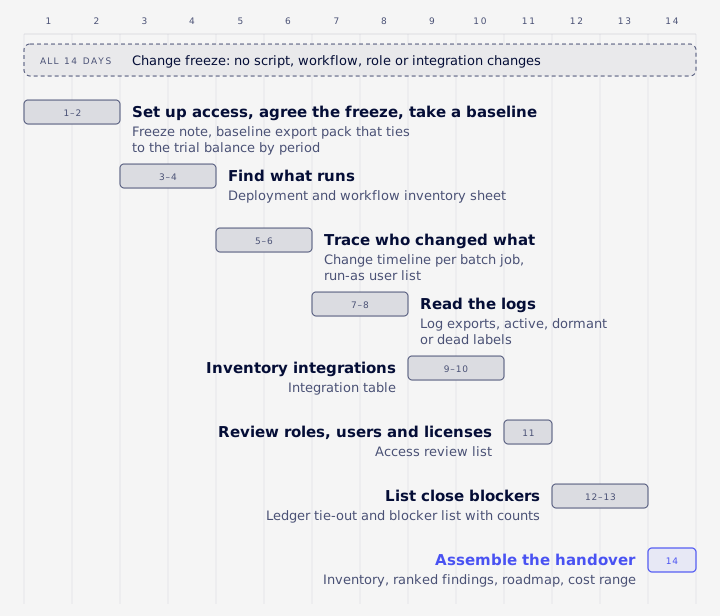
This guide is for the CFO, controller or NetSuite admin who has inherited one of these accounts. It walks through the two weeks in order, names the NetSuite screens to open, and ends with what you should hold at the end. The table below is the whole plan on one page.
| Days | Action | Output |
|---|---|---|
| 1-2 | Set up access, agree the freeze, take a baseline | Freeze note, baseline export pack that ties to the trial balance by period |
| 3-4 | Find what runs | Deployment and workflow inventory sheet |
| 5-6 | Trace who changed what | Change timeline per batch job, run-as user list |
| 7-8 | Read the logs | Log exports, active, dormant or dead labels |
| 9-10 | Inventory integrations | Integration table |
| 11 | Review roles, users and licenses | Access review list |
| 12-13 | List close blockers | Ledger tie-out and blocker list with counts |
| 14 | Assemble the handover | Inventory, ranked findings, roadmap, cost range |
Rescue or restart
A broken account can often have a core design (chart of accounts, subsidiary structure, item model) that still holds, with the trouble sitting in the scripts, workflows, integrations and settings built on top of it. The inventory is how you find out which case you have. A restart makes sense only when that core design is wrong at the root, for example a chart of accounts or subsidiary structure that can't produce the reports the business needs.
Why the inventory comes first
The handover document, the old partner's code repository and people's memories all describe the account someone meant to build. The live account is the only record of what was actually built and what runs today. Some of what runs in an inherited account can have no source file outside it, because some scripts exist only in the account and others are vendor scripts installed with SuiteApps. If you fix from the documents, you fix an account that doesn't exist.
Signs you need a rescue
Adding fixes to a build nobody fully understands usually adds to the confusion. These finance symptoms suggest you need an inventory first:
- The month-end close needs manual journals before the trial balance ties.
- The trial balance only ties after a manual adjusting journal each month, and nobody can explain it.
- An integration "mostly works", and someone fixes the failures by hand each week.
- Nobody can say who owns a given script or why it exists.
- The admin or partner who built the account has gone.
- The go-live date has moved more than once.
You'll find published ERP failure rates and rescue success rates quoted around this topic. Treat them with caution: many come from vendors marketing their own services, and none of them describes your account.
A simpler test works better. If you can't list everything that posts transactions into your general ledger, and under whose login each one runs, you need an inventory before anyone attempts another fix.
Access, freeze and baseline
Get access that can see everything
The person running the inventory needs a dedicated role or user with visibility into scripts, script deployments, system notes and setup records. A borrowed administrator login is a bad substitute: it hides who did what during the rescue, and it disappears when its owner leaves.
Permissions matter more than people expect. A role without the right permission often gets an error such as "record not found" when it reads script or deployment data, which looks exactly like "there's nothing there". VCG's consultants treat "I can't see it" and "it doesn't exist" as two different findings. If your role can't see the script tables, the inventory covers only what you're allowed to see, and nobody should conclude that nothing runs a process.
Freeze changes
Agree a change freeze for the two weeks and write down who can approve exceptions. Freeze:
- new script deployments and edits to existing scripts
- workflow changes
- role and permission changes
- integration mappings and credentials
Don't freeze normal transaction entry. Sales orders, bills and journals keep flowing, because the business still has to run and the inventory should describe the account under real use.
Take a baseline
Before anything else changes, export and file:
- The script deployment list.
- The workflow list.
- The role list.
- The accounting periods and their open or closed status.
- A trial balance by period.
Note the NetSuite release the account is on. NetSuite has two major releases a year (the .1 and .2 versions), with monthly updates between them (Oracle release notes), so behaviour you record today may shift at the next upgrade.
Inventory production, not the sandbox
Inventory production. The sandbox only shows what was copied at its last refresh, plus whatever someone deployed there afterwards.
A refresh overwrites the sandbox with a copy of production, and VCG's consultants have observed three effects on inherited setups: objects deployed only to the sandbox are wiped, scheduled deployments come back as Not Scheduled, and saved searches and custom record types can get new internal ids, which breaks any code that checks for a hardcoded production id. Back up and compare sandbox, repo and production before anyone requests a refresh, and read Oracle's sandbox documentation for what a refresh copies in your account.
Finding what runs
Where to look
Start with these places in the account:
- The Script Deployments list. One row per deployment. It typically shows the status, the script and its owner; open each record for the role it executes as and, for batch jobs, the schedule.
- The Scripted Records page. Oracle describes it as listing "all records that have a script or workflow associated with a record". By default it shows only record types with at least one script or workflow attached; tick Show Undeployed to list every record type (Oracle: The Scripted Records Page). The same page lets you reorder scripts and change deployment and workflow statuses, so look but don't touch during the freeze.
- The workflow list. Every workflow, its record type and its release status.
- SuiteApp and bundle scripts. These belong to the account even though they live in no repo. Count them with everything else.
A few terms, defined once. A user event script runs on the server when a record is created, edited or saved. A client script runs in the user's browser. Scheduled and Map/Reduce scripts are batch jobs that run on a schedule or on demand. Suitelets are custom pages, and RESTlets are endpoints other systems call. A workflow is point-and-click automation built in SuiteFlow rather than written in code.
Active, dormant or dead
A deployment record existing tells you very little. For each one, record its status and schedule, then check the logs. Script execution logs only cover the last 30 days (more on that below), so a script with no log entries in that window is probably dormant, though a quarterly or year-end job could also look that way. A workflow can sit on a record type for years without ever starting, for reasons covered in the logs section.
Label each item active, dormant or dead, and write down the evidence that put it there.
For admins: pull the list with a query
Admins can pull the same inventory with SuiteQL (NetSuite's SQL dialect) against the script and scriptdeployment tables, which also pick up SuiteApp scripts (SuiteApps are apps installed from NetSuite's marketplace).
Watch for silent caps. VCG's consultants have seen SuiteQL calls stop at a fixed row limit without any error, and the limit differs between SuiteScript and REST, so check Oracle's current documentation for both. Page through results with a unique sort order, and re-check every count against its stated scope. A capped query produces an inventory that looks complete and isn't.
Match the repo to the account
For every script record, find its file in the File Cabinet (NetSuite's built-in file store) and import the live version before anyone edits it. Two rules follow from VCG's work on inherited accounts:
- Never deploy a shared library that exists only in the account from an old local copy. The deploy overwrites the live file, and every script that depends on it inherits the stale version.
- Don't decide which of "v1", "v1 copy" and "v2" is live from the file name or from whichever copy is newest in the repo. Open the deployment record and see which file it points to.
Treat the repo's own README with the same suspicion. In VCG's experience it's often out of date on exactly the things you care about, such as script counts and what's deployed.
Find the job that really does the work
One lesson VCG's consultants see repeatedly: the job doing the real work is often not the one you were told about. Here is a synthetic example of the pattern. Finance believes a custom script built by the previous partner creates the vendor bills from the AP system. A month of bills, counted by creator, memo pattern and external id pattern, shows that a vendor SuiteApp's batch job created most of them, while the custom script created few. Both were live, and nobody knew.
That count is quick and gives evidence an interview can't.
Who changed what
System Notes
System Notes are NetSuite's built-in change log. Oracle lists them as auditing enabled features, configuration settings, roles and permissions, user logins, customization objects and key financial record audit trails. Each note has a Context field that records how the change was made, for example through the user interface, web services or SuiteScript (Oracle: auditing with system notes). Context is how you tell whether a person or an automation made a change.
The audit trail and deleted records
Oracle says "the audit trail for transaction records is available at Transactions > Management > View Audit Trail", and that audit trails are "predefined searches of system notes, with set filters and results". Because they're built on system notes, they only show what system notes capture. Many record types also have a History subtab that tracks updates, including line-level changes.
When someone asks where a batch of records went, use the deleted record search, which Oracle describes as the way "to find details about deleted records" (same source).
Build a timeline for every batch job
For each scheduled or Map/Reduce deployment, try to build a timeline of who scheduled it, who unscheduled it and who changed its schedule. Oracle doesn't document a single screen for this, so test in your account which sources show it: a system notes search on the script deployment record type, the Context field on any notes you find, and the execution logs for when the job last ran. Where none of them show it, record that as a gap.
VCG's consultants have found jobs quietly rescheduled by someone else months after they were switched off. In the AP example above, if a source did show the SuiteApp job switched off and later turned back on by someone else, that would explain why two jobs were creating bills.
Run-as users and credentials
List every script's owner and the role it executes as. Then list every integration and job that runs under a named person's login or token. When that person leaves and their access is removed, or their password rotates, the integration stops, often without anyone noticing until a balance looks wrong. Move each one to a dedicated integration user owned by a role, not a person.
Reading the logs
Script execution logs
Oracle documents the Script Execution Logs page at Customization > Scripting > Script Execution Logs. It shows "log details across all scripts for 30 days", filters by log level, execution date range and script name, and warns that "downloads may be limited to 10,000 entries" (Oracle: Script Execution Logs). The same page notes the logs are not moved when an account moves to a new Oracle Cloud data center.
Retention is shorter than most people assume. Oracle's governance page says user-generated logs are kept up to 30 days and system error logs are purged after 60. It also describes a shared limit of 5 million logs per database instance, and reaching it purges logs for every customer on that database (Oracle: governance on script logging). On a busy instance, logs can be gone sooner than 30 days.
The practical step: export the logs on day one and again on day ten. Filter by script when you export, so each download stays under the 10,000-entry cap.
Workflow logs are not usage reports
The workflow execution log is a debugging trace for one state visit on one record. It shows which actions and transitions ran. It is written only when Enable Logging is on, which is off by default once a workflow is released, and it is deleted after 60 days (Oracle: workflow execution log). A workflow with no log entries may simply have logging switched off. Don't read it as an account-wide report of what your automation does.
A deployment existing doesn't mean the process runs
On inherited accounts, VCG's consultants often find scripts and workflows interacting in ways that hide broken automation:
- A record saved from inside a user event script often does not start a workflow (confirm in your account). An approval workflow can fail to start for weeks while admins approve by editing the record, so nobody sees the bug.
- Saves made by a workflow button may not run afterSubmit user events (the part of a user event that runs after the record is saved).
- A save made by a script running in the browser runs in a different context, and workflows restricted to normal contexts won't start.
Test each inherited automation through the path real users take, and read its log afterwards.
Check the Parameters tab before running any batch job
Before you run any inherited batch job, even once to see what it does, open the deployment's Parameters tab. The value on the deployment record is what the job uses, whatever the source file says. A synthetic example: a Map/Reduce has a "commit changes" checkbox, the source file defaults it to off, and the deployment record has it ticked. The admin runs it expecting a preview and it writes to hundreds of item records. Check the first log line for the mode, and untick the box after any commit run.
Integrations
Inventory each one
For each integration (an iPaaS, a service that connects systems, such as Celigo; bank feeds; Salesforce; EDI, the automated exchange of orders and invoices; payment processors), record:
| Question | Why it matters |
|---|---|
| Which record types does it create or update? | Tells you what it can get wrong in the ledger |
| Under which user or token does it run? | Shows the single-person dependencies |
| Which endpoint and host does it call? | Catches test hosts wired into production |
| How does it retry a failure? | Retries can create duplicates or loops |
| Where do failures land, and who reads them? | An error queue nobody reads is a silent failure |
VCG's system integration work usually starts from a table like this one.
Two importers writing the same thing
Look for two integrations or jobs that create the same record type. A synthetic example: an invoice is voided and re-entered with the same number and a new external id. Two importers each retry it on every run, and the logs fill with thousands of errors that look like a data bug. In this example, the fix would be a data flag marking the re-entered documents as already exported, with no code change.
Hardcoded hosts, ids and keys
Search the code for hardcoded hosts, account URLs, subsidiary ids and API keys. One pattern to look for is an integration that authenticates production against a vendor's test host because the host was typed into the code. Rotate any key you find in source code, because anyone who has seen the repo has seen the key.
Duplicate guards that don't guard
Many inherited scripts check for an existing record before creating a new one. Read those checks closely. In VCG's experience, a search filter whose operator doesn't fit the field type, such as a text operator on an integer custom field, can silently drop the filter. The "duplicate check" then matches the first record in the account and the script carries on with the wrong one.
Roles and licenses
Roles and users
Review the role list for roles that are effectively administrator, users who hold Administrator, inactive employees who still have access, and shared logins. Search the Login Audit Trail for each user's most recent sessions and IP addresses. Several IP addresses for one user can point to a shared login, and an active user with no recent sessions is worth asking about. That is a review technique, not something the tool reports on its own.
Oracle places it at Setup > Users/Roles > View Login Audit Trail and says it records session start time, user and IP address; check which of your roles hold the permission to see it (Oracle: Login Audit Trail overview).
If you later change a role through SuiteCloud deployment (SDF), read its permissions back afterwards. In VCG's experience, deploying a role adds permissions but never removes them.
Licenses
Count active full users against your order form. Whether you can drop unused seats or modules mid-term depends on your contract, so read the order form rather than assuming a rule.
Enabled features
Don't trust the handover document's list of enabled features. Admins can read what is switched on from SuiteQL, where companyfeaturesetup.isactive means enabled and isavailable only means licensed. One symptom worth knowing: a field write that NetSuite accepts but that stores nothing often means an enabled feature is hiding the field. Re-read the record after any write.
Close blockers
Anchor to the general ledger
Start the financial baseline from the general ledger, not from a subledger report:
- Pull a trial balance by accounting period (not transaction date), posting transactions only, for one accounting book.
- Require any subledger total to tie to it before you drill into detail.
- When it doesn't tie, diff by period, then by transaction type, then by transaction.
- Keep manual journals that nobody can explain in their own bucket. Don't drop them to make the numbers agree.
VCG's consultants see the same causes again and again: transaction date used instead of the posting period, a missing posting filter, lines from more than one accounting book, a journal touching several orders counted once per order, and foreign currency amounts mixed with base currency.
List what blocks the close
Write down each of these, with counts:
- open or stuck accounting periods
- unposted transactions and transactions waiting for approval
- unreconciled bank and clearing accounts
- unbilled receivable and deferred revenue that won't tie
- revenue elements with no revenue plan, if you use Advanced Revenue Management (ARM)
Revenue is often where an inherited account hurts most. In the Cyderes case study, a broken ARM setup was rebuilt, finance closes on time again, and the revenue numbers held up at audit.
Count inactive references early
Old transactions often point at accounts, employees, classes or departments that have since been made inactive. In VCG's experience, those references make the first clean-up edits fail at save time, one record at a time. Editing any field on an old transaction can fail while one of its lines uses an inactive account. Count these during the inventory so the remediation plan doesn't discover them record by record.
What you should get at the end
Four deliverables
Whoever runs the inventory, an internal team or a rescue partner, should hand over four things:
- The inventory. Every script, workflow, scheduled job, integration and role, each with its owner, run-as user, status, last run and source location (repo, account only, or SuiteApp).
- Risk-ranked findings. In the format below.
- A roadmap that sequences the work as stabilize, then fix, then improve.
- A cost and effort range for each phase of the roadmap.
A findings format
| Finding | Evidence | Business impact | Risk | Effort | Recommendation |
|---|---|---|---|---|---|
| AP bill import runs under a former employee's token | Deployment record, integration settings | Bills stop when the token is revoked | Close | Small | Move to a dedicated integration user |
| Two jobs create vendor bills from the same source | Bill counts by creator, execution logs | Duplicate bills, retry errors | Data integrity | Medium | Retire one job after a parallel check |
| Shared library exists only in the account | File Cabinet, no repo file | A deploy from an old copy breaks dependent scripts | Maintainability | Small | Import the live file into source control |
The rows above are synthetic. Use one row per finding and name the screen or log behind each.
Ranking rule
Rank in this order:
- Anything that can post wrong numbers or lose data.
- Close blockers.
- Security issues and single-person dependencies.
- Performance and tidy-up.
Fix, rebuild or restart
- Fix when the design is sound and the defect is local: a wrong filter, a missing permission, a bad mapping.
- Rebuild a component when its logic can't be traced, two automations do the same job, or it has no owner and no source.
- Restart only when the core financial structure (chart of accounts, subsidiaries, item model) is wrong.
This is a framework. A percentage threshold, such as "rebuild above some share of custom code", ignores what the code actually does, so the inventory evidence should drive the call. Rebuilds of scripts and automations are the core of VCG's SuiteScript automation work.
Timeline and cost
The inventory is a bounded piece of work, and this plan gives it two weeks.
The cost of fixing what it finds can't be known until it exists, because remediation is driven by things you can count.
| Phase | Duration | What sets the cost |
|---|---|---|
| Inventory | 2 weeks | Scope agreed up front |
| Stabilize | Sized from the inventory | Close blockers and single-person dependencies |
| Fix | Sized from the inventory | Number of defects and rebuilt components |
| Improve | Sized from the inventory | Roadmap items you choose to fund |
The cost drivers are:
- the number of live scripts, workflows and integrations
- the number of close blockers
- how much source is missing from the repo
- the number of subsidiaries and accounting books involved
That's why a percentage quoted for someone else's rescue doesn't transfer to yours. Their count of scripts, integrations and missing source isn't yours.
Two future costs belong in the roadmap. NetSuite's twice-yearly releases mean someone has to re-check customizations on each upgrade, which is ongoing work that managed services usually covers. And inherited SuiteScript 1.0 code is a known future cost: Oracle has published an end-of-life timeline for 1.0, so check the current release notes for the dates and count your 1.0 scripts during the inventory.
Frequently asked questions
How do I find all scripts in NetSuite?
Use the Script Deployments list and the Scripted Records page, with Show Undeployed ticked to see every record type. Admins can also run a SuiteQL query on the script and scriptdeployment tables, which includes SuiteApp scripts. Page through the results so a row cap doesn't cut the list short.
How do I see scheduled scripts and their run history?
Check each batch deployment's status and schedule, then the Script Execution Logs page at Customization > Scripting > Script Execution Logs, which covers 30 days across all scripts. For schedule changes, run a system notes search on the script deployment record type in your account and test what it returns, since Oracle's documentation doesn't confirm that it captures schedule history.
How long does NetSuite keep logs and system notes?
Oracle says user-generated script logs are kept up to 30 days and system error logs 60, and a shared limit can purge them earlier. Workflow execution logs exist only when logging is enabled and are deleted after 60 days. Oracle's documentation doesn't state a system notes retention period, so export what you need during the inventory, for example by running a search on system notes for the records and date range you care about and downloading the results.
How do I audit a NetSuite account?
Start with System Notes and the audit trails built on them, then the Login Audit Trail for access, the Script Deployments list for automation and the role list for permissions. The sections above walk through each.
What is the NetSuite Script Execution Log?
It is the page at Customization > Scripting > Script Execution Logs, which shows log details across all scripts for 30 days and can be filtered by log level, date range and script name. Downloads may be limited to 10,000 entries.
How do I list customizations in NetSuite?
Use the Script Deployments list, the workflow list and the Scripted Records page, and add SuiteApp scripts. Admins can also run SuiteQL against the script and scriptdeployment tables.
How do I find deleted records?
Use the deleted record search, which Oracle documents alongside system notes and audit trails.
Can I rescue a failed NetSuite implementation without starting over?
It depends on what the inventory finds. If the core structure (chart of accounts, subsidiaries, item model) is sound, often yes, and the inventory tells you whether it is.
How much does a NetSuite rescue cost?
The inventory is a short, bounded piece of work. Remediation cost depends on what it finds: live scripts and integrations, close blockers, missing source, and the number of subsidiaries and books. Ask for a cost range per roadmap phase once the inventory is done.
The takeaway
Freeze changes, inventory the live account, baseline the ledger, and only then decide what to fix.
Changes made before the inventory is finished are one way a rescue makes an account worse, because they're made against an account nobody has looked at properly yet.
If you'd rather have VCG's consultants run the two-week inventory and hand over the four deliverables, you can book an assessment.