
The short answer
NetSuite SuiteSkills SuiteAgents readiness comes down to four things you can test this month, whatever the announcements said.
You need an AI role that isn't Administrator and has been tried on real work. You need approval rules configured inside NetSuite instead of held in PDFs, and clean subsidiary, class and department values. Then you need a sandbox pilot whose answers tie to a report you already trust. Fix the role first, because every other test depends on it.
This week, list who holds MCP Server Connection and Log in using OAuth 2.0 Access Tokens, build one non-Administrator pilot role, and have the connected assistant run ns_getSessionInfo to confirm what that role holds.
SuiteWorld 2026 gave you new ways to expose what your account already is. Oracle's own files are blunt about where the controls sit:
"Plugin text does not grant connector permissions or enforce account controls."
Everything here was checked on November 1, 2026. VCG's lessons below come from the AI Connector Service, the layer SuiteSkills runs on, and VCG has no first-hand results yet on SuiteSkills, SuiteAgents or AI Units metering.
Here is the fix order, with an access check first and the budget last.
| Step | Owner | Pass test |
|---|---|---|
| Confirm access | NetSuite admin | Features, SuiteApp and AI Units are checked in the account and written down |
| Build the role | NetSuite admin | A non-Administrator role completes the pilot tasks, and a one-page read and write table exists |
| Move the rules | Controller | Every approval an agent could touch is enforced in NetSuite |
| Clean the segments | Controller and admin | The four data checks return nothing, or every exception is explained |
| Run the pilot | Team lead and controller | Every period total ties to a native report, and every refusal is explained |
| Budget it | CFO | Your account manager's answers are in writing, and someone checks AI Units monthly |
What changed at SuiteWorld 2026
The change you can read today is SuiteSkills, with 5 skills and 48 runbooks; the rest is reported or announced.
A runbook is a written procedure the assistant follows, and you can read every one before anyone uses it. The files sit on Oracle's GitHub (Oracle: netsuite-suitecloud-sdk, ai-plugins-dist branch). Our SuiteWorld 2026 overview sorts the rest of the announcements.
The industry agents are reported as covering software, product and construction first (HPCwire: Oracle NetSuite Puts Industry Expertise to Work with New AI Agents).
SuiteSkills is for business users. The NetSuite SuiteCloud plug-in is a separate one for developers (Oracle: AI Agent Plug-ins Introduction). Admins should treat Oracle's GitHub branch as the source and record the version installed.
The catalog also explains why nobody can sell you a readiness score. It marks role permissions "not_collected" for 45 of 48 runbooks, and the other 3 have no requirements block. Account execution is marked "not_run". Runbook text may name some needs, and this is only v1.0.0, but for now your own pilot has to produce the permission list.
NetSuite Next and your country
Whether you need NetSuite Next depends on the route, and our NetSuite Next rollout guide tracks country availability.
Oracle's plug-in README names the AI Connector Service as the requirement for data access and doesn't mention NetSuite Next, which is our reading of the file and not a statement from Oracle (Oracle: SuiteSkills README). SuiteAgents are reported as tied to NetSuite Next.
How to check your account
This check replaces assumptions about what was announced with what your account actually holds.
- Features. At Setup > Company > Enable Features, confirm Server SuiteScript and OAuth 2.0 for the connector, and REST Web Services for the standard tools. Oracle lists them in its setup requirements (Oracle: Required Features and Permissions).
- SuiteApp. See whether MCP Standard Tools is installed. MCP (Model Context Protocol) is how an outside AI client talks to NetSuite. External AI agents are disabled by default, and no user has access until a role is granted it (Oracle: Associated Risks, Controls, and Mitigation Strategies).
- AI Units. Open Setup > Company > View Billing Information. Oracle's pages name this page, and you won't find a "Billing Components" tab on them.
- Role. Ask the connected assistant to run
ns_getSessionInfo, which returns account, role, features, permissions and preferences. It caches for the session, so re-check after any role change (Oracle: Available Tools in the MCP Standard Tools SuiteApp). - What already runs. Review scripts and deployments in the account, including SuiteApp ones. VCG's rule is that absence from your documentation is not absence from the account.
- Onboarding skill. Run it in the sandbox. Per Oracle's README, it identifies role and access and suggests workflows.
Fix first: the AI role
Fix the role first because every answer and every action through the connector is bound by what that role can do.
Oracle says MCP tools are never run with Administrator or full-permission roles, and Run as role is disabled. A tool only appears if the role holds all the permissions it requires. Each role also needs the MCP Server Connection permission and Log in using OAuth 2.0 Access Tokens. All of that applies to the connector. We found no Oracle statement covering SuiteAgents, and agent execution roles are announced only.
Too narrow, the quiet failure
VCG's consultants often see "Record X was not found" when the real cause is a missing permission. They have seen it on script and deployment records, system notes, some revenue records and accounting periods. It reads like a missing record, so people rewrite the question and lose an afternoon.
Writes fail too. VCG's consultants have seen roles refused on item changes and on bills, and on anything in a locked period without the Allow Non-G/L Changes permission.
Too broad, the easy fix
Granting wide access makes those errors go away and creates an exposure problem in their place. Add one specific permission at a time. Oracle recommends separate roles by business function and risk level, with read-only or low-impact tools first.
A worked example
This is a synthetic AR Analyst pilot role. The permission-by-permission build has its own article.
| Task | What it needs | What happens without it |
|---|---|---|
| List overdue invoices for one subsidiary | Read access to invoices and customers, limited to that subsidiary | Partial or empty list that looks complete |
| Check whether a period is closed | Read access to accounting periods | "Record X was not found" |
| Draft a collections reply | Read access only, with the draft kept outside NetSuite | Nothing lost, since it writes nothing |
| Update a note on a customer | One write permission, added last | Refused, which is the right result until you decide otherwise |
Keep a one-page table per account showing what the AI role can read and what it can write, and check it before promising any use case. Add the AI role to your quarterly access review for auditors.
Can agents write or approve?
Yes for some SuiteSkills workflows, so the common "read-only" shorthand will mislead you when you scope the role.
The catalog marks this edition "non-read-only". The action contract says "This edition has no blanket external-write ban", and tells the assistant "do not ask again merely because an action writes data" once exact-scope authorization exists.
Oracle's catalog marks 17 of the 48 runbooks "operation-dependent", meaning writes depend on the operation (Oracle: SuiteSkills catalog). Scope those first. The likely owners are our suggestion, not Oracle's.
| Area and likely owner | Marked read-only | Operation-dependent |
|---|---|---|
| Finance, controller | 12 of 22 | Cash and Liquidity, Executive Financial Reporting, Expense Close Assistant, Finance Controls Review, Invoice Collections, Journal Entry Review, Payment Prioritization, Variance and Flux Analysis, Vendor Bill Processing Time, Vendor Spend Analysis |
| Operations, operations lead | 7 of 13 | Field Service Management, Inventory Balance Viewer, Inventory Exceptions Review, Inventory movement insights, NetSuite Inventory Availability Lookup |
| Customers & Sales, sales or support lead | 8 of 8 | None |
| Workforce, HR or payroll lead | 3 of 5 | Time Approval Review, Time Entry Creation |
The last Operations runbook, Data Visualization, makes local files from supported reads.
A label is not a control, and bank reconciliation shows why. The catalog marks Bank reconciliation prioritization read-only, while the October 19 notes let external AI clients accept or reject bank reconciliation suggestions through record actions (Oracle: Release notes, October 19, 2026). A read-only runbook doesn't make the role behind it read-only.
The gates differ by runbook:
- Time Approval approves or rejects after a confirmed preview.
- Time Entry Creation keeps saving as a separate decision.
- Journal Entry Review drafts correcting entries. Posting needs explicit approval of the exact entry, and the result must distinguish saved from posted (Oracle: Journal Entry Review runbook).
- Payroll is audited, and never run or submitted.
Your real limit is your role plus your approval setup. Don't grant a write permission because a runbook is labelled read-only, and don't expect a label to stop anything.
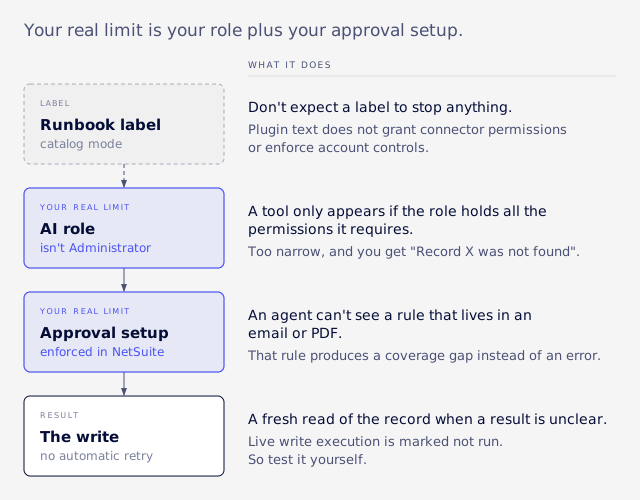
Oracle's README sets two safeguards for writes: no automatic retry, and a fresh read of the record when a result is unclear (Oracle: SuiteSkills README). Oracle also says policy checks "do not establish model adherence" (Oracle: SuiteSkills security notes), and live write execution is marked not run. So test it yourself.
VCG's practice on the connector is to approve each write individually. How SuiteAgents behave when acting on their own is unconfirmed.
Approval rules in emails and PDFs
An agent can't see a rule that lives in an email or PDF, so that rule produces a coverage gap instead of an error.
Oracle's journal review shows how this plays out. It needs your materiality threshold, expected preparers, support requirements, required dimensions and reversal due dates. The runbook then says: "Missing policy makes that criterion not assessed; do not guess thresholds."
Build the inventory
List each approval in a four-column worksheet. These sample rows are synthetic.
| Approval and threshold | Approver and exception path | Where the rule lives | Enforced in NetSuite? |
|---|---|---|---|
| Manual journal over $25,000 | Controller, CFO if the controller prepared it | Close policy PDF | No |
| Vendor bill over $10,000 | Department head, then AP manager | Approval routing | Yes |
| Customer discount over 15% | Sales VP, by email | Someone's inbox | No |
Sort each rule into one of three groups: enforced in NetSuite, written but not enforced, or only in someone's head. Move the last two into approval routing or a workflow before agents write anything.
What VCG sees with automated writes
VCG's consultants have seen an approval status set by a script or integration skip the approval workflow altogether. Journals sat in Pending Approval with nothing on the GL, or returned to Pending at the next save.
They have also seen workflow writes to approval checkboxes cleared later in the same save. Expense reports lack next-approver and approval-status fields unless Approval Routing is on for them. An agent that writes records can run into any of these.
Period locks have edges too. Writes are blocked in locked periods, and reopening a period does not clear Lock All, Lock A/R or Lock A/P. Deploying a role file adds permissions but never removes those missing from it, so narrowing a role by file can leave old access in place.
A success message is not proof of a change. VCG has seen an API write report success and change nothing, once when clearing a multi-select with an empty list and once when a hidden form field dropped a value. After any AI bulk update, re-read the records and compare.
Some rules have no system home at all, such as your discount policy and close checklist. Write those down too, with one owner each.
SuiteFlow Agent is no reason to wait. Its availability is unconfirmed, and it would need the same written rules.
Can messy segments mislead?
Yes, inconsistent subsidiary, class and department values give wrong answers, and usually no error comes with them.
Take a synthetic case. One subsidiary uses "Prof Services" and another uses "Professional Services". Ask for labor cost by department and the answer reports half the department, in a clean table.
Four checks
Run these with saved searches, and confirm the field names in your own account first.
- Missing dimensions. A transaction search on lines only, filtered to one closed period, where department or class is empty. Summarize by transaction type.
- Inactive values. Open transactions whose department, class or employee is now inactive. VCG's consultants find that an inactive value set in an automated copy doesn't fail at once. It surfaces at save.
- Two names, one meaning. Export the department and class lists with their subsidiaries, sort by name, and read for near-duplicates.
- Wrong subsidiary. Export the same lists and check each value's subsidiaries against the entities posting to it.
Clean-up order
- Decide your required dimensions, since the journal runbook treats them as a policy input.
- Merge or inactivate duplicates.
- Confirm each value per subsidiary.
- Document the result.
- Fill in Oracle's AI Description field on custom records, transaction types and fields. It arrived in 2026.2, holds up to 280 characters, and is used only after validation (Oracle: AI Description for Custom Object Definitions, Oracle: Guidelines for Writing an AI Description). Oracle notes that text from its Optimize for AI action may contain errors, so have someone read it (Oracle: Adding an AI Description for a Custom Object).
Pilot in a sandbox
Run one team, one role, three questions it already answers monthly and at most one write workflow, for two weeks.
Pick questions with a native report to tie against, because that is what makes the score mean something. Three read-only runbooks fit that rule: Financial Statement Review against your native statements, Credit Management against your A/R aging, and Period Close Status against your accounting periods.
Mirror the intended production role exactly. VCG's consultants note that testing as an admin-like role hides every permission gap, so it proves nothing about production. Administrator is blocked on the connector, but over-broad custom roles are not.
Set up the environment
A sandbox differs from production. After a refresh, scheduled scripts are off, sandbox-only records and internal ids are gone, and objects may need redeploying. Check the role again after any refresh.
VCG's advice is a separate connector per account and environment. Each sandbox has its own AI Units pool equal to production's licensed units, so pilot use of those features doesn't spend production units (Oracle: AI Units FAQ). Sandbox logs last 7 days, so export your findings as you go.
Score every answer
Mark each answer as tied to a report, partial, wrong or refused. Permission errors are findings to log, and working around them defeats the test.
Set the pass bar before you start. For example, every period total ties to a native report or a posting-period query, and every refused record is explained.
VCG's consultants found that the connector's report tool filters by transaction date, not posting period, which is why the AI connector report accuracy guide matters for any monthly number. Oracle advises using ns_runReport or ns_runSavedSearch before generated SuiteQL (NetSuite's query language), and not rebuilding financial reports in SuiteQL (Oracle: Best Practices for MCP Standard Tools SuiteApp).
Check volume
A clean sandbox won't show real volume or throttling, so rerun a timed check at production volumes.
- VCG's consultants see SuiteQL results stop at 5,000 rows with no warning.
- Queries over transaction lines can time out.
- A burst of errors can be another session throttling the account, so don't resend the same query.
- Concurrency limits are shared with other integrations, an admin can allocate a limit per integration record, and overflow fails with "Too Many Requests" (Oracle: NetSuite AI Connector Service FAQ).
Bound your questions by period and subsidiary. Route anything that pages or aggregates through a read-only script outside the AI.
Included or extra?
Our SuiteWorld 2026 overview holds the AI Units numbers and the questions for your account manager, so only the SuiteSkills angle is here.
Oracle says: "The NetSuite AI Connector will not consume AI Units" (Oracle: AI Units FAQ). You pay your AI vendor instead. SuiteSkills through Claude or ChatGPT runs on the connector, so it reasonably shouldn't draw on the pool, but that is our inference and Oracle doesn't say it about SuiteSkills. Assign someone to check Billing Information monthly.
Logging and auditors
Connector activity is logged, but we found no Oracle statement on auditor acceptance, so ask your auditor before go-live.
MCP tool usage is recorded in the integration record's Execution Log, at Setup > Integration > Manage Integrations, with time, duration, status, user and request details. Oracle's connector FAQ gives the retention as 21 days in production and 7 in sandbox. If you need a quarter's history, export it on a schedule.
For auditors, the wording in System Notes matters. Set By, or User on System Notes v2, shows the initiating user. In the current experience, the AI Used column tracks only changes made by custom tools through the AI Connector Service. The value "Ask Oracle" appears only in Next (Oracle: August Monthly Release). Make a change through the connector in a sandbox and read the note as an auditor would.
System notes for agent changes in the Management Workspace are announced, with availability unconfirmed, so don't design a control around them today.
Security risks
NetSuite restricts what tools do inside NetSuite, and Oracle is plain that it can't control what outside components do.
Prompt injection means hidden instructions inside content the AI reads, such as a vendor's PDF telling it to mark an invoice as approved (a synthetic example). Oracle says to review the AI vendor's documentation (Oracle: Associated Risks, Controls, and Mitigation Strategies). Our advice is to keep any role that can write away from outside documents until your pilot has tested it.
If you hold health data, Oracle says the connector has not been assessed for HIPAA and must not be used for ePHI, meaning electronic protected health information, unless you have independently determined that it meets your obligations.
Before month-end
Keep AI out of the close's writes for now and start with reads such as period close status and journal review.
That is this article's recommendation, not Oracle's. Three other steps go with it:
- Give the journal review its inputs. It needs materiality, expected preparers, normal hours and support rules, or those criteria come back not assessed.
- Read the coverage figures. Oracle's procedure reports flagged, cleared and not fully assessed separately, and it says "Never call missing support or approval evidence clean."
- Tie any AI period total to a native report before anyone uses it, using the report accuracy guide.
Don't change roles or dimensions mid-close. Schedule the clean-up after you lock the period.
When readiness turns into rescue
If the pilot findings are bigger than a cleanup, you have a build problem, and that deserves a different kind of plan.
Cleanup looks like a few missing permissions, a handful of duplicate values and a short list of rules to configure. Your admin and controller can close these.
A build problem looks like roles that can't be explained, automated writes that skip approvals, totals that even people can't tie, and segments unusable across subsidiaries. That is the point where NetSuite rescue work starts to make sense.
If the pilot passes, carry on without outside help, and wait on anything still announced-only. If it exposes build problems, Book an Assessment.
FAQ
Which SuiteAgents are available now?
Software, product and construction are reported as available in NetSuite Next. Check your own account.
Can an Administrator role use it?
Not on the connector. Oracle blocks Administrator and full-permission roles.
Does the connector use AI Units?
Oracle says no. You pay your AI vendor instead.
Where do I see AI Units?
At Setup > Company > View Billing Information.