
The short answer
The SuiteWorld 2026 NetSuite announcements change three things for current customers: what you can use now, what it costs, and what still has no date.
Some features work today if your account has Ask Oracle or NetSuite Next, which Oracle confirms for the US and Canada. The AI Connector Service is free in writing. Ask Oracle is included with your licence but draws metered AI Units. The agent builders have no date in writing. No data migration is required, and Oracle expects most scripts to keep working.
Every one of these features inherits the account it is switched on in, including its roles, its data and its existing build. Start with one step per role:
- Administrator: look for the NetSuite Next banner, then check which roles have Ask Oracle access.
- Controller: once access is on, ask the assistant for a closed period's total and tie it to a native report.
- CFO: open Setup > Company > View Billing Information and see how many AI Units you hold.
What works today
We sorted each item by where it is written down. Status was checked November 1, 2026.
| Status | Feature | In plain English | What to do |
|---|---|---|---|
| Usable now | Ask Oracle (2026.2) | The built-in assistant inside NetSuite | Check the banner and role access |
| Usable now | AI Connector Service | Lets outside AI clients such as Claude or ChatGPT work with NetSuite data | Build a dedicated role first |
| Usable now | AI Description fields | Notes that explain your custom records and fields to AI features | Fill in your most-used custom objects |
| Usable now | Banking and bank reconciliation records | Connector clients can read these and accept or reject suggestions | Decide who may hold this |
| Usable now | SuiteSkills | 5 skills holding 48 step-by-step business runbooks | Download and test in a sandbox |
| Check your account | AI Portlets | Dashboard analysis and charts from a plain request | Look for it in your account |
| Check your account | Select industry SuiteAgents | Agents for specific industries | Ask which ones apply to you |
| Check your account | AI Workspaces | A shared view of people, agents and approvals | Treat as unavailable until you see it |
| Don't plan on it | SuiteFlow Agent, SuiteAgent Studio, SuiteAgent Management Workspace, Ask Oracle Connectors, NetSuite Data Intelligence | Tools to build and oversee agents, connectors, and a renamed analytics product | Wait for a date in writing |
| Don't plan on it | Ask Oracle predictions, AI Workspace Builder, native lease accounting, Suite Express, marketplace listings, BILL promotion | Items shown or mentioned at the event | Watch the demo, then ask for it in writing |
Oracle's published package explains the "more than 45" headline. The Oracle: netsuite-suitecloud-sdk ai-plugins-dist page lists five skills and 48 runbooks. The release says SuiteSkills are available to all customers for download and also inside Ask Oracle within NetSuite Next (CPA Practice Advisor: NetSuite Introduces Over 45 SuiteSkills Across Key Business Functions). Our SuiteSkills and SuiteAgents readiness guide covers what to fix first.
The middle group depends on Next. The reposted release says those items are available in all markets where NetSuite Next is available, which means Next accounts, not every account (BigDATAwire: Oracle NetSuite Adds More Than 45 AI Skills for Financial and Operational Tasks). On AI Workspaces, the release says available and the stage reportedly said upcoming, so only your own account settles it.
What the assistant can replace
If a person reads the answer once, the assistant can produce it; if someone signs off, keep a saved search, report or script.
That rule is VCG's view, and the second half extends to anything an auditor may ask you to reproduce. Much of what used to need a custom report can now start as a question, so do not pay for custom work on one-off lookups.
| Task | Assistant is enough | Keep it custom | Why |
|---|---|---|---|
| One-off lookup or throwaway search | Yes | Nothing depends on it | |
| How-to question | Yes | No number to defend | |
| First-draft variance explanation | Yes, as a draft | A person still checks the figures | |
| Monthly report with sign-off | Yes | Must give the same answer next month | |
| Scheduled job | Yes | Has to run unprompted, every time | |
| Approval logic | Yes | Part of your control design | |
| High-volume processing | Yes | Needs paging and error handling | |
| Anything scripts or integrations read | Yes | Check dependencies before retiring it | |
| Reconciliation with an evidence trail | Yes | Differences must be explained |
Reconciliations show the gap best. VCG's rule is that every difference is either explained by a named class, such as a manual journal, reclass or timing, or it fails the run. Nothing goes into an unexplained bucket to be plugged silently. A general AI summary does not give a controller that trail.
Integration plumbing also stays as work, because the vendor-specific edge cases are the job. VCG has seen a bank-feed plug-in fail because it touched a library as the file loaded, and NetSuite reported the wrong API version. That is the sort of repair our system integration team handles.
Which state is your account in?
What you do next depends less on the announcements than on whether your numbers tie today.
| State | What it looks like | What to do |
|---|---|---|
| Clean account | Reports tie, close runs on time | Pilot in a sandbox, then widen per role |
| Known workarounds | Reports tie after manual fixes people can list | Use AI read-only to explain, and hold off on writes |
| Books do not tie | Audit findings, a late close, numbers you defend by hand | Fix those first |
The third state is where our NetSuite rescue work starts. An assistant inherits the build it reads, so a revenue setup that does not tie gets explained wrongly with confidence. Cyderes' ARM setup could not support a timely close until it was rebuilt.
Do you have Next or Ask Oracle?
The fastest test is the administrator banner, because Oracle makes accounts eligible in phases and says some exclusions may apply.
When your account qualifies, an administrator sees a banner offering three choices: request a NetSuite Next Preview Account, enable Ask Oracle in the current account, or enable NetSuite Next in production (Oracle: NetSuite Next FAQ). These are two separate questions, because you can have Ask Oracle without moving anyone to Next.
A missing feature may be a role setting and not an eligibility problem. Oracle says "By default, roles do not have access" to Ask Oracle, and only the Administrator role can open the Ask Oracle Access page (Oracle: Managing Ask Oracle Access for Roles).
Older guides may give the path as Setup > Company > AI > Ask Oracle Access. The October 19 notes moved these settings, and Oracle now points to Setup > Agent Management, where AI Preferences has become Agent Preferences (Oracle: Managing AI in NetSuite).
Oracle's pages name the US and Canada, and our NetSuite Next rollout guide covers other countries. Trust the banner over any article, including this one. That guide also covers which scripts Oracle flags for review, the safe places to test, and a regression list by owner.
Is the AI really no extra cost?
Partly, because Ask Oracle is included with your licence but still draws on a metered pool of AI Units.
The "no extra cost" line is reported from the stage, and the written position is narrower. Oracle's FAQ says Ask Oracle is included with your licence and needs no separate ChatGPT or Claude licence, while its Oracle: AI Units FAQ lists Ask Oracle as consuming units. Linking those two statements is our reading and not Oracle's wording.
Each General Access user brings 1,000 AI Units per month of term, provisioned upfront into one account pool. Oracle's example is 10 users on a 36-month term, which gives 360,000 units. Only listed licence types earn units, so check your contract. Sandboxes have separate pools, and Oracle tracks preview accounts separately too.
| Consumes AI Units | Does not consume AI Units |
|---|---|
| Ask Oracle | AI Connector Service |
| Text Enhance | NetSuite Bill Capture |
| Prompt Studio | NetSuite EPM |
| SuiteScript Generative AI APIs | NetSuite Analytics Warehouse |
| Any SuiteApp using NetSuite generative AI |
Read the left column against your current build. Custom scripts that call generative AI, and SuiteApps that use it, may already draw on the pool your users will share.
SuiteSkills inside Ask Oracle, Portlets, Workspaces and SuiteAgents don't appear in Oracle's AI Units pages (Oracle: How AI Unit usage is calculated). Their consumption is unknown, which is different from free.
Oracle's estimates for Ask Oracle are about 10 units for a how-to question, 10-50 for analysis and 50-200 for research, and it warns that actual use may vary (Oracle: NetSuite AI Units and NetSuite Features). Its labels matter. A single invoice balance counts as analysis, while "top five customers by overdue A/R balance this quarter" counts as research.
Unused units expire when your term ends, so nothing rolls over. At zero, Oracle says customers "are expected to purchase more or pause any further usage of AI features", without saying whether features hard-stop. Add-on packs come in 10,000 and 25,000 pooled units, and the FAQ gives sizes without prices.
Administrators can see usage at Setup > Company > View Billing Information, with a breakdown by date, name and feature in the Oracle: NetSuite AI Units usage dashboard. Do not rely on email alerts, because the FAQ says in one place that you will get them and in another that NetSuite plans to provide them. Oracle also says there is no single switch to turn off all AI, since features are controlled individually through preferences, roles and permissions.
Budgeting AI Units at renewal
Budget from a measured month of real use, because the same licence count can leave units expiring unused or empty the pool within weeks.
Here is a synthetic illustration using Oracle's estimates. A company has 25 General Access users on a 12-month term, so it starts with a pool of 300,000 units.
| Scenario | Daily use per user | Units per month (21 working days) | What happens |
|---|---|---|---|
| Light | 2 how-to questions at 10 units | 10,500 | 126,000 used in a year, 174,000 expire |
| Heavy | 10 analysis questions at the top estimate of 50 units | 262,500 | Pool gone in about five weeks |
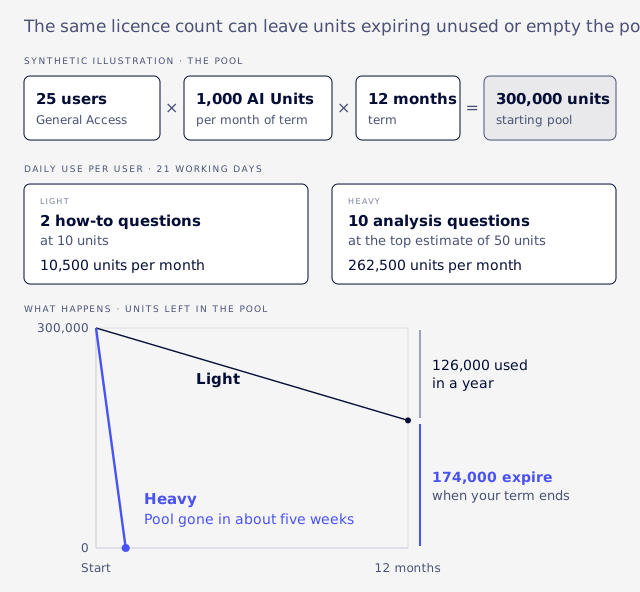
Pool size also moves with term length. The same 25 users on 36 months would start with 900,000 units, so compare like with like when you renew. Heavy use is easier to reach than it sounds, since Oracle files an ordinary ranked customer question under research.
Analysis through the AI Connector Service uses no AI Units, but you pay for the AI client. Ask Oracle needs no second subscription, but it is metered. Neither route is free in all cases, so price both against your measured month.
Ask your account manager these questions, and get the answers in writing:
- How many AI Units does our contract hold?
- What do the 10,000 and 25,000 packs cost?
- What happens at zero, and do features stop?
- Are SuiteAgents included for our edition and contract, and in which markets?
- Do agents and portlets consume units, and at what rate?
- What are the terms behind the "no extra cost" statement?
What the connector needs
It needs a dedicated role, because Oracle blocks Administrator and full-access roles, and possibly a paid subscription for your AI client.
MCP (Model Context Protocol) is the standard route that lets an outside AI assistant work with NetSuite data under a user's role. Oracle is clear about the price of that route:
"The NetSuite AI Connector Service is not a paid feature and the MCP Standard Tools is a free SuiteApp. However, you may need a paid subscription for your AI client."
Our guide to MCP role permissions walks through the build, and the readiness guide covers what to test. Then fill in the AI Description field on custom records, transaction types and fields, which Oracle says Ask Oracle and the connector both use (Oracle: AI Description for Custom Object Definitions).
Controls and the audit trail
AI works inside your existing role permissions, but Oracle's writing promises no human approval of every action, so ask how each agent is configured.
Oracle's NetSuite Next release said agentic workflows "give users the choice to approve key decisions or allow agents to act autonomously" (CPA Practice Advisor: NetSuite Unveils NetSuite Next). Our inference is that role design is now AI design, so the AI role belongs in your access review alongside everyone else's.
Do not assume bank reconciliation is read-only. The October 19 notes expose Bank Reconciliation Suggestion, Banking Statement, Banking Transaction and Transaction Match, and they say record actions "let users accept or reject suggestions" through external AI clients (Oracle: Release notes, October 19, 2026).
This applies if you use the connector and the role allows it. The boundary is the role, so the controller should settle who holds this before anyone connects, because it is a segregation of duties question. Oracle also advises reviewing who holds MCP Server Connection before installing the SuiteApp (Oracle: MCP Standard Tools SuiteApp).
Before relying on the audit trail, test it the way the readiness guide describes, by reading the System Notes of a sandbox change as an auditor would.
Oracle says these AI features have not been assessed for HIPAA and must not process or store ePHI, meaning electronic protected health information (Oracle: NetSuite Features That Use AI). Take data residency questions to Oracle in writing, as we found nothing to rely on.
Why right-looking answers can be wrong
An assistant can read the wrong date basis or too few rows, so treat its totals as unvalidated until they tie to a native report.
In one live comparison VCG ran, a connector period report filtered by transaction date, and net income was off by roughly half a million across 13 accounts when compared by posting period. Revenue tied only because every revenue line was dated inside the month. Our guide to AI connector report accuracy shows how to run the tie-out.
Rows can also fail to arrive. Plain SuiteQL, NetSuite's query language, stops at 5,000 rows with no error, as our guide to the SuiteQL row limit explains. Oracle's writing does not say whether the new features read every row or a sample, so test each one by asking for a total you already know.
Do the deadlines still apply?
Yes, nothing we found from SuiteWorld changes Oracle's authentication dates, and the first of them land at the next release.
Our TBA and OAuth 2.0 guide holds every date, starting with NLAuth sign-ins and the 2FA default, and sorts each integration by route.
After the first checks
Once the first checks are done, each role has one job left, and a measured month settles the rest.
- Administrator: build the dedicated AI role and test what it sees.
- Controller: decide which actions AI may take, including who may accept bank reconciliation suggestions.
- CFO: send the account manager questions above, and name one owner for AI access.
Then measure one real month of AI Units before choosing between Ask Oracle and the connector for analysis. Widen access role by role, and check whether the undated items have shipped.
FAQ
Do I have to move to NetSuite Next?
We found no deadline in Oracle's writing. You can enable Ask Oracle in your current account, and Ask Oracle access is granted per role. Moving production to Next is a separate choice, covered in the rollout guide.
Does Ask Oracle cost extra?
It is included with your licence but consumes AI Units from your pool. Beyond that pool, you buy more or pause.
Do AI Units roll over?
No. Unused units expire when your NetSuite term ends.
Can an AI client accept a bank reconciliation suggestion?
Yes, through the AI Connector Service, if the role allows it. Oracle added this in the October 19 notes.
Why can't I see Ask Oracle?
Your account may not be eligible yet, or your role may lack access. Roles have no access by default.
Is NetSuite Next available outside the US and Canada?
Oracle's pages confirm only those two countries. Check your banner, and see the rollout guide for other countries.
Should we switch this on if our books do not tie?
No. Fix the books first, since an assistant reads the same numbers you already doubt.
If your account is in that third state, Book an Assessment. It is a review of the account and its business processes before AI goes near them.