
The short answer
NetSuite OAuth 2.0 client credentials lets another system get a 60-minute access token by signing a short note with a private key.
The grant is also called machine to machine, or M2M, because no person logs in. You upload a public certificate on the OAuth 2.0 Client Credentials (M2M) Setup page and link it to an integration record, an entity (the user the integration runs as) and a role. The calling system then signs a JWT with the matching private key and posts it to https://<accountID>.suitetalk.api.netsuite.com/services/rest/auth/oauth2/v1/token. NetSuite answers with a bearer token that lasts 60 minutes (Oracle: OAuth 2.0 Client Credentials Setup).
The rest of this guide uses these terms:
- JWT (JSON Web Token): a small signed note. Anyone can read it, but nobody can change it without breaking the signature.
- Private key and public certificate: a matched pair. The private key signs, stays with the caller and never leaves it. The certificate holds the public half, which NetSuite uses to check the signature.
- Bearer token: the access pass NetSuite returns. Whoever holds it can call the API until it expires, so treat it like a password.
Five rules are worth checking first when a setup fails. The signature must be PS256, PS384, PS512, ES256, ES384 or ES512, never RS256. The JWT header carries the Certificate ID as kid. The scope claim is required. exp must be less than 60 minutes after iat. The certificate is valid for two years at most (Oracle: Request Token Structure).
If you are here because token-based authentication (TBA) is being retired, the dates are in our TBA deprecation guide. In short, no new TBA integrations can be created from NetSuite 2027.1, and support for existing ones ends tentatively in 2028.2 (Oracle: Preparing for TBA End of Support).
How the pieces fit together
Four things make one working connection: an integration record, an entity, a role and a certificate, joined in a single mapping.
| Piece | Where it lives | What it does |
|---|---|---|
| Integration record | Setup > Integration > Manage Integrations | Supplies the client ID, which becomes the iss claim |
| Entity | The mapping | The user the integration acts as |
| Role | The mapping | Decides what the integration can see and change |
| Public certificate | The mapping | Lets NetSuite check the JWT signature |
| Private key | The calling system only | Signs each JWT |
The flow runs in one direction. The caller signs a JWT with its private key, posts it to the token endpoint and receives an access token. It then uses that token to call REST web services, RESTlets (custom scripts that expose an endpoint) or SuiteAnalytics Connect (ODBC and JDBC reporting access).
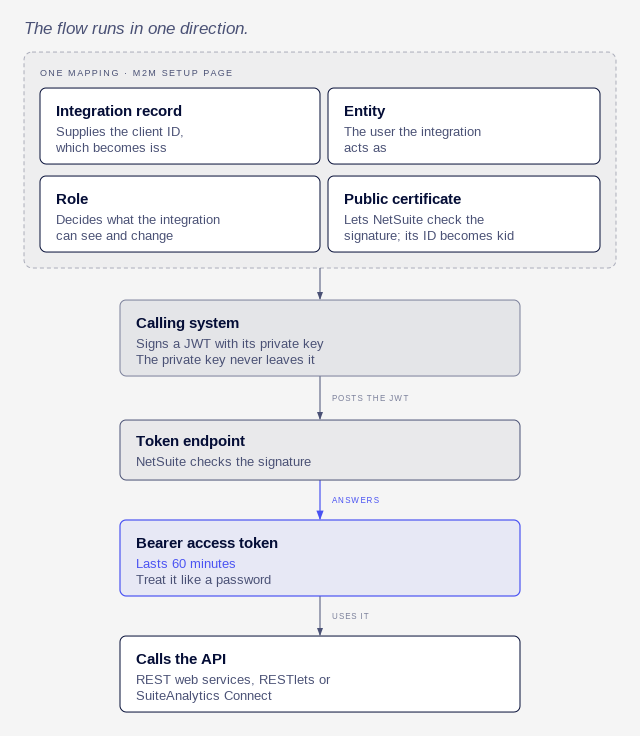
The integration runs as the entity and role on the mapping, and nothing else. The role is therefore the real security boundary, so give it the narrowest set of permissions that does the job.
Saving the integration record shows a client ID and a client secret, once only (Oracle: Create Integration Records for OAuth 2.0). For M2M the secret does not authenticate anything, because the certificate key signs the assertion. Keep it anyway. If you lose either value, Oracle says you reset them on the integration record to get new ones.
Oracle is also explicit that the Client Credentials (Machine to Machine) Grant does not support public clients, meaning apps that cannot keep a secret, such as a browser page or a desktop tool handed to users.
Features, permissions and the role
Turn on OAuth 2.0, give the setup person the right permission, and give the mapped role permission to log in with OAuth 2.0 tokens.
Enable the feature at Setup > Company > Enable Features, SuiteCloud subtab, Manage Authentication section: check OAuth 2.0 and accept the terms. For RESTlets, Oracle also asks for Client SuiteScript and Server SuiteScript to be enabled (Oracle: Enable the OAuth 2.0 Feature).
The setup touches several people and roles, and each needs different permissions (Oracle: OAuth 2.0 Permissions):
- Whoever creates the integration record needs the Integration Application permission, or the Administrator role.
- Whoever creates the mapping needs Administrator or the OAuth 2.0 Authorized Applications Management permission. That permission requires two-factor authentication and grants no API access by itself.
- The mapped role needs Log in using OAuth 2.0 Access Tokens. Add REST Web Services if it will read or write records through REST, plus the record permissions for the actual work.
The OAuth 2.0 login permission covers REST web services, RESTlets and SuiteAnalytics Connect. Do not confuse it with Access Token Management, which belongs to TBA and has nothing to do with this flow (Oracle: Access Token Management Permission).
In one case, VCG's consultants saw an under-privileged mapped role, an A/P analyst role, produce errors that read like token failures, such as a 302 redirect or a message about a missing permission, from SuiteCloud development tooling. If the token request succeeds and the next call fails, fix the role before you touch the certificate.
Create the integration record
The integration record supplies the client ID and decides whether the application can be used for M2M at all.
- Go to Setup > Integration > Manage Integrations > New.
- Set State to Enabled.
- On the Authentication subtab, check Client Credentials (Machine to Machine) Grant.
- Check the scopes you need: REST Web Services, RESTlets, SuiteAnalytics Connect.
- Save, and copy the client ID and secret from the confirmation page straight into your secrets manager.
Skip step 3 and the application will not appear in the Application list on the M2M Setup page (Oracle: OAuth 2.0 Client Credentials Setup). The client ID goes into every JWT as the iss claim.
Generate a key and certificate
NetSuite accepts RSA keys of 3072 or 4096 bits, or EC keys on the 256, 384 or 521-bit curves, valid for two years at most.
Oracle's Certificate Conditions set those rules, and a longer validity is shortened to two years automatically (Oracle: Certificate Conditions). The two recipes below use 700 days, which stays under the cap with a small margin. Replace the subject text with your own integration's name.
Recipe A: RSA-PSS for PS256
This is the recipe VCG's consultants use for M2M connections. A plain RSA key and certificate made with default settings can be rejected, so the certificate is signed with the PSS scheme.
openssl req -new -x509 -newkey rsa:4096 -nodes -sha256 \
  -sigopt rsa_padding_mode:pss -sigopt rsa_pss_saltlen:64 \
  -days 700 -subj "/CN=example-nightly-sync" \
  -keyout private.pem -out public.pem
req -new -x509makes a self-signed certificate in one step.-newkey rsa:4096creates a new 4096-bit RSA key.-nodesleaves the key file unencrypted. Protect it with your secrets manager instead.-sha256sets the hash used in the signature.-sigopt rsa_padding_mode:pssandrsa_pss_saltlen:64sign with RSA-PSS rather than the older PKCS#1 v1.5 padding.-days 700keeps validity under two years.public.pemis what you upload.private.pemnever leaves the caller.
Recipe B: EC for ES256
EC keys are smaller and use the P-256 curve for ES256.
openssl ecparam -name prime256v1 -genkey -noout -out ec-private.pem
openssl req -new -x509 -key ec-private.pem -sha256 \
  -days 700 -subj "/CN=example-nightly-sync" -out ec-public.pem
Which one to pick
Pick the key type your calling library or tool supports, then check NetSuite's list. In one case, VCG's consultants found a vendor command-line tool that rejected EC keys with an "error with the private key" message, although NetSuite accepts EC keys.
Key file formats
Both recipes produce PEM files, the text format that starts with a BEGIN line. Look at that line. BEGIN PRIVATE KEY is PKCS#8, and BEGIN RSA PRIVATE KEY or BEGIN EC PRIVATE KEY is the older format. Many JWT libraries want PKCS#8 (a standard wrapper for private keys), and this converts a key:
openssl pkcs8 -topk8 -nocrypt -in ec-private.pem -out ec-private-pkcs8.pem
That is a requirement of the library, not of NetSuite.
Why older recipes fail
Some published guides still show a 2048-bit RSA key signed with RS256. Both are outside Oracle's rules: 2048 bits is below the 3072-bit minimum, and Oracle states that RSA PKCS#1 v1.5 signing, which is what RS256 means, is no longer supported for client credentials (Oracle: Request Token Structure).
Upload it and find the Certificate ID
The mapping joins the application, entity, role and certificate, and it gives you the Certificate ID that goes into every JWT.
- Go to Setup > Integration > Manage Authentication > OAuth 2.0 Client Credentials (M2M) Setup.
- Click Create New.
- Choose the Entity, Role and Application, and the signing algorithm if the page asks for one.
- Upload
public.pem. - Save, then find the Certificate ID NetSuite generated for the mapping and copy it.
Oracle says the setup list shows the data you entered plus the data read from the certificate, but it does not say which column holds the Certificate ID (Oracle: OAuth 2.0 Client Credentials Setup). Look for it on the saved mapping in your own account, and paste it into your secrets manager next to the client ID. Oracle's Request Token Structure page says the kid header carries "the value of the Certificate ID generated during the mapping of the application".
What VCG has seen about the ID
VCG's consultants observed that the Certificate ID appeared to follow the certificate itself rather than the mapping. Oracle does not document this. In one test, the same public certificate uploaded into two accounts showed the same ID in both, and in one account one certificate backed two separate mappings.
That has an upside and a downside. After a sandbox refresh you can upload the same certificate again and keep the same key pair. But a leaked private key is leaked everywhere that certificate is mapped.
The five-certificate limit
Oracle allows five active certificates for each combination of integration record, entity and role. Revoked and expired certificates do not count. If you need more, Oracle's answer is a different entity or role. A revoked certificate cannot be reused in a different integration, and once a certificate is revoked or expires, you need a new mapping.
PS256, ES256 and why RS256 fails
Oracle accepts only PS256, PS384, PS512, ES256, ES384 and ES512, and has dropped RS256 for client credentials.
The PS family is RSA with PSS padding. The ES family is elliptic-curve signing. RS256 uses the older RSA PKCS#1 v1.5 padding, which Oracle no longer supports for this flow, so integrations built on it have to move to RSA-PSS (Oracle: Request Token Structure).
PS256 needs an RSA key and a signing library that actually does RSA-PSS. Check that your library supports RSA-PSS, not only RS256. Test a full token request in sandbox before you commit to a platform.
ES256 has its own trap. A JWT expects the EC signature in raw form, the two numbers R and S joined end to end, as RFC 7518 sets out. Generic crypto calls usually return the signature in DER, a nested binary encoding, which is not the raw form. Oracle's own SuiteScript sample sets useRawFormatForECDSA for that reason. A JOSE library handles the conversion. A hand-rolled signer often does not.
Whatever you choose, the alg in the JWT header has to match the key and the algorithm on the mapping.
Build and sign the JWT
The JWT has a three-field header and five claims, and every value comes from your mapping, your integration record or the clock.
Oracle defines the structure (Oracle: Request Token Structure):
| Part | Field | Value |
|---|---|---|
| Header | typ | Always JWT |
| Header | alg | PS256/384/512 or ES256/384/512 |
| Header | kid | The Certificate ID from the mapping |
| Claims | iss | The integration record's client ID |
| Claims | scope | restlets, rest_webservices, suite_analytics, or several separated by commas |
| Claims | aud | The account's token endpoint URL |
| Claims | iat | Issue time, in seconds since 1970 |
| Claims | exp | Less than 60 minutes after iat |
There is no literal all scope; list the scopes you need. Oracle documents no sub claim for the assertion, so leave it out.
Should aud be in the JWT?
Oracle's Request Token Structure says yes, set to the token endpoint. Some third-party samples leave aud out, and Oracle's own SuiteScript sample writes it as https://<accountID>/services/rest/auth/oauth2/v1/token without the suitetalk.api.netsuite.com host (Oracle: Using SuiteScript with OAuth 2.0). Start with the documented form and confirm it in sandbox.
Leave room on the clock
Take iat from a synced clock and keep exp well inside the hour. In one data warehouse integration, VCG saw a token whose lifetime sat exactly on the issuer's one-hour maximum fail whenever the signing machine's clock ran slightly ahead. That lesson comes from the connection described in our NetSuite and Snowflake guide, and is not a documented NetSuite tolerance.
A working example in Node
This uses the jose library, which handles PSS padding and the raw ES256 signature format. The account ID is synthetic.
import { SignJWT, importPKCS8 } from 'jose';
import fs from 'node:fs';

const ACCOUNT_ID = '1234567-sb1';
const TOKEN_URL = `https://${ACCOUNT_ID}.suitetalk.api.netsuite.com/services/rest/auth/oauth2/v1/token`;
const ASSERTION_LIFETIME_SECONDS = 1800;

const privateKey = await importPKCS8(fs.readFileSync(process.env.NS_KEY_PATH, 'utf8'), 'PS256');
const now = Math.floor(Date.now() / 1000);

const assertion = await new SignJWT({ scope: 'rest_webservices,restlets' })
  .setProtectedHeader({ typ: 'JWT', alg: 'PS256', kid: process.env.NS_CERTIFICATE_ID })
  .setIssuer(process.env.NS_CLIENT_ID)
  .setAudience(TOKEN_URL)
  .setIssuedAt(now)
  .setExpirationTime(now + ASSERTION_LIFETIME_SECONDS)
  .sign(privateKey);

const response = await fetch(TOKEN_URL, {
  method: 'POST',
  headers: { 'Content-Type': 'application/x-www-form-urlencoded' },
  body: new URLSearchParams({
    grant_type: 'client_credentials',
    client_assertion_type: 'urn:ietf:params:oauth:client-assertion-type:jwt-bearer',
    client_assertion: assertion,
  }),
});

const body = await response.json();
if (!response.ok) throw new Error(`${response.status} ${body.error}: ${body.error_description}`);
The same request with curl, once you have a signed JWT:
curl -X POST "https://1234567-sb1.suitetalk.api.netsuite.com/services/rest/auth/oauth2/v1/token" \
  -H "Content-Type: application/x-www-form-urlencoded" \
  --data-urlencode "grant_type=client_credentials" \
  --data-urlencode "client_assertion_type=urn:ietf:params:oauth:client-assertion-type:jwt-bearer" \
  --data-urlencode "client_assertion=$JWT"
The body must be form-encoded, not JSON (Oracle: Client Credentials Token Endpoint).
The account ID in the hostname
Use the account ID as it appears in your NetSuite URL. Sandbox IDs carry a suffix, such as 1234567-sb1 in the synthetic example above. Check the exact form in your own account, because a wrong host fails before NetSuite ever reads your JWT.
Token lifetime and refresh
The access token always lasts 3600 seconds, and the documented response contains no refresh token, so you repeat the grant.
Oracle's response holds three fields: access_token, expires_in and token_type. Oracle's text says the type is bearer while its sample shows Bearer, so compare it without regard to case (Oracle: Client Credentials Token Endpoint).
A sound pattern for a nightly job or middleware looks like this:
- Cache the token with its expiry time.
- Reuse it for every call until a few minutes before it expires.
- Sign a fresh JWT and request a new token.
- If a long job outlives its token, mint a new one. Do not try to stretch lifetimes.
Share one cached token per process. A pool of parallel workers that each request a token on every call creates needless load and makes failures harder to read.
What does invalid_grant mean?
It means NetSuite rejected the grant, and the response body usually tells you which part was wrong.
Rule one is to log the error and error_description fields from the response, not just the HTTP status. In one case, VCG's consultants saw a single 400 status cover several unrelated causes. Throwing the body away turned a two-minute fix into repeated runs of the whole handshake.
Oracle's token endpoint page says that "when the access token expires, the token endpoint returns an invalid_grant error." That sentence is accurate as quoted, but the token endpoint never receives your access token, so expiry is rarely the cause there. When you see invalid_grant or invalid_client on a token request, suspect the assertion first.
| What you see | Likely cause | What to check | Status of the cause |
|---|---|---|---|
invalid_request | The body is JSON instead of form-encoded, or a parameter such as client_assertion_type is missing or misspelled | Send the three form fields exactly as in the curl example | The OAuth 2.0 standard defines this code for a malformed request (IETF: RFC 6749 section 5.2) |
invalid_grant or invalid_client | kid does not match the mapping, or the private key does not match the uploaded certificate | Copy the Certificate ID again; confirm which key file the caller loads | Matches Oracle's JWT rules |
| Worked yesterday, fails today | Certificate expired or revoked | Expiry date and status on the M2M Setup page | Oracle documents expiry and revocation |
| Fails in sandbox after a refresh | Mapping cleared by the refresh | Does the mapping still exist? | Oracle documents the clearing |
| Rejected signature | RS256 used, or alg does not match the mapping | Header alg against the mapping and key type | Oracle lists the allowed algorithms |
| Rejected scope | scope missing or misspelled (space-separated values are untested) | Use the exact names, separated by commas | Oracle documents the values |
| Rejected audience or host | Wrong aud or wrong account host | Account ID and sandbox suffix | Oracle documents aud |
| Intermittent failures | exp too far from iat, or the signing clock is ahead | Keep exp well under 60 minutes; sync the clock | Not documented by Oracle as a cause |
invalid_client with correct-looking values | A secret placeholder never resolved, so its literal text was sent | Log the length and first characters of the value, never the value | Observed by VCG |
If the token request succeeds and later API calls fail with permission errors, the authentication is working. That is a role problem.
The misleading certificate ID error
On the M2M Setup page, a vague error about the certificate ID can mean the application is wrong, not the certificate.
In one engagement, VCG's consultants hit this while mapping a certificate to a custom integration record. Oracle does not document the behaviour, so treat this section as field observation.
The cause was the tool on the other end. Some tools cannot send their own client ID and only work with their built-in integration record. Oracle's SuiteCloud SDK, for example, maps its certificate to the SuiteCloud Development Integration application (Oracle: OAuth 2.0 Authentication for SuiteCloud SDK). A client you build yourself, which sends your own client ID as iss, works fine with a custom record.
To isolate it, map the same certificate to a known-good application and test. If that mapping works, the certificate is fine and the problem is the application choice.
What breaks a working connection
Four events commonly break a working M2M connection: a sandbox refresh, an expiry, a deleted mapping or a lost key.
Sandbox refresh. Oracle says the client credentials setup is not copied to other production, Release Preview, sandbox or Next Preview accounts, and a sandbox refresh clears it (Oracle: OAuth 2.0 Client Credentials Setup). Upload the certificate again and recreate the mapping. The same key pair still works, so nothing needs regenerating.
Deleted mapping, revoked or expired certificate. Each one needs a new mapping.
Lost private key. There is no recovery. Generate a new pair and map it again in every account that used the old one. Keep the key in a secrets manager, backed up, and never in a code repository.
VCG's consultants have also seen problems that looked like authentication failures but were not:
- A private key path containing spaces broke one command-line tool's argument parsing. Use a path without spaces, or a link to one.
- A sandbox hostname stopped resolving after a refresh because the sandbox had moved. Check which sandbox hosts actually resolve.
- A project validation error after a successful login is a project problem, such as a missing object reference. The login already worked.
Can one certificate serve sandbox and production? Technically yes. We recommend one key pair per environment, so a key exposed in a sandbox test cannot reach production.
Rotating certificates without downtime
Upload the new certificate while the old one is still active, switch the caller over, confirm it works, then revoke the old one.
- Generate a new key pair with the recipe you used before.
- Add it as a new active certificate for the same integration, entity and role, within the five-certificate limit.
- Change the caller's
kidand private key to the new pair. - Run a full cycle and confirm the token requests succeed.
- Revoke the old certificate.
Oracle also provides a certificate rotation endpoint that can list, create and revoke certificates for an integration record. It needs the Manage own OAuth 2.0 Client Credentials Certificates permission and a token with the REST web services scope (Oracle: OAuth 2.0 Client Credentials Certificate Rotation Endpoint).
The certificate is the only part of an M2M setup that expires, and an expired one looks like a sudden authentication failure. VCG records the expiry date next to every mapping. Put the date on a calendar owned by a named person. VCG has not seen NetSuite send a renewal reminder, so the calendar is the process.
When NetSuite is the caller
When a SuiteScript must sign a JWT to call another system, use a Digital Certificate record, because an API secret cannot do asymmetric signing.
This applies when a script calls another provider, or another NetSuite account, that expects a certificate-signed JWT. Oracle's own example connects one NetSuite account to another this way (Oracle: Using SuiteScript with OAuth 2.0).
Why a custsecret will not work
An API secret (a value stored under Setup > Company > Preferences > API Secrets, with an ID such as custsecret_example) has two uses in script. https.createSecureString substitutes it into an outbound request that NetSuite makes for you. crypto.createSecretKey uses it for HMAC (a keyed hash used to prove a message is unaltered) or symmetric ciphers (Oracle: N/crypto Module).
Neither lets the script read the key out, and neither does RSA or EC signing. Oracle's secure-string JWT sample signs with HMAC, which cannot produce the PS256 or ES256 signature that certificate-based flows need (Oracle: Create a JWT Token Using a Secure String).
The pattern that works
- Bundle the private key and certificate into a
.p12file. - Upload it as a Digital Certificate record at Setup > Company > Certificates.
- In a server script, call
certificate.createSignerfrom the N/crypto/certificate module withcertIdset to the certificate's script ID and a hash fromcertificate.HashAlg. - Pass the JWT header and claims to the signer and sign.
Oracle's sample uses certId: "custcertificate_oauth2_pss" with HashAlg.SHA256 and a PS256 header (Oracle: Using SuiteScript with OAuth 2.0). The certId is the script ID, not the internal id, and createSigner costs 10 governance units (Oracle: certificate.createSigner). The module works in server scripts only (Oracle: N/crypto/certificate Module).
For an EC certificate, a JWT needs the raw signature format (RFC 7518), and Oracle's sample adds the useRawFormatForECDSA option for that reason. The key never appears in script text or memory, because NetSuite signs internally.
Practical notes from VCG
- If NetSuite refuses the
.p12upload, export it again withopenssl pkcs12 -legacy. OpenSSL 3's default settings are sometimes refused. - Output the signature base64url-encoded and strip the
=padding. - Never log the signed JWT. It is a credential until it expires.
- Test your exact algorithm in sandbox before you design around it. Oracle's sample shows PS256 from a PSS certificate.
What to avoid
Hardcoding a private key in a library file is a risky workaround. Rotating that key means redeploying code, and the key leaks through the code base and any debug log that prints the JWT. The Digital Certificate record avoids both.
Prefer client credentials over refresh tokens in SuiteScript, too. When a provider rotates refresh tokens, each stored token survives one use. A script has no write API for API secrets to store the new one, and parallel Map/Reduce instances would rotate and revoke each other's tokens.
What a controller should approve
A controller or CFO should sign off on who the integration runs as, who owns the certificate, and how access is removed.
The approval is short, and each line should name a person:
- A dedicated integration user and a narrow role. Never Administrator. Our guide to MCP role permissions walks through least-privilege role design that applies here too.
- An owner for the mapping, recorded with the integration record and entity.
- An expiry owner and date for each certificate, on a shared calendar.
- Key custody. Where the private key lives, and who can reach it.
- A sandbox refresh checklist item. Re-upload the M2M certificate and recreate the mapping.
- An audit trail. Activity runs under the mapped entity and role, so include that role in periodic access reviews.
- A revocation runbook. Who revokes the certificate or mapping, and how fast, if a key is exposed.
FAQ
Two questions come up once the first token works: SOAP and shared certificates.
Does OAuth 2.0 client credentials work with SOAP?
No. Oracle states that "OAuth 2.0 can't be used with SOAP web services" (Oracle: OAuth 2.0 for REST Web Services). Our TBA deprecation guide explains what to do with SOAP integrations.
Can two mappings share one certificate?
In one account, VCG's consultants observed one certificate backing two mappings. Oracle does not document this either way. Oracle does say the system creates a record for every unique combination of application and certificate, so treat sharing as something to test in sandbox, not a design to rely on.
The takeaway
Following Oracle's certificate rules, building the JWT from the documented claims and naming an owner help prevent common M2M failures.
Generate the key and certificate to Oracle's sizes and two-year limit, with RSA-PSS or EC. Build the JWT exactly as Oracle documents it, and log the full error body when it fails. Give the certificate expiry date and the key backup a named owner, so a refresh or an expiry becomes a calendar task instead of an outage.
If an M2M integration keeps failing after refreshes or rotations, or your team cannot say which certificates are live, VCG's system integration consultants can review the setup. Book an Assessment.