
The short answer
NetSuite bank reconciliation AI can read your bank data and accept suggestions, but no route finishes the month on its own.
Whatever you use, match everything that needs no new entry first, then create entries for what's left, and have the accountant finish Reconcile Account Statement. The routes differ in how many of the hard lines they can take.
| Route | What it does | Where it stops |
|---|---|---|
| Oracle's AI on Match Bank Data | Settles ties between same-amount candidates and recommends one match among several | Same-amount or one-to-one cases; the assistant creates no matches |
| AI Connector Service | Reads bank data, accepts or rejects suggestions, creates match records | No matching logic of its own; multi-line matches are not described |
| Add-on apps | Match through the vendor's own app and rules | Vendor claims, and they cover the vendor's environment |
| VCG's bank rec skill, free to VCG clients | Matches several lines at once, proposes missing entries, writes the workpaper | Uses undocumented calls, so Oracle does not support it |
Which bank lines break matching?
The lines that break matching are the ones where the bank shows one amount and NetSuite holds several, or holds nothing at all.
VCG's rule for all of them: a match ties to the cent or goes to the accountant, and several equally good candidates are never picked automatically.
| Bank line | Why it breaks | How to treat it |
|---|---|---|
| Bill payment run | Several numbered payments, one bank debit | Tally payments per run and combine whole runs |
| Payroll | Several debits against one or more entries | Group by pay date; never match to a general ledger (GL) line named for an unrelated party |
| Card payout | Several days of receipts, net of fees | Tie receipts less the fee, then book the fee |
| Lockbox or batch deposit | One line made of several customers' payments | Find the set of payments that ties exactly |
| Loan or tax remittance | One debit, several GL lines | Tie the set, such as principal plus interest |
| Foreign wire | Differs by a rate or fee variance | Book the variance, then match |
| Returned item | No entry, or an original that needs reversing | Exclude both sides with a reason, or reverse the original |
| Sweep | Nets to 0.00 with no NetSuite entry | Exclude with a reason, or book a transfer if you track the other account |
Oracle's one-to-one assistant and same-amount enrichment, covered below, don't address most of this table, by design. Oracle also lists a Match Group suggestion, the one native feature that may reach further. VCG has not tested it, so see what your own statement patterns produce before ruling native out.
Here is an illustration with made-up figures. Three days of card receipts of $3,400.00, $3,250.00 and $3,520.00 total $10,170.00. Less a $300.02 fee, the bank deposit is $9,869.98. No single GL line equals that deposit, and it ties only once the fee entry is booked.
A second illustration, also made up, is a bill payment run. Four payments of $1,250.00, $2,480.50, $760.25 and $3,100.00 total $7,590.75. The bank shows one debit of $7,590.75, so the combined tie leaves a difference of 0.00, and none of the four payments matches the debit alone.
VCG's consultants also see data traps that make a rec look wrong when the matching is fine:
- Items already cleared in Reconcile Account Statement can't be matched and should be ignored.
- One journal can post several lines to the same bank account, so a match has to key to the line. Oracle's Transaction Match example includes a transaction line field (Oracle: Transaction Match).
- Money-in and money-out signs must agree between bank and GL. Check one inflow and one outflow on an account's first run.
- Missing days or unparseable dates in the import mean the feed needs fixing before any matching. Check the feed before blaming the matcher.
The order of work that prevents double booking
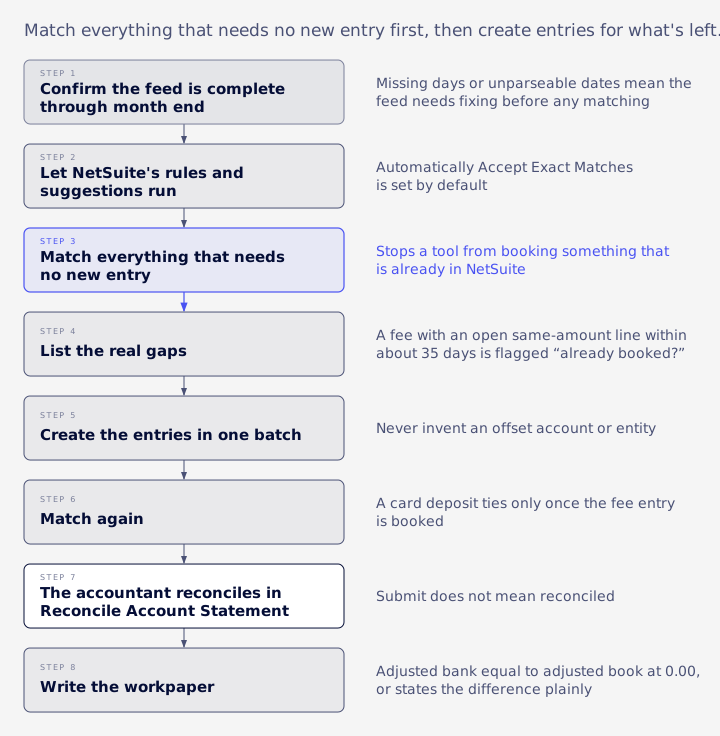
Match everything that needs no new entry first, then create entries for what's left.
This stops a tool from booking something that is already in NetSuite, and leaves a creation list of real gaps only. VCG's close checklist covers the rest of the close.
- Confirm the feed is complete through month end.
- Let NetSuite's rules and suggestions run.
- Match everything that needs no new entry.
- List the real gaps.
- Create the entries in one batch.
- Match again.
- The accountant reconciles in Reconcile Account Statement.
- Write the workpaper.
A common trap in step 4 is a fee booked early, on the last day of the prior month. VCG's approach flags a fee with an open same-amount line within about 35 days as "already booked?" and doesn't propose it as new.
Book fees and interest the way recent months were booked, and flag any month more than 50% off the average. For recurring entries, check for memo patterns seen in two or more prior months and missing now.
Never invent an offset account or entity. A proposed entry needs both from history or from a memo-to-treatment list someone confirmed. Auto-create rules can carry repeat treatments, but they don't ship ready-made: you build each one from a one-to-one match on Match Bank Data, and each works for one account (Oracle: Intelligent Transaction Matching for Bank Data).
A first-run backlog needs an agreed cut-off. Work the current month first, then oldest first. Old lines are usually already booked, so match them or exclude them with a reason, and don't rebook into closed periods.
Then review what the bank can't show: open lines that cancel each other, stale payments over 90 days, and future-dated typos. List them as reconciling items with date, amount and age, flagged over 60 days. A good workpaper ends with adjusted bank equal to adjusted book at 0.00, or states the difference plainly.
A free bank rec skill for VCG clients
VCG built a bank rec skill for Claude, called NetSuite Bank Match, and gives it to its clients at no charge.
You need your own paid Claude plan with Claude in Chrome, which Anthropic lists on Pro, Max, Ultra, Team and Enterprise (Anthropic: Get started with Claude in Chrome).
It covers the whole month-end job in the order above. It reads bank and GL lines through the accountant's own signed-in NetSuite session, works through the cases in the table, matches lines where no suggestion exists, combines several lines against one bank line, proposes missing entries and writes the workpaper.
The accountant gets about three stops a month (matches, new entries, done). Each stop is a short summary with one question. Setup answers are asked once and saved, so the skill keeps the company's treatments from month to month.
Matching needs nothing installed in NetSuite. Creating new entries goes through NetSuite's AI connector, which needs the MCP Standard Tools SuiteApp and a role, as set out in VCG's role permissions guide.
The safeguards are built in:
- Auto-submit is opt-in, and even with it on, the first run on each account needs a yes.
- Large items are never auto-submitted.
- Every new transaction needs a yes, and a yes covers exactly the list shown.
- Unmatched lines with no evidence go to the accountant.
Journal entry approval and Reconcile Account Statement stay with the accountant, and if a browser action is blocked the skill falls back to a list for the accountant.
The limits belong next to the offer. The skill relies on undocumented calls behind NetSuite's own screen, so it is unofficial and Oracle does not support it. A release could break it until VCG updates it, so keep your manual process ready. VCG has no measured time-saving figure to publish.
Skip it if Oracle's suggestions already clear your lines, because native is enough for simple accounts. Skip it too if your auditors or policy rule out an unofficial route, and use a supported one.
Can AI reach the Match Bank Data screen?
AI can reach the data and the match records behind that screen, within documented limits. Nothing in Oracle's topics describes an AI client driving the screen itself.
A controller can hear "AI does this now" and "AI can't get in there" in the same week. Both are out of date. Oracle's notes expose four records, Bank Reconciliation Suggestion, Banking Statement, Banking Transaction and Transaction Match, and say they "let users use external AI clients to access bank reconciliation data" through the AI Connector Service, which uses Model Context Protocol (MCP) (Oracle: NetSuite Applications Suite, October 19, 2026).
- Read. Banking Transaction and Banking Statement are read-only (Oracle: Banking Transaction).
- Accept or reject. Accept "submits the resulting match for reconciliation", so it takes more than a nod. Oracle does not support running either action across all qualified records (Oracle: Bank Reconciliation Suggestion Record Actions).
- Create. External AI clients can "access and create transaction matches". An existing match cannot be updated (Oracle: Transaction Match).
Three things are left unsaid, and silence is different from "cannot". The match sublists hold lists, but Oracle's examples show one bank line and one GL line, so test a many-line match in a sandbox before you rely on one. The topics also don't say whether a created match is submitted, or how a match gets made when no suggestion exists. Oracle supplies the record and leaves the decision about what ties to what with you.
Two practical warnings from VCG's work apply to any connector route. Unpaged queries stop at 5,000 rows with no error, so a tool reading open GL lines or a year of history can look complete when it isn't (why that happens). And "Record X was not found" from a connector usually means a role permission gap, not a missing record.
What NetSuite's own AI does
NetSuite has two separate AI features here, with separate toggles, and neither one reconciles your account.
Enriched Bank Data uses generative AI to extract the entity from a bank line, after all system and custom rules have run. Oracle is direct about its scope: it "is only used to resolve ambiguity between multiple same-amount candidates". A candidate needs the exact amount and a GL date 7 days or less before the bank date (Oracle: Enriched Bank Data for Transaction Matching).
It is on by default. An Administrator can turn it off at Setup > Company > Enable Features, on the Accounting subtab. Oracle's own caution is worth repeating to your team: "AI-assisted results can be erroneous and should always be verified."
Transaction Matching Assistant recommends the likely match when several candidates remain. It considers one-to-one candidates only, creates no matches or transactions, and does not learn from past decisions. It uses OpenAI and is limited to eligible NetSuite Next customers in a phased rollout. You must review each recommendation before submitting it (Oracle: Transaction Matching Assistant).
One default needs a controller's decision. Automatically Accept Exact Matches is set by default, so NetSuite submits a rule-generated suggestion when there is one unambiguous answer, and shows System under Submitted By (Oracle: August Monthly Release). VCG's Next rollout guide covers that decision.
Submit does not mean reconciled. Submitted items land on the Review subtab of Reconcile Account Statement, and the accountant finishes the job there.
Does bank data leave our environment?
Yes, on any outside AI route: bank and GL lines go into the AI session.
Oracle's 2026.2 banners warn that imported memo fields may contain bank account numbers, card numbers and addresses, so assume those travel too (Oracle: Banking, NetSuite 2026.2 Release Notes).
Through the connector, Oracle says that data "is governed by the third-party LLM's privacy policy" (Oracle: NetSuite AI Connector Service FAQ). In a browser session your AI vendor's plan terms apply too. Anthropic says it doesn't train on inputs or outputs from its commercial products by default, and personal plans fall under separate terms (Anthropic: Is my data used for model training?).
Give your policy owner five questions: which plan, whether data trains models, how long it's retained, who holds access, and whether memos need masking.
What auditors will ask
Auditors will ask who may accept, create and submit matches, and who actually looked at them.
Settle the first before anyone connects anything, because the role is the control. Accept needs Reconcile at Create and reject needs Edit, so a connector role without them is a sensible place to start. VCG's auditor access review guide covers the wider review.
A browser-session tool works differently. It inherits the accountant's full role, so no separate AI role limits it.
Read the audit trail with care. Matched By and Submitted By show a user or system, but anything acting in the accountant's session shows the accountant's name, including an auto-submitted batch the accountant never saw row by row. The trail tells you whose session it was, and it can't tell you whether a person looked at each line. Disclose that in your control narrative and keep the workpaper and approval record, or keep auto-submit off.
Keep these manual on any route:
- Journal entry approval
- Reconcile Account Statement sign-off
- Large items above a set threshold
- First-run review
- Exclusions, each with a reason
No source reviewed for this article sets a blanket rule, so don't assume AI is acceptable to your auditor. Walk the plan past them early, with a sandbox test and the evidence ready.
How to judge any AI bank rec tool
Send the vendor a short list of questions and ask for answers against your own bank data. The answers will tell you more than any stated match rate.
- Does it tie to the cent?
- Can it show exactly what it will submit, and will it refuse a different list?
- Who is named as matcher?
- What is auto-submitted, and what is approved?
- Does it invent offset accounts?
- How does it handle result caps?
- Does it post, or only propose?
- What does it do with several equal candidates?
- Who supports it after a release changes the screen?
Then measure your own results over two or three closes: hours per account, the share of lines matched without a person, corrections after submission, and unresolved differences. Re-test one inflow and one outflow in a sandbox after every release, on any route.
When the problem is the build, not the matcher
If lines stay unmatched for months, the matcher may be the wrong place to look.
An AI layer matches against whatever is in the ledger, so it can't repair what's wrong underneath.
The signs are familiar: recurring lines with no rule, gaps in the feed, entries booked twice, and a statement difference that keeps rolling forward. VCG's consultants often trace feed gaps back to import mapping.
Start small. Check the feed, turn repeat memo patterns into Matching or Auto-Create rules, and test one account in a sandbox.
If the backlog or a stubborn difference points to something deeper, Book an Assessment. VCG reviews your account and gives you a written plan. Larger repairs fall under NetSuite rescue, and managed services cover ongoing help.
Already a VCG client? The bank rec skill is free, so ask your VCG contact for it. Not a client yet? Ask about the skill.
FAQ
These are the questions finance teams ask most about AI clients, the on/off setting and the free skill.
Can Claude, ChatGPT or Copilot match in NetSuite?
Through the connector, an MCP client can read bank data, accept or reject suggestions and create match records, if the role allows it. Oracle's FAQ names Claude and ChatGPT, doesn't name Copilot, and says any client meeting its MCP requirements can connect.
How do I turn off generative AI matching?
Use the Accounting subtab at Setup > Company > Enable Features. Enriched Bank Data and the Transaction Matching Assistant are separate features.
Is VCG's skill free for everyone?
It's free for VCG clients, and you need your own Claude plan. Becoming a client starts with a VCG assessment, which has a set fee quoted up front. The first call is free, so ask about the skill.
Will a NetSuite release break an unofficial route?
It can, and whoever maintains it has to update it. Keep your manual process ready and re-test after each release.